
If your business runs on bookings, your booking flow is your checkout. Clinics, salons, studios, tutors, rental companies, coworking spaces, tour operators and repair services all live or die by how easily a customer can go from "I want this" to a confirmed slot. So when the booking tool you started with starts getting in the way, the question comes up quickly: keep paying for software, or build your own?
Booking website development sounds like an obvious upgrade, but often it isn't. Tools like Calendly, Fresha, SimplyBook.me, Square Appointments, Acuity and Setmore are good, cheap and maintained by someone else. For many businesses they're the right answer for years. A custom booking system pays off when your rules, your payments or your data stop fitting the shape those tools were designed for.
This guide helps you work out which side of that line you're on. It covers what booking software does well, the specific signs that a custom booking website makes sense, how a custom system is built (Next.js, a database, payments and calendar sync), what it costs, how long it takes, and how to make sure it ranks in local search.
What Booking Software Does Well
Before deciding to build, it's worth being clear about what you'd be giving up. Modern booking SaaS covers a lot:
- Online booking pages with service menus, staff selection and availability.
- Reminders by email and SMS, often WhatsApp too.
- Payments, including deposits and card-on-file in many tools.
- Calendar sync with Google Calendar and Outlook.
- Staff management, working hours and time off.
- Marketplaces and discovery. Fresha and Vagaro list businesses in their own marketplaces, and several tools connect to Reserve with Google so customers can book from Google Maps.
- Mobile apps for staff, maintained and updated for you.
Pricing ranges from free tiers to per-staff monthly plans, with some tools charging on payments or on new clients from their marketplace instead of a subscription. Prices change often, so check current pricing for any tool you're comparing.
The point is that you get years of product development for the cost of a subscription. If your business fits the model, that's hard to beat.
SaaS vs Custom: A Quick Comparison
| Booking software (SaaS) | Custom booking website | |
|---|---|---|
| Upfront cost | Low or none | $5,000–$20,000 for most projects |
| Running cost | Monthly fee, per-staff fees or payment commission | Hosting, database, email/SMS, payment fees, maintenance |
| Time to launch | Days | Usually 6–12 weeks |
| Booking rules | The ones the tool supports | Whatever your business needs |
| Branding and UX | Limited theming, tool's booking flow | Fully yours |
| Customer data | In the vendor's system, export varies | In your database |
| Payments | The tool's processor or a supported list | Stripe, Razorpay or another provider you choose |
| SEO | Booking pages often on the vendor's domain | Every page on your domain, built for search |
| Maintenance | Vendor's job | Yours or your developer's |
When Booking Software Is Enough
Stay with SaaS if most of these are true:
- You have one location, or several that run the same way.
- Your bookings are one person, one time slot: a stylist, a therapist, a consultant.
- Your services have fixed durations and prices.
- A deposit or full prepayment through the tool's own payments works for you.
- You're happy for the customer list to live in the vendor's system, with an export available.
- Your website's job is to send people to the booking page, and the booking page itself doesn't need to rank.
In that situation, a custom build mostly buys you a different-looking booking page at a much higher price. Spend the money on a good marketing website and a clean integration with the booking tool instead. If what you actually want is faster replies on WhatsApp and Instagram, an AI booking agent on top of your existing tool may solve more of the problem than a new website would.
When a Custom Booking Website Pays Off
The case for building usually comes from one or more of these.
Multi-location with different rules
Two locations with different opening hours are fine in most tools. Five locations with different service menus, staff who move between sites, location-specific pricing and a central call team that needs to see everything are where SaaS starts to strain. A custom system models locations, staff and services the way your business actually runs.
Resources, rooms and equipment
Many tools schedule people well and resources poorly. If a booking needs a specific room, a piece of equipment, a vehicle, a court, a studio or a combination ("a therapist and the double treatment room", "an instructor, a car and a two-hour slot"), and those constraints are what cause double-bookings today, a custom booking engine can check all of them in one place.
Packages, memberships and credits
Course packages, class passes, memberships with monthly allowances, gift vouchers, prepaid bundles shared across family members: these are common in booking businesses and handled very differently across tools. If you've ended up tracking package balances in a spreadsheet next to your booking software, that's a sign.
Deposits and payments that don't fit the tool
You might need a percentage deposit that varies by service, a balance charged automatically 48 hours before the appointment, a cancellation fee charged to a saved card, split payments between locations, or a payment provider the tool doesn't support. With a custom build, payments go through Stripe, Razorpay or another provider you choose, with rules written for your business. In India, Razorpay's UPI and card support matters; elsewhere, Stripe's saved payment methods and payment links cover most deposit patterns.
Staff rules
Commission tiers, seniority-based pricing, staff who can only do certain services at certain locations, minimum breaks between long services, apprentices who need a senior on shift: if your scheduler enforces rules by memory because the software can't, a custom system can encode them.
Owning your customer data
Your customer list, their booking history and their preferences are some of the most valuable assets you have. In a SaaS tool, how much of that you can export, and in what shape, depends on the vendor. In a marketplace tool, some customers may also see you as one listing among many. A custom system keeps customer data in your own database, under your own privacy policy, ready for your CRM and marketing.
Booking is the product
For some businesses, the booking experience is what customers are paying for: a tour operator with seasonal departures, a rental marketplace, a coworking space, a multi-provider clinic network. Here, a generic booking widget is a ceiling on how good the product can be.
If two or more of these apply, a custom build is usually worth scoping. If only one does, check whether a different SaaS tool or an add-on solves it first.
How a Custom Booking Website Is Built
A custom booking system is a web application, not just a website. Here's the architecture we'd typically use, and why.
Frontend and server: Next.js
Next.js handles both the public site and the booking application in one codebase. Service pages, location pages and the blog are server-rendered for search. The booking flow, staff dashboard and admin area are interactive React pages behind authentication. Server Actions or API routes handle bookings, payments and webhooks.
Database: PostgreSQL
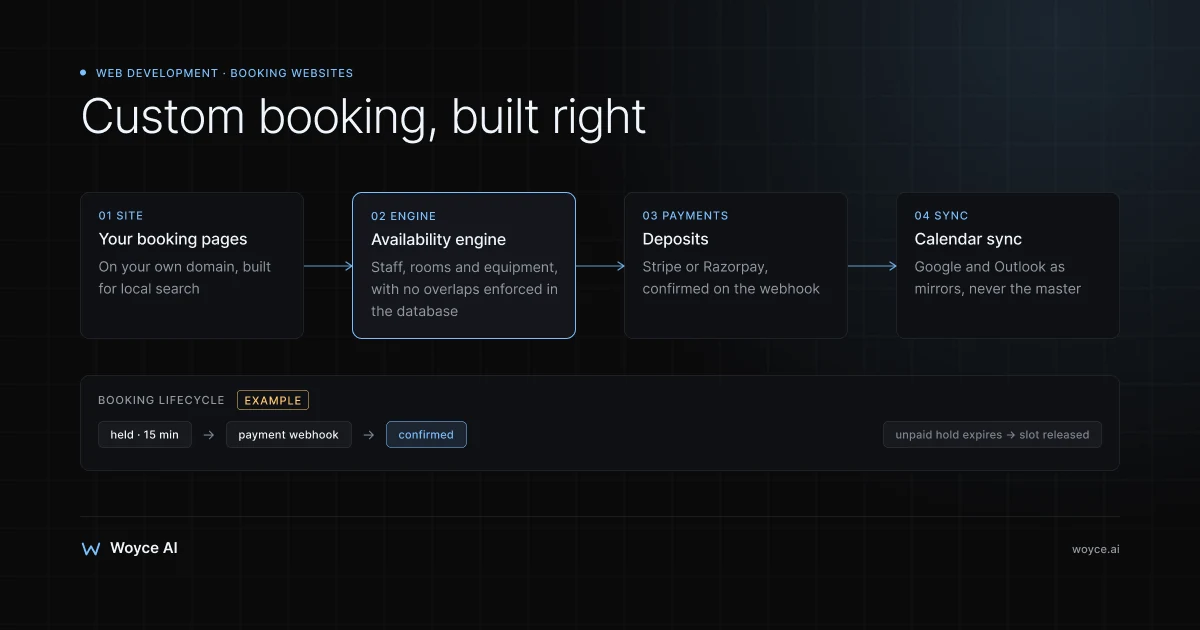
The database holds locations, staff, services, resources, schedules, bookings, customers, packages and payments. PostgreSQL is a strong default here for one reason in particular: preventing double-bookings at the database level.
The safe way to stop two customers booking the same slot isn't to check availability and then insert, because two requests can both pass the check at the same moment. It's to make the database refuse overlapping bookings outright. PostgreSQL can do that with an exclusion constraint on a time range:
CREATE EXTENSION IF NOT EXISTS btree_gist;

CREATE TABLE bookings (
  id          uuid PRIMARY KEY DEFAULT gen_random_uuid(),
  resource_id uuid NOT NULL,          -- a staff member, room or piece of equipment
  during      tstzrange NOT NULL,     -- start and end, with time zone
  status      text NOT NULL DEFAULT 'confirmed',
  EXCLUDE USING gist (
    resource_id WITH =,
    during WITH &&
  ) WHERE (status IN ('held', 'confirmed'))
);
With that in place, a second booking for the same resource that overlaps an existing one fails, however busy the site gets. Bookings that need several resources (a therapist and a room) are written in one transaction, so either all of them are reserved or none is.
Time zones need the same care. Store every time in UTC with a time zone, display in the location's local time, and test daylight-saving transitions. A surprising number of booking bugs show up one Sunday in spring.
Payments: Stripe or Razorpay
The usual deposit flow:
- The customer picks a slot. The system places a short hold on it (the
heldstatus above), typically ten to fifteen minutes. - The customer pays the deposit through Stripe Checkout or a Razorpay order, on the provider's own secure page or embedded form. Your site never handles raw card details.
- The provider sends a webhook when the payment succeeds. Only then does the booking move to
confirmed. - If the payment fails or the hold expires, the slot is released.
For cancellation fees or balance payments, Stripe can save a payment method with the customer's consent and charge it later under the terms they agreed to. Refunds, partial refunds and no-show fees are handled through the same provider. Build this around webhooks, not the browser redirect, because customers close tabs.
Calendar sync
Staff often want bookings in their own Google or Outlook calendar, and their personal commitments blocking availability. Two-way sync goes through the Google Calendar API and Microsoft Graph: bookings are pushed out as events, and busy times are pulled in as blocks. The booking database stays the source of truth; external calendars are inputs and mirrors, never the master copy.
Notifications
Confirmations, reminders and reschedule links go out by email (through a provider such as Resend or Postmark), SMS (through a provider such as Twilio), and WhatsApp through the WhatsApp Business Platform, where business-initiated reminders use pre-approved templates. Scheduled jobs send reminders at the right time in the customer's time zone.
Admin and staff tools
The part people underestimate. Staff need a day view, a way to move bookings, block time, mark no-shows, look up customers and see package balances. Managers need reports. Front-desk staff need to make phone bookings faster than the customer could online. These screens often take as long to build as the customer-facing flow.
Hosting
A managed setup is usually enough: Vercel or a similar platform for the Next.js app, a managed PostgreSQL service such as Neon, Supabase or Amazon RDS, and the payment and messaging providers above. Monthly running costs for a small to mid-size booking business are modest compared with per-staff SaaS fees, but they aren't zero, and someone has to keep dependencies updated.
What It Costs
Costs depend on scope more than anything else. As a guide to how our pricing works: our minimum engagement is $3,000, and most of our projects land between $5,000 and $20,000.
Within that range, illustrative bands look like this:
| Scope | What it includes | Typical position |
|---|---|---|
| Marketing site plus existing booking tool | Fast, SEO-built site with service and location pages, booking tool embedded or linked | Lower end of the range |
| Custom booking for a single location | Services, staff availability, deposits via Stripe or Razorpay, reminders, admin day view | Middle of the range |
| Multi-location or resource-based system | Locations, rooms or equipment, packages or memberships, calendar sync, reporting | Upper end, and larger systems can go beyond it |
Larger platforms, such as a multi-provider marketplace with its own mobile apps, sit above that range and are scoped individually. If you also want a mobile app for customers or staff, see our mobile app development page.
Ongoing costs to budget for: hosting and database, email and SMS volume, WhatsApp conversation charges, payment processing fees, and maintenance and small changes. Compare that total honestly with what you pay your booking software today, including any marketplace commission.
How Long It Takes
For a custom booking website of moderate scope, a realistic timeline is:
- Weeks 1–2: discovery and design. Booking rules, payment rules, data model, the customer booking flow and staff screens in wireframe.
- Weeks 3–6: build. Database and booking engine, payments and webhooks, notifications, admin tools, public pages.
- Weeks 7–8: testing and migration. Concurrency tests on the booking engine, payment edge cases, time-zone tests, importing customers and future bookings from your current tool.
- Launch and parallel running. Many businesses run the old and new systems side by side for a short period, or switch on a quiet day with future bookings already migrated.
Simpler projects are quicker; multi-location systems with packages and calendar sync take longer. The migration step deserves its own plan: future bookings, customer records and package balances need to come across correctly, and customers with existing booking links need to land somewhere sensible.
SEO for Local Search
A booking business gets most of its new customers from local search, so the website has to rank, not just take bookings. A custom build is a good chance to get this right:
- Google Business Profile for every location, with accurate hours, services, photos, and a booking link that goes to the right location's booking page.
- One page per location, with its own address, opening hours, map, staff and services, and genuinely local content rather than a copy of the others.
- Service pages that explain each service, price range and duration, so they can rank for "deep tissue massage in [area]" rather than only your brand name.
- Structured data (schema.org
LocalBusinessor a more specific type, with address, opening hours and geo-coordinates) on location pages. - Booking pages on your own domain. With many SaaS tools, the booking page lives on the vendor's domain, so it can't build your site's authority. With a custom build, every page is yours.
- Fast pages on mobile. Most local searches happen on phones. Server-rendered pages with optimised images load quickly, and that's worth checking against Core Web Vitals.
- Reviews. Post-visit messages asking for a Google review are easy to automate from the booking system and matter a great deal for the local map results.
If you stay with booking software, most of this still applies: build the marketing site on your own domain and link or embed the booking tool from there.
Common Mistakes
Rebuilding a SaaS tool for its own sake
Building a custom system because the booking page doesn't match your brand is rarely worth it. Build when the rules, payments or data justify it.
Checking availability without locking it
Check-then-insert booking logic works in testing and fails on a busy launch morning. Enforce non-overlap in the database and hold slots during payment.
Trusting the payment redirect
If the booking is confirmed when the customer lands back on your site, closed tabs and dropped connections produce paid bookings that never got confirmed. Confirm on the payment provider's webhook.
Forgetting the staff side
A beautiful customer flow with a clumsy admin screen means staff go back to paper. Design the day view and phone-booking flow with the people who'll use them.
No migration plan
Switching systems with hundreds of future bookings and package balances in the old one needs a tested import and a cutover date. Plan it from the start.
Related guides
- How to build a web app with Next.js
- AI agents for appointment booking
- AI agents for salons and spas
- Our web development services
Not Sure Whether to Build or Stay on SaaS?
Most booking businesses don't need a custom system, and the ones that do usually know exactly which rule, payment or report their current tool can't handle.
Talk to us about your booking setup. We'll look at how you take bookings today, what your current tool costs you, and tell you honestly whether a custom build is worth it or whether a better website around your existing tool would do.
Frequently Asked Questions
How much does it cost to build a booking website?
Our minimum engagement is $3,000, and most projects land between $5,000 and $20,000. A marketing site that embeds your existing booking tool sits at the lower end; a custom booking system with deposits, staff rules and reminders sits in the middle; multi-location or resource-based systems sit at the upper end or above. Running costs for hosting, messaging and payment fees come on top.
Is a custom booking system better than Fresha, Calendly or SimplyBook.me?
Not by default. Those tools are well built and maintained, and for single-location businesses with simple booking rules they're usually the better choice. A custom system is better when you need rules, payments, resource scheduling or data ownership those tools can't provide.
How long does it take to build a custom booking website?
A moderate-scope booking system typically takes around six to twelve weeks from discovery to launch, including testing and migration from your current tool. A marketing site around an existing booking tool is much quicker. Multi-location systems with packages and calendar sync take longer.
Can a custom booking site take deposits?
Yes. Deposits are usually taken through Stripe or Razorpay on the provider's secure payment page, with the booking confirmed only when the provider's webhook reports a successful payment. Cancellation fees and balance payments can be charged to a saved payment method when the customer has agreed to those terms.
How do you stop double bookings?
By enforcing it in the database rather than in application code alone. PostgreSQL exclusion constraints refuse overlapping bookings for the same staff member or resource, and bookings that need several resources are written in a single transaction. Slots are held briefly during payment so two customers can't pay for the same one.
Will a custom booking website help with local SEO?
It can, because every page, including the booking pages, lives on your own domain and can be built for search: location pages, service pages, structured data and fast mobile performance. Google Business Profile, reviews and consistent business details still matter as much as the website itself.
Can I move my existing bookings and customers over?
Usually, yes. Most booking tools offer some form of export for customers and appointments, though the format and completeness vary. Migration should be planned and tested before launch, including future bookings and any package or membership balances.
Conclusion
Booking software is the right answer for most booking businesses, especially early on. It's cheap, it's maintained for you, and it handles one-person, one-slot bookings very well.
Booking website development pays off when your business outgrows that shape: several locations with different rules, rooms and equipment that need scheduling alongside staff, packages and memberships, deposit and payment rules the tool can't express, or a customer base you want to own outright. A well-built custom system on Next.js, PostgreSQL, Stripe or Razorpay and calendar sync handles those properly, and gives you a site built for local search on your own domain.
Before deciding, write down the specific rules, payments and reports your current tool can't handle. If the list is short, improve your website and stay on SaaS. If it's long, it's worth scoping a build. Our web development team can help with either.