
The front desk of a dental practice does three jobs at once. It greets the patient standing at the counter, takes payment from the one who just finished, and answers a phone that rarely stops. When the phone loses, a caller who wanted to book a check-up hangs up and tries the next practice on Google. When the counter loses, the patient in front of you waits while someone explains your parking for the fourth time that morning.
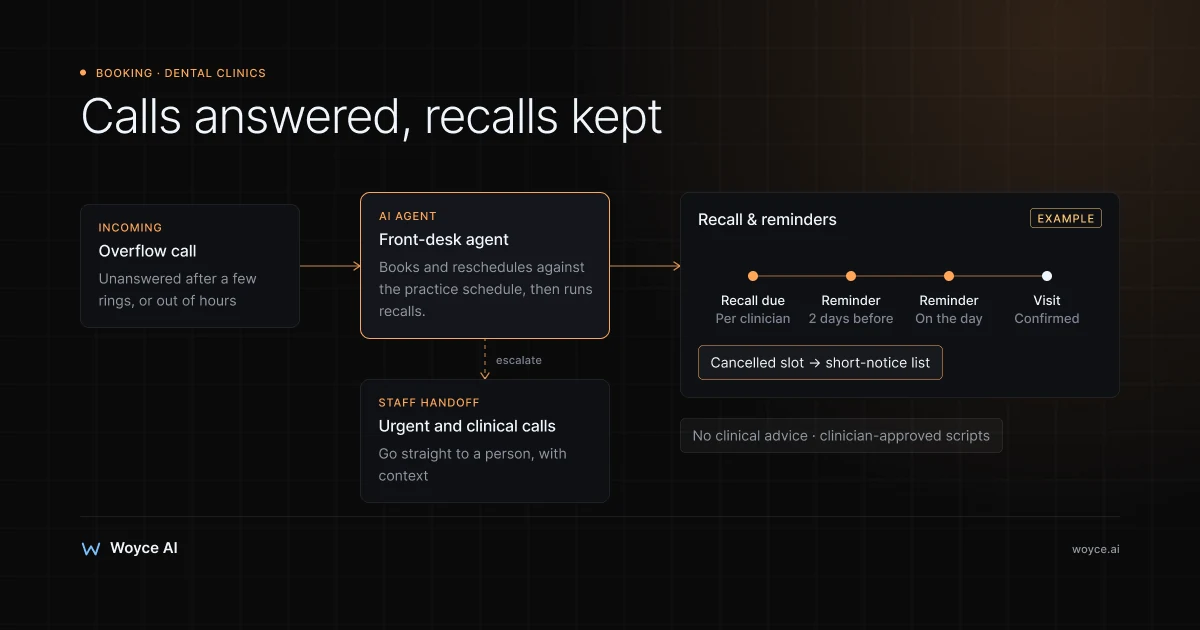
An AI agent for dental clinics takes the repetitive part of that workload. It answers calls and messages, books and reschedules appointments against your real schedule, collects new-patient details before the first visit, runs recall and reminder campaigns, and answers the same insurance and payment questions your team answers every day. Anything clinical, urgent or sensitive goes to a person, with the context attached.
This guide explains what a dental AI agent does, how it handles new-patient intake and recalls, how it connects to practice-management systems like Dentrix, Open Dental and Dentally, what it must never do, how patient data needs to be handled, and when the tools you already have are enough.
Why Dental Front Desks Are Stretched
Dental scheduling looks simple from outside and isn't. Appointment types have different lengths and need different chairs, clinicians and equipment. Hygiene appointments follow recall intervals. New patients need forms, medical history and insurance details before they arrive. Emergency slots need protecting. And a cancellation the day before leaves a gap that only gets filled if someone has time to phone the short-notice list.
Most of that work lands on a small team during the busiest hours of the day. The calls cluster in the morning, at lunch and right after the practice opens. Messages and web enquiries pile up overnight. The result is familiar to most practice managers: missed calls, a recall list nobody has worked through, gaps in the hygiene schedule, and staff who spend their day on the phone instead of with the patients in the building.
Missed appointments make it worse. A no-show in a hygiene or restorative slot is chair time that can't be resold, and the patient who missed it often needs chasing before they rebook. Reminders help, but only if they go out reliably and make it easy to reschedule.
What a Dental AI Agent Does
Answers front-desk calls and messages
The agent picks up calls that the front desk can't, through a voice agent, and answers messages on the channels your patients use: website chat, SMS, WhatsApp where it's common, and email. Most practices set the phone agent to answer on overflow (when nobody picks up within a few rings) and outside hours, so the team still takes the calls they can.
The calls it handles well are the routine ones:
- "I'd like to book a check-up and clean."
- "Can I move my appointment on Thursday?"
- "Are you taking new patients?"
- "Do you take my insurance?"
- "What time do you open on Saturday?"
- "How much is teeth whitening?"
Our healthcare voice AI receptionist guide covers the phone side in more depth, including call routing and what a good handoff to staff sounds like.
Books and reschedules against the real schedule
When a patient asks for an appointment, the agent checks availability in your practice-management system, respecting the rules your scheduler follows by hand:
- Appointment types and durations: a new-patient exam, a hygiene visit and a crown prep all take different amounts of time.
- Clinician and chair: hygiene appointments go into hygienist columns, implant consultations to the clinician who does them.
- Protected slots: emergency slots held back each day, blocks for specific procedures, clinicians' admin time.
- Patient preferences: the patient's usual dentist or hygienist, preferred days and times.
It offers a few suitable options, books the one the patient picks, and sends a confirmation. When a patient needs to move an appointment, the agent offers alternatives and updates the schedule in the same conversation. When a cancellation opens a slot, it can contact patients on a short-notice list in order until someone takes it.
New-patient intake
New patients are where the front desk spends the most time per booking. The agent can collect the basics during the booking conversation (name, date of birth, contact details, reason for visit, how they heard about you) and then send a link to your digital forms for medical history, consent and insurance details.
Two lines matter here. First, the agent collects information; it doesn't interpret it. A patient who lists a medication or a medical condition has that recorded for the clinician to review, and the agent doesn't comment on it. Second, sensitive health information should go into a secure form or directly into the patient record, not sit in a chat transcript on a messaging platform. That's a design decision to make at the start, not an afterthought.
Recalls
Recall is one of the most valuable things a dental agent can take over, because it's the work that slips first when the front desk is busy. Patients due for a hygiene visit or periodic exam get a message, with real available slots, and can book by replying.
The agent follows your recall rules: the interval set for each patient by their clinician (commonly six months, but often different per patient), how many reminders to send, through which channels, and when to stop and flag the patient for a phone call from a team member. It doesn't decide recall intervals. Those are clinical decisions that come from the patient record.
Reminders and confirmations
Before each appointment, the agent sends a reminder, typically two days ahead and again on the day for longer or higher-value treatment. The patient can confirm, cancel or reschedule in the same thread. Confirmations show up in your schedule, so the team can see at a glance which appointments are confirmed and which need a call.
The reschedule option is the important part. A patient who can move their appointment with one reply usually does. A patient who has to call during opening hours often doesn't turn up instead.
Insurance and payment FAQs
A large share of front-desk calls are about money, and most of them have standard answers. The agent answers from information your practice provides:
- Which insurance plans or networks you work with, in general terms.
- Whether you offer payment plans or financing, and through which provider.
- Fee ranges for common private treatments, where you publish them.
- Your cancellation and missed-appointment policy.
- What patients need to bring to their first visit.
What it should not do is tell a patient what their plan will cover for a specific treatment. Coverage depends on the individual plan, and verifying it is a job for your team or your eligibility-checking tools. The agent's answer to "will my insurance cover a crown?" is that the practice checks coverage before treatment and someone will confirm the details, then it logs the request.
Handoff to staff
Every dental agent needs clear rules about what it passes to a person, and the list should be generous:
- Anything that sounds urgent. Pain, swelling, bleeding, trauma, a knocked-out tooth, fever. The agent follows a script your clinicians write and approve: offer the next emergency slot, connect the caller to the practice, or direct them to urgent care or emergency services, depending on what they describe. It doesn't assess symptoms.
- Clinical questions. "Is this normal after an extraction?" or "should I take antibiotics?" go to clinical staff.
- Treatment plans and estimates beyond published fee ranges.
- Complaints, billing disputes and anything emotionally charged.
- Any patient who asks for a person.
A good handoff includes the conversation so far, the patient's details and the reason for the escalation, so the team member who picks it up doesn't make the patient start again.
What the Agent Must Never Do
Dental practices deal with health information and clinical care, so the boundaries need to be written down before anything is built:
- No clinical advice. The agent doesn't diagnose, triage symptoms by its own judgement, recommend medication or comment on treatment options. It follows scripts approved by clinicians and routes clinical questions to them.
- No coverage promises. It explains the process, not the outcome.
- No invented answers. If a question isn't covered by the information it was given, it says a team member will follow up.
- No pretending to be human. It identifies itself as an automated assistant, and patients can reach a person at any time.
These rules aren't only about risk. They're also what makes patients comfortable using it: an assistant that's quick and accurate about bookings, and clear about when it's handing over, builds trust faster than one that tries to answer everything.
Patient Data and Privacy
An AI agent in a dental practice handles appointment details, contact information and, during intake, health information. How that data is handled depends on where the practice operates.
In the US, HIPAA treats this as protected health information (PHI). A vendor that creates, receives, stores or transmits PHI on behalf of a practice is generally a business associate, and the practice needs a business associate agreement (BAA) in place with that vendor. That applies to each service in the chain that touches PHI: the hosting provider, the model provider, the messaging or telephony provider, and the developer if they have access. In the UK and EU, health data is special category data under GDPR, with stricter requirements for its processing; UK practices also work within NHS and General Dental Council expectations on records and confidentiality.
In practice, that leads to a few design choices that are worth insisting on with any vendor:
- Minimum necessary data. The agent sees what it needs to book and remind, not the full clinical record.
- Health details through secure forms, not free-text chat on consumer messaging apps.
- Providers that will sign the agreements your jurisdiction requires, and configuration that matches those agreements (for example, model providers' zero-retention or healthcare offerings where available).
- Audit logs and access controls on transcripts and integration credentials.
- A data retention policy for conversation logs.
None of this is unusual for healthcare software, and your existing practice-management and forms vendors deal with the same requirements. The point is to ask the questions before the build, and to get your own compliance adviser's view on the final setup. Our healthcare AI development page explains how we approach this kind of work.
Connecting to Practice-Management Systems
A dental agent is only useful if it reads and writes the schedule your team actually uses. Integration with the practice-management system (PMS) is usually the biggest technical question in the project, and the answer varies by system and by how the practice runs it.
| System | Typical access route | What to confirm |
|---|---|---|
| Open Dental | Open Dental publishes an API for third-party access | API licensing for your office, and which read and write operations it allows |
| Dentrix | Access typically runs through the vendor's developer or partner programme | Programme requirements, fees, and whether you run Dentrix on-premise or Dentrix Ascend in the cloud |
| Dentally | Dentally has a documented API for cloud-hosted practices | Which endpoints cover appointments, patients and availability for your account |
| Eaglesoft, Curve, others | Varies from documented APIs to partner-only access | Documentation, partner terms, any per-practice costs |
There's also a middle layer. Integration platforms such as NexHealth and Sikka sync with many dental practice-management systems and expose a single API on top. For a practice on an on-premise system with limited direct access, going through one of these can be the practical route, at the cost of another subscription and another vendor in the data chain.
We're careful about this part with every practice: API access, its cost and what it can write back change over time and differ between accounts, so we confirm it for your specific system during discovery, before quoting a build. Where direct booking isn't possible, there are fallbacks (the agent captures the request and a team member confirms it in the PMS, or the agent books into protected blocks that staff reconcile), but they're less efficient and it's better to know that up front.
Beyond the PMS, a dental agent typically connects to:
- Your phone system, for overflow and out-of-hours calls to a voice agent.
- SMS, email and, where patients use it, WhatsApp, for reminders and recalls.
- Digital forms for medical history and consent.
- Payment or financing providers, if the agent sends deposit or payment links for private treatment.
A Day With an Agent Running (Illustrative Example)
Here's an illustrative example, not a client of ours: a three-dentist, two-hygienist practice where the front desk misses a noticeable share of calls in the morning rush and the recall list is always behind.
With an agent in place:
- Overflow calls at 8:30am are answered. Routine bookings and reschedules are completed on the call and appear in the schedule.
- A patient who messages at 10pm asking to move tomorrow's hygiene appointment gets two alternatives and picks one. The freed slot goes to the short-notice list.
- Patients due for recall get a message with three real slots. Those who don't reply after two attempts land on a call list for the team.
- New patients booked overnight receive the intake forms link, so their history is in before they arrive.
- A caller describing facial swelling is given the practice's approved urgent-care message and transferred to the clinical team straight away.
- The practice manager checks a short morning list of escalations: two billing questions, a treatment estimate request, one complaint.
The numbers worth tracking are simple: missed call rate, time to answer messages, recall bookings per month, no-show rate, and hygiene chair utilisation. Measure them for a few weeks before launch.
Benefits for a Dental Practice
Fewer missed calls, more booked patients
Overflow and out-of-hours calls stop going to voicemail. New patients who would have tried the next practice get an appointment.
A recall list that actually gets worked
Recall stops depending on someone finding a quiet hour. Patients are contacted on schedule, with real slots, and the team only calls the ones who didn't respond.
Fewer no-shows and faster refilling of gaps
Reminders with one-reply rescheduling reduce missed appointments, and the short-notice list gets contacted the moment a slot opens.
Front-desk time goes back to patients in the building
The team spends less of the day on routine calls and more on the patients at the desk, treatment coordination and the conversations that need a person.
Consistent answers to money questions
Insurance, financing and policy questions get the same accurate answer every time, and coverage-specific questions go to the person who can verify them.
Rolling It Out
- Weeks 1–2: discovery and rules. Confirm PMS access, map appointment types and scheduling rules, write the escalation and urgent-call scripts with your clinicians, agree on data handling and the agreements needed with each provider.
- Weeks 3–4: build and integrate. Connect the PMS and the first channel, usually overflow calls or web chat. Set up reminder and recall templates.
- Week 5: testing. Run the awkward cases: a family booking three people, a patient who wants their usual hygienist on a day she doesn't work, a caller describing pain, a request for an emergency slot when none are left.
- Week 6: soft launch with staff reviewing every booking and escalation.
- After launch: add channels, turn on recall campaigns, review transcripts weekly.
Because of the PMS integration and the data-handling work, dental agents often sit at the upper end of our pilot range or in a production build. As listed on our AI agent development cost page, pilots run $8,000–$20,000 over 3–5 weeks and production builds $20,000–$60,000 over 6–12 weeks. Running costs include telephony, messaging, model usage and any PMS or integration-platform fees; check current pricing for each.
Common Mistakes
Letting the agent drift into clinical territory
The fastest way to lose a practice's trust is an agent that offers aftercare advice or reassures a patient about a symptom. Write the escalation rules first, have clinicians approve the urgent-call scripts, and test them hard.
Building before checking PMS access
If the agent can't write to the schedule, much of the value disappears. Confirm what your system allows, and what it costs, before committing to a build.
Collecting health details in chat
Free-text medical history in a messaging thread is hard to secure and hard to file. Send intake to secure forms that write to the patient record.
Ignoring the recall rules your clinicians set
Recall intervals belong to the patient record. An agent that applies one interval to everyone will annoy patients and cut across clinical decisions.
Launching every channel at once
Phone, SMS, web chat and WhatsApp each have different edge cases. Start with one, usually overflow calls or the recall campaign, and expand once it works.
Best Practices
- Start with the highest-volume routine task, usually overflow calls or recalls.
- Keep the PMS as the single source of truth for the schedule and patient record.
- Give every escalation an owner and a response time, and tell patients when they'll hear back.
- Review transcripts weekly for the first month, then monthly.
- Re-check the scripts with clinicians whenever services, policies or fees change.
- Measure against your own baseline, not general claims.
When It's Not a Fit
- Small practices with manageable call volume may get most of the benefit from their PMS's built-in reminders and an online booking tool. Many dental systems and add-ons already send automated reminders.
- Practices whose PMS offers no practical access, directly or through an integration platform, will get a weaker agent that captures requests rather than booking them.
- Practices that can't commit time to writing scripts and rules with their clinicians shouldn't start, because those rules are what keep the agent safe.
Related guides
- Healthcare voice AI receptionist
- AI agents for appointment booking
- AI patient chatbots and triage: knowing when to escalate
- Our AI agent development services
Ready to Take the Pressure Off Your Front Desk?
Missed calls in the morning rush, a recall list nobody has time for, gaps in the hygiene schedule: these are fixable without hiring another receptionist.
Talk to us about your practice. We'll check what your practice-management system allows, look at your call and appointment volumes, and tell you honestly whether an agent is worth building or whether your existing tools would do the job.
Frequently Asked Questions
Can an AI agent book directly into Dentrix, Open Dental or Dentally?
Often, but it depends on the system and your account. Open Dental and Dentally publish APIs, and Dentrix access usually runs through the vendor's developer or partner programme. Integration platforms such as NexHealth and Sikka can also provide access to many systems. Because access and costs differ between accounts and change over time, it has to be confirmed for your practice before a build is scoped.
Will the agent give patients clinical advice?
No. A well-built dental agent doesn't diagnose, triage symptoms by its own judgement or recommend treatment or medication. Urgent symptoms trigger a script your clinicians approve, such as offering an emergency slot, transferring the call, or directing the patient to urgent care. Clinical questions go to clinical staff.
How does an AI agent reduce no-shows at a dental clinic?
By sending reminders reliably before every appointment and letting patients confirm, cancel or reschedule with one reply. When a patient cancels, the freed slot can be offered to a short-notice list straight away. Measure your current no-show rate before launch so you can see the real effect in your practice.
How is patient data protected?
That depends on the design and your jurisdiction. In the US, HIPAA generally requires a business associate agreement with each vendor that handles PHI for the practice, and in the UK and EU health data is special category data under GDPR. Good designs limit what the agent can see, collect health details through secure forms, use providers that will sign the required agreements, and keep audit logs. Your compliance adviser should review the final setup.
Can it answer insurance questions?
It can answer general questions from information your practice provides, such as which plans you work with, financing options and your policies. It shouldn't tell a patient what their specific plan covers. Coverage questions are logged and passed to your team or your eligibility-checking process.
Does it replace the receptionist?
No. It takes the repetitive calls and messages so the front desk can focus on patients in the building, treatment coordination and the conversations that need a person. Most practices run it on overflow and out of hours rather than in place of staff.
What does a dental AI agent cost?
As listed on our cost page, pilots run $8,000–$20,000 over 3–5 weeks and production builds $20,000–$60,000 over 6–12 weeks. Dental projects often land toward the upper end because of practice-management integration and data-handling requirements. Running costs for telephony, messaging, model usage and integration fees vary, so check current pricing.
Conclusion
The pressure on a dental front desk comes from volume and timing: calls cluster at the busiest moments, recalls slip when the team is stretched, and every missed appointment is chair time you can't get back.
An AI agent for dental clinics takes the routine part of that work. It answers overflow calls and messages, books and reschedules against the real schedule, collects new-patient details, runs recalls and reminders, and answers standard insurance and payment questions. It hands everything clinical, urgent or sensitive to your team.
The caveats are real. Practice-management access decides how well it can book, clinicians need to write and approve the escalation scripts, and patient data has to be handled with the agreements and safeguards your jurisdiction requires. Start with one high-volume task, measure it, and expand from there. If you want an honest view on whether it fits your practice, our AI agent development team will look at your system and your numbers with you.