
Most e-commerce projects go wrong at the platform decision, before anyone writes a line of code. A shop owner picks the platform a friend uses, or the one with the slickest advert, and two years later is paying for twelve apps that fight each other, waiting four seconds for product pages to load, or discovering that the checkout can't handle the way they actually sell. Moving platforms after that point is expensive: products, customers, order history, URLs, and search rankings all have to come across intact.
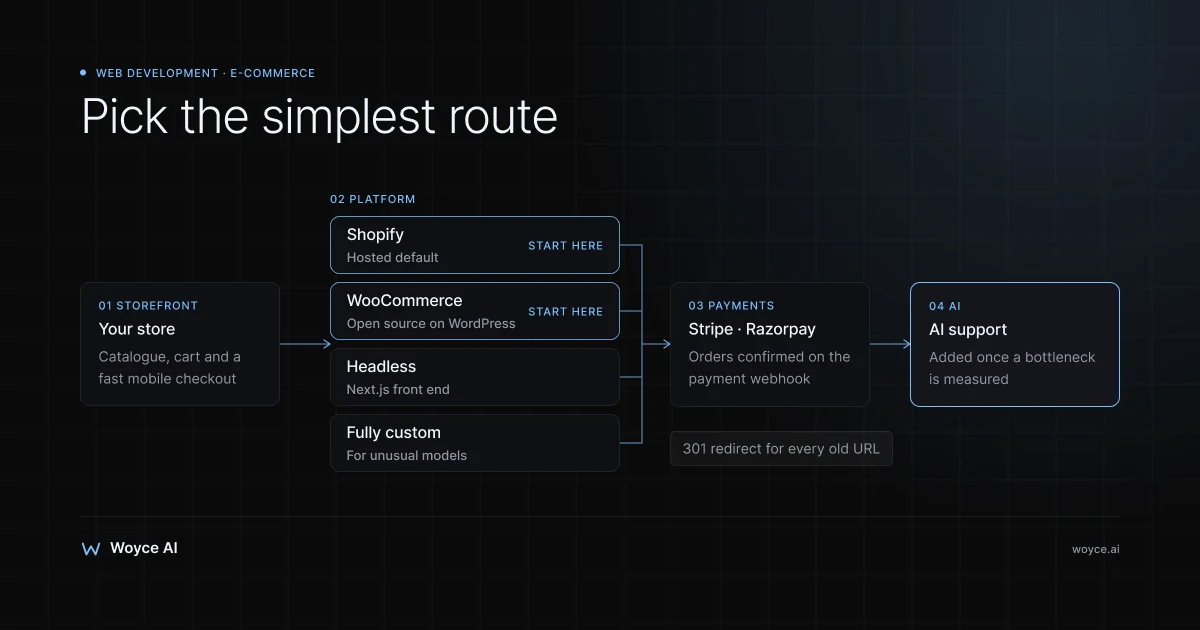
E-commerce website development in 2026 comes down to four realistic routes. You can run a hosted platform like Shopify, a self-hosted WooCommerce store on WordPress, a headless store that keeps Shopify (or another commerce engine) behind a custom Next.js front end, or a fully custom build. Each one is the right answer for some businesses and an expensive mistake for others.
This guide is for shop owners moving a physical business online and for brands that have started to outgrow their first store. It compares the four routes honestly, explains when headless is worth the extra build, covers payments with Stripe and Razorpay, catalogue and inventory, performance and SEO, and where AI genuinely helps (support, search, recommendations). It finishes with realistic cost bands, a timeline, the mistakes we see most often, and the questions owners ask before they commit.
Three Ways a Store Outgrows Its Platform
Picture a homeware brand that started on a starter Shopify plan with a free theme. For the first year it was perfect: no servers, no developers, sales on day one. Then the catalogue grew to 1,500 products with variants, the brand started wholesale, and the owners wanted bundles, subscription refills, and a "build your own gift box" flow.
Each new requirement became an app. Wholesale pricing: one app. Bundles: another. Subscriptions: another. Reviews, search, upsells, loyalty: four more. The monthly bill crept up, the theme loaded a dozen third-party scripts on every page, and mobile product pages slowed to a crawl. Nobody had made a bad decision; the platform had simply been asked to do things it doesn't do natively.
A second common pattern runs the other way. A bakery or boutique builds a WooCommerce store because WordPress is "free", and then spends more on plugin licences, security patches, and emergency fixes after updates than a Shopify plan would have cost.
The third pattern is the over-build. A new brand with forty products commissions a fully custom store with its own admin panel, then spends its launch budget on infrastructure instead of marketing.
All three are avoidable. The trick is matching the platform to how you sell now and over the next two to three years, not to how big you hope to be in ten.
The Four Routes, Explained
Shopify: the hosted default
Shopify is a hosted platform: it runs the servers, checkout, security patches, and payment processing, and you pay a monthly subscription plus payment fees. Plans start at roughly $39 a month for the Basic tier and climb through mid tiers to Shopify Plus, which starts around $2,300 a month for high-volume brands (approximate, check current pricing for your region and billing period).
What you get is a very reliable checkout, a huge app ecosystem, built-in inventory and order management, and a theme system that lets non-developers change most of the storefront. Shopify Payments handles cards in the countries where it's offered; elsewhere, including India at the time of writing, you connect a third-party gateway such as Razorpay, PayU, or Cashfree, and Shopify may add its own transaction fee on top of the gateway's rate depending on your plan.
The trade-offs are control and cost creep. You work within Shopify's data model (products, variants, collections, metafields), the checkout is customisable only within limits outside Plus, and every gap gets filled with a paid app. For most small and mid-sized stores those trade-offs are well worth it.
WooCommerce: open source on WordPress
WooCommerce is a free plugin that turns a WordPress site into a store. You host it yourself (or with a managed WordPress host), so you control the code, the data, and the server. It suits businesses that already run a content-heavy WordPress site, want deep customisation without a full custom build, or sell in ways that need unusual product logic.
The plugin is free; running it properly isn't. You pay for hosting that can cope with checkout traffic, premium extensions for subscriptions, bookings, or advanced shipping, and someone to keep WordPress core, WooCommerce, the theme, and every plugin updated and compatible. Payments come through gateway plugins: WooPayments, the official Stripe extension, and Razorpay's plugin for Indian stores are the common ones.
WooCommerce is at its best with a disciplined plugin list and a maintenance plan. It's at its worst when it becomes a patchwork of forty plugins installed by three different freelancers over five years.
Headless: Shopify (or another engine) behind a Next.js front end
Headless commerce separates the storefront customers see from the commerce engine that holds products, carts, orders, and payments. A common 2026 setup keeps Shopify as the back end, so the team still manages products and orders in the familiar Shopify admin and uses its checkout, while the storefront is a custom Next.js application reading from Shopify's Storefront API.
Why bother? Because the front end is where most of the pain lives in a growing store: page speed, design freedom, content and commerce mixed on the same page, and custom flows like configurators or gift builders. A headless front end can be server-rendered and cached aggressively, ships only the JavaScript it needs, and can pull content from a CMS like Sanity or Contentful alongside product data. Shopify also offers its own headless framework, Hydrogen, with hosting on Oxygen; Next.js is the more common choice when the team already works in React and wants hosting flexibility.
The catch is that you now own a front-end codebase. Theme-store apps that inject widgets into Liquid themes won't work out of the box, so reviews, search, and personalisation need API-based equivalents. Headless pays off for brands with real traffic, strong content, or custom flows. For a store doing a few orders a day it's usually overkill.
Fully custom: your own commerce stack
A fully custom store means building the catalogue, cart, checkout, order management, and admin yourself, typically with a framework like Next.js, a PostgreSQL database, and Stripe or Razorpay for payments, or with an open-source commerce engine such as Medusa or Saleor as a starting point.
This route makes sense when the way you sell doesn't fit a standard store at all: complex B2B pricing per customer, quote-to-order workflows, rental or hire, made-to-measure products with pricing rules, marketplaces with multiple sellers, or a store that is one part of a larger product. It gives you complete control of the data model and the experience.
It also gives you complete responsibility. Tax rules, inventory reservations, failed payments, refunds, abandoned carts, fraud checks, and admin tooling all become your code. If a standard platform can do 90% of what you need, the remaining 10% is rarely worth building everything else from scratch.
Side-by-Side Comparison
| Factor | Shopify | WooCommerce | Headless (Shopify + Next.js) | Fully custom |
|---|---|---|---|---|
| Time to launch | 2–6 weeks | 3–8 weeks | 8–14 weeks | 12–24+ weeks |
| Upfront build cost | Lowest | Low to medium | Medium to high | Highest |
| Monthly running cost | Subscription + apps | Hosting + extensions + maintenance | Shopify plan + front-end hosting | Hosting + ongoing development |
| Checkout | Shopify's, highly reliable | Plugin-based, flexible | Shopify's | You build it |
| Design freedom | Theme-bound | High | Very high | Total |
| Page speed ceiling | Good, app-dependent | Varies widely | Excellent | Excellent |
| Maintenance burden | Low | Medium to high | Medium | High |
| Best for | Most new and growing stores | Content-led sites, custom logic on a budget | Growing brands with traffic and content | Unusual business models |
The table hides one important truth: most businesses should start on Shopify or WooCommerce and only move to headless or custom when a specific, measurable limit appears. "We might need it later" is not a limit.
How to Choose: Five Questions
- How many products and variants, and how complex are they? A few hundred simple products fit anywhere. Configurable products with pricing rules push towards WooCommerce, headless, or custom.
- How do you take payment? Card-only consumer sales fit every platform. Invoicing, credit terms, deposits, or per-customer pricing need either Shopify Plus B2B features, WooCommerce extensions, or custom work.
- Who will run the store day to day? If it's the owner and one assistant, low maintenance beats flexibility. If you have a developer or an agency on retainer, more control becomes affordable.
- How important is content? Brands that win on guides, recipes, lookbooks, or editorial need a storefront where content and products live together well. WordPress or a headless CMS does this better than most themes.
- Where do you sell besides the website? Marketplaces, social shops, a physical till, wholesale portals, or ONDC all need the same inventory. Pick the platform whose inventory and integrations cover your channels with the fewest workarounds.
Payments: Stripe, Razorpay, and the Checkout
Payments decide more of your margin than most owners realise, so pick the gateway with the same care as the platform.
Stripe is the default for stores selling to the US, UK, Europe, and most international markets. Standard card pricing in the US is roughly 2.9% plus 30 cents per transaction, with additional fees for international cards and currency conversion (approximate, check current pricing). It supports Apple Pay, Google Pay, Link, buy-now-pay-later providers, subscriptions through Stripe Billing, and strong fraud tooling through Radar.
Razorpay is the common choice for stores selling inside India. It supports UPI, cards, net banking, wallets, and EMI, with standard domestic pricing around 2% per transaction and different rates for international cards and some methods (approximate, check current pricing). UPI matters because a large share of Indian online customers prefer it to cards; a checkout without UPI loses orders.
A few practical rules apply whichever you use:
- Offer the methods your customers use. Cards and wallets for international buyers; UPI and cash on delivery decisions for India. Cash on delivery raises conversion but also returns and failed deliveries, so many stores restrict it by pin code or order value.
- Handle webhooks properly. Orders should be confirmed when the gateway's webhook says the payment succeeded, not when the browser lands on a thank-you page. Missed webhooks are the most common cause of "paid but no order" complaints in custom builds.
- Plan refunds and partial refunds. Your admin needs a clean way to refund through the gateway and update stock at the same time.
- Keep card data off your servers. Use hosted checkout pages or embedded payment elements so card details go straight to Stripe or Razorpay. That keeps your PCI DSS scope small; self-handling card numbers is never worth it for a store.
Catalogue, Inventory, and Operations
The storefront gets the attention, but the catalogue and inventory model is what you live with every day.
Structure products before you build. Decide how products, variants (size, colour, material), collections, and attributes relate. A clean structure makes filtering, search, feeds to Google Merchant Center, and future migrations straightforward. A messy one, such as colours stored as separate products in some places and variants in others, makes every later feature harder.
Choose one source of truth for stock. If you sell in a physical shop, on marketplaces, and online, inventory has to sync across all of them. Shopify POS keeps shop and online stock together natively. Otherwise you'll connect an inventory or ERP system such as Zoho Inventory, Unicommerce, or an accounting tool, and the integration needs to handle reservations so the last unit isn't sold twice.
Plan shipping and fulfilment early. Rates by weight or zone, free-shipping thresholds, local delivery, click and collect, and integration with carriers or aggregators (Shiprocket and Delhivery in India; ShipStation, EasyPost, or carrier APIs elsewhere) shape both checkout and operations.
Think about imports and bulk edits. A store with thousands of SKUs needs CSV import and export, bulk price changes, and a way for staff to fix data without a developer. Shopify and WooCommerce handle this well; in a custom build it's a feature you must scope.
Performance and SEO
Organic search and page speed are where platform choices show up in revenue a year later.
Page speed and Core Web Vitals
Google measures real-user experience through Core Web Vitals: Largest Contentful Paint (how fast the main content appears), Interaction to Next Paint (how quickly the page responds to taps), and Cumulative Layout Shift (whether things jump around). Slow product pages hurt both rankings and conversion, especially on mid-range phones over mobile data.
The biggest speed problems in stores are rarely the platform itself. They are oversized images, heavy themes, and third-party scripts from apps: chat widgets, review carousels, pop-ups, trackers. Audit them. Every app that loads JavaScript on every page should earn its place. Headless and custom front ends make it easier to keep pages lean, but a disciplined Shopify theme can perform well too.
Technical SEO for stores
- Clean, stable URLs. Product and collection URLs should be readable and should not change. If you migrate platforms, map every old URL to its new one with 301 redirects; losing this step is how stores lose years of rankings overnight.
- Faceted navigation under control. Filters for size, colour, and price can create thousands of near-duplicate URLs. Use canonical tags and keep filter combinations out of the index unless they match real searches.
- Structured data. Product, Offer, and review markup lets search engines show price, availability, and ratings in results. Shopify themes and WooCommerce SEO plugins include basic markup; check it with Google's Rich Results Test.
- Real product content. Manufacturer descriptions copied across hundreds of sites don't rank. Write descriptions that answer the questions customers actually ask: sizing, materials, care, compatibility, delivery times.
- Merchant Center feeds. A clean product feed into Google Merchant Center gets products into free Shopping listings as well as paid campaigns.
Being found in AI answers
Shoppers increasingly ask ChatGPT, Perplexity, and Google's AI Overviews what to buy. Assistants tend to cite stores whose pages clearly state what the product is, who it's for, what it costs, and how it compares. Detailed buying guides, comparison pages, and FAQ content help here as much as they help classic SEO.
Where AI Fits in an Online Store
AI is worth adding where it removes repetitive work or helps customers find the right product faster. Three places consistently earn their keep.
A support agent connected to order data
The largest share of store support is "where is my order", returns, exchanges, sizing, and delivery questions. An AI support agent connected to your order system, shipping tracker, and returns policy can answer most of these on chat, WhatsApp, and email, and process simple returns, handing anything unusual to your team with context attached. The platform matters for how it integrates: see our guides to a Shopify AI agent and a WooCommerce AI agent for the specifics.
Search that understands what shoppers mean
Default store search matches keywords. Shoppers type "black dress for a beach wedding under 5,000" or "charger for my older laptop". Semantic search, which uses embeddings to match meaning rather than exact words, handles those queries far better and can be combined with filters for price, size, and stock. Tools like Algolia and Searchanise offer AI-assisted search as apps; custom and headless builds can run their own vector search.
Recommendations and guided buying
Recommendation engines suggest related products, complete-the-look sets, and reorders. Conversational "shopping assistants" go a step further and ask a few questions before recommending products. These work best for catalogues where choice is genuinely hard, such as skincare, electronics, or gifting. For a store with forty products, a well-written collection page beats any algorithm.
For a broader look at automating cart recovery, post-purchase flows, and operations, read our guide to AI agents for e-commerce. The practical advice is to launch the store first, measure what customers ask and where they drop off, and then add AI to the specific bottleneck.
What E-commerce Development Costs
Costs depend far more on scope than on platform, but the bands below are realistic for 2026. Third-party prices are approximate; check current pricing.
| Route | Typical build cost | Typical monthly running cost |
|---|---|---|
| Shopify, customised premium theme | $3,000–$10,000 | Plan (from ~$39) + apps, often $50–$500 |
| WooCommerce, customised theme | $3,000–$12,000 | Hosting + extensions + maintenance, often $50–$400 |
| Headless Shopify + Next.js | $15,000–$40,000+ | Shopify plan + front-end hosting + upkeep |
| Fully custom store | $30,000–$100,000+ | Hosting + ongoing development |
Those bands assume a professional team, design work, product setup, payment and shipping configuration, and basic SEO. A DIY store on a theme can cost little more than the subscription; a large catalogue migration, ERP integration, or multi-country setup moves any route upwards.
At Woyce, the minimum engagement is $3,000 and most projects fall between $5,000 and $20,000. A customised Shopify or WooCommerce store usually sits towards the lower end of that range; headless builds and custom stores sit at the top or above it, depending on integrations. If you later add an AI support or shopping agent, those are priced separately on our AI agent development cost page: a focused pilot is $8,000–$20,000 over three to five weeks, and a production agent is $20,000–$60,000 over six to twelve weeks.
Budget for the costs owners forget:
- Product photography and copy. Often the single biggest factor in conversion, and rarely in the build quote.
- Data migration. Products, customers, and order history from an old platform, plus URL redirects.
- Apps and extensions. Add up the monthly cost of every app before you commit, not after.
- Payment fees. At 2–3% of revenue, gateway fees usually dwarf hosting costs.
- Ongoing improvements. A store that launches and is never touched again slowly loses ground. Plan a small monthly budget for updates, testing, and fixes.
A Realistic Timeline
For a customised Shopify or WooCommerce store with a few hundred products:
- Week 1: Discovery. Products and variants, payment methods, shipping rules, integrations, content, and success measures agreed.
- Weeks 2–3: Design. Home, collection, product, cart, and content templates designed mobile first.
- Weeks 3–5: Build and setup. Theme development, product import, payment gateway and shipping configuration, apps installed and tested.
- Week 6: Testing and launch. Test orders on every payment method, refund tests, redirects from any old site, analytics and Merchant Center set up, then go live.
Headless builds typically take 8–14 weeks because the front end is built from scratch and every integration is API-based. Fully custom stores run from three months to six or more depending on admin tooling and integrations. The fastest way to slow any project down is to arrive at week four without product data and photography ready.
Common E-commerce Development Mistakes
Choosing the platform for an imagined future
Building a custom or headless store "because we'll be big" spends money before there's revenue to justify it. Start on a platform that fits now, keep your data clean, and migrate when a specific limit appears. A clean catalogue migrates easily; a messy one doesn't, whatever platform it sits on.
Installing an app for every problem
Each app adds a subscription, a script on your pages, and another vendor who can break your store with an update. Before installing one, ask whether the theme, a small custom section, or a process change solves the problem. Review your app list every quarter and remove what isn't used.
Ignoring mobile checkout
Most store traffic is on phones. A checkout that needs pinch-zooming, makes customers create an account, or hides delivery costs until the last step loses sales. Test the full purchase on a real mid-range phone over mobile data, not just on a fast laptop.
Migrating without redirects
Changing platforms changes URLs. Without a complete redirect map, old links from Google, social posts, and other sites break, and rankings fall. Export every old URL, map each one, and test the redirects before switching DNS.
Treating launch as the finish line
The first three months after launch reveal which products sell, where customers drop off, and which questions they keep asking. Stores that review analytics and support conversations monthly and act on them grow; stores that treat the website as a one-off project stall.
E-commerce Development Best Practices
- Write the requirements down. Products, variants, payment methods, shipping rules, integrations, and must-have features in one document before any design starts.
- Get product data right first. Clean titles, variants, attributes, and photography make every later feature easier.
- Keep the plugin and app list short. Fewer moving parts means faster pages and fewer breakages.
- Test real orders end to end. Every payment method, a refund, a failed payment, a discount code, and an out-of-stock variant before launch.
- Measure from day one. Analytics, conversion tracking, and Search Console from launch, so decisions are based on data.
- Own your accounts. Domain, platform, payment gateway, and analytics accounts should be in the business's name, not the developer's.
- Plan for maintenance. Updates, security, backups (for self-hosted stores), and small improvements every month.
Where Each Option Doesn't Fit
Shopify is a poor fit when your business model fights its data model, such as complex per-customer B2B pricing without Plus, rentals, or highly configurable products, or when the app bill has grown larger than the cost of a better build. WooCommerce is a poor fit when nobody will own maintenance; an unpatched WordPress store is a security liability. Headless is a poor fit for small catalogues with modest traffic, where the extra build and upkeep buy little. Fully custom is a poor fit for any business whose needs a standard platform already covers. And sometimes the honest answer is that you don't need a store yet: a small catalogue sold mostly to regulars may be better served by a simple site plus WhatsApp ordering, as covered in our guide to WhatsApp commerce for local shops.
Related guides
- Shopify AI agent: automate your store's support, sales, and ops
- WooCommerce AI agent: automate support, orders, and returns
- AI agents for e-commerce
- How to build a web app with Next.js in 2026
- Our web development services
Ready to Plan Your Store?
Whether you're putting a physical shop online for the first time or your current store has started to hold you back, the right platform decision saves years of workarounds.
Talk to us about your business. We'll look at your catalogue, channels, and growth plans, recommend a route, and tell you plainly if a standard Shopify or WooCommerce setup is all you need.
Frequently Asked Questions
Is Shopify or WooCommerce better for a small business?
For most small businesses without a developer, Shopify is the safer choice: hosting, security, and checkout are handled for you, and the monthly cost is predictable. WooCommerce is a better fit if you already run a WordPress site, want more control over the code and data, or need product logic that would require several paid Shopify apps. Either can run a successful store; the deciding factor is usually who will maintain it.
When does a headless Shopify store make sense?
Headless makes sense when the storefront itself has become the bottleneck: page speed is hurting conversion, you need design or content flexibility the theme can't give, or you want custom flows like product configurators. It also suits brands with significant traffic, where faster pages translate into measurable revenue. For a store with a small catalogue and modest traffic, a well-built theme delivers most of the benefit at a fraction of the cost.
How much does an e-commerce website cost to build?
A customised Shopify or WooCommerce store built by a professional team typically costs $3,000–$12,000. Headless builds usually run $15,000–$40,000 or more, and fully custom stores start around $30,000 and can exceed $100,000 for complex B2B or marketplace setups. Running costs, including platform subscriptions, apps, hosting, and payment fees of roughly 2–3% of revenue, matter as much as the build price over time.
Can I accept UPI and international cards on the same store?
Yes. Razorpay supports UPI, Indian cards, net banking, and international cards, so a single gateway can cover both, subject to its approval for international payments. Some stores selling heavily abroad add Stripe or PayPal for international customers alongside Razorpay for domestic ones. On Shopify you connect them as payment providers; on WooCommerce and custom builds through their plugins or APIs.
How long does it take to build an online store?
A customised Shopify or WooCommerce store usually takes four to eight weeks, assuming product data and photography are ready. A headless store takes eight to fourteen weeks, and a fully custom store three to six months or more. Content readiness is the most common cause of delay, so prepare product data, images, and policies early.
Will I lose my Google rankings if I switch platforms?
Not if the migration is planned. Keep URLs the same where possible, set up 301 redirects from every old URL to its new equivalent, carry across titles, descriptions, and structured data, and submit the new sitemap in Search Console. Expect some fluctuation for a few weeks. Rankings are usually lost when redirects are skipped or product content is thinned out during the move.
Should I add an AI chatbot to my store at launch?
Usually not at launch. Run the store for a few weeks and look at what customers actually ask and where they drop off. If support volume is dominated by order tracking and returns, an AI support agent connected to your order data is often the first worthwhile addition. If shoppers struggle to find products, better search may matter more. Adding AI to a measured problem works better than adding it by default.
Conclusion
E-commerce website development is mainly a series of fit decisions. Shopify suits most new and growing stores that want reliability without maintenance. WooCommerce suits content-led businesses and those that want control on a budget, provided someone owns maintenance. Headless Shopify with a Next.js front end suits growing brands whose storefront has become the bottleneck, and a fully custom build suits business models that standard platforms can't express.
Whichever route you choose, the same fundamentals decide success: clean product data, the payment methods your customers use, a fast mobile checkout, careful SEO and redirects, and a plan for improving the store after launch. AI earns its place once you know where customers get stuck, most often in support and product discovery.
Start by writing down how you sell today and what has to change in the next two years, then choose the simplest platform that covers it. If you'd like a second opinion, our web development team is happy to review your plans.