
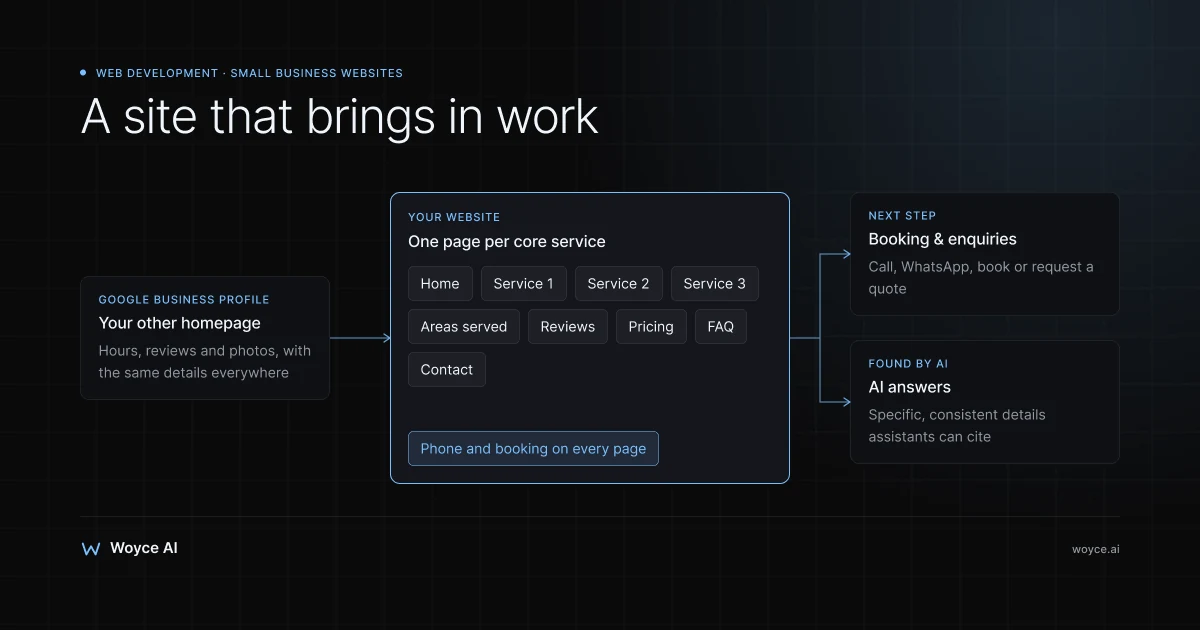
Most small business owners don't want a website. They want the phone to ring, the booking calendar to fill, and new customers to find them when they search "plumber near me" or ask an AI assistant for "the best physio in town". A website is just the most reliable way to make that happen, provided it's built for that job rather than as an online brochure nobody visits.
The goalposts have also moved. In 2026, a small business website has to load quickly on a phone, work hand in hand with your Google Business Profile, let people book or enquire without calling, and be clear enough that Google's AI Overviews, ChatGPT, and Perplexity can understand and recommend you. A five-page site built in 2018 and never touched since usually fails on most of those counts.
This guide is for owners of small local and service businesses: trades, clinics, salons, cafés, consultants, studios, repair shops, and agencies. It covers the pages you actually need, how booking, enquiries, and chat should work, the role of Google Business Profile, speed and mobile, local SEO and answer-engine visibility, whether to use a builder like Wix or Squarespace or go custom, what it all costs to build and run, and the mistakes that waste money. By the end you should know what to ask for and roughly what to pay.
The Website That Didn't Bring In Any Work
Imagine an illustrative two-van electrical contractor. A few years ago a relative built them a website: a homepage with a stock photo, an "About Us" page, a list of services in one paragraph, and a contact form that emailed an address nobody checked. It took six seconds to load on a phone. It had no prices, no areas served, no reviews, and no way to book.
When people searched "electrician in [their town]", the business appeared in Google's map results thanks to a decent Google Business Profile, but anyone who tapped through to the website left quickly. The owner concluded that "websites don't work for our trade".
The website wasn't the problem in principle; that website was. A fast, specific site with a page for each core service, the towns covered, real reviews, rough pricing, and a booking or quote form converts the attention the Business Profile already earns. That's the bar this guide sets.
The Pages a Small Business Website Needs
You don't need dozens of pages. You need the right ones, each with a clear job.
Home
Within a few seconds a visitor should know what you do, where you do it, and how to get in touch. That means a plain-language headline ("Emergency and domestic electrician in Leeds and surrounding towns"), a short list of services, proof such as reviews, years trading, or accreditations you genuinely hold, and a prominent call to action: call, book, or request a quote.
One page per core service
A separate page for each main service ranks better and converts better than one long list. "Boiler repair", "bathroom fitting", and "leak detection" each deserve their own page explaining what's included, typical price ranges or what affects the price, how long it takes, the areas covered, and frequently asked questions.
Areas served or location pages
If you serve several towns or neighbourhoods, a page for each main area helps you appear in local searches, but only if each page says something genuinely useful about working there, such as response times, parking, or local projects you've done. Pages that just swap the town name in the same text are ignored by search engines and annoy visitors.
About
People buy from people, especially in local services. Show the owner and team, explain how long you've been trading and how you work, and include qualifications and memberships you actually hold.
Reviews and examples of work
Real reviews (pulled from Google or a review platform), before-and-after photos, menus, portfolios, or short case examples. Proof is often the deciding factor between you and the competitor on the next result.
Pricing, menu, or "what it costs"
Even a price range or "from" price reduces wasted enquiries and builds trust. Salons and clinics can list treatments and prices; trades can explain typical ranges and what changes them.
Contact and booking
Phone number (tappable on mobile), WhatsApp, email, a short form, opening hours, address with an embedded map if customers visit you, and a booking link if you take appointments.
FAQ
Answer the questions customers ask before they buy: parking, payment methods, cancellations, guarantees, what to bring, how quickly you can come out. FAQ content also helps search engines and AI assistants understand your business.
Legal pages
A privacy policy and, where relevant, terms and a cookie notice. If you collect personal data through forms or bookings, you need to explain what you do with it under laws such as the GDPR or India's DPDP Act.
Booking, Enquiries, and Chat
The site's main job is turning visitors into conversations. Make the next step obvious and easy on a phone.
Online booking
If you sell appointments, online booking is usually the biggest single improvement a small business website can make. Use a tool built for your trade rather than building your own: Fresha, Booksy, or Square Appointments for salons and wellness; Calendly or Cal.com for consultations; Setmore or SimplyBook.me for general services; industry-specific systems for clinics and restaurants. Embed it or link to it from every service page, and connect the same tool to your Google Business Profile's booking button where supported.
For businesses with more complex scheduling, such as multiple staff, varying durations, or deposits, see our guide to AI agents for appointment booking, which explains where an agent beats a simple booking link.
Enquiry and quote forms
Keep forms short: name, phone or email, service needed, postcode or area, and a free-text box. Optional photo upload helps trades quote. Make sure submissions reach an inbox or phone that someone actually checks, and send an instant confirmation so the customer knows it worked.
Click-to-call and WhatsApp
On mobile, a tappable phone number and a WhatsApp chat button are often used more than forms. A wa.me link opens a chat with your business number directly. If WhatsApp is a big channel for you, our guide to WhatsApp commerce for local shops covers catalogs, orders, and payments.
Website chat
A chat widget helps when visitors have quick questions outside business hours. A basic FAQ bot or a live chat tool you answer from your phone is enough for many businesses; an AI chatbot trained on your services and prices can answer common questions and capture leads. Our guide to a chatbot for small business covers what works and what it costs. Whatever you choose, don't add chat if nobody will respond to the conversations it escalates.
Google Business Profile: Your Other Homepage
For local businesses, the Google Business Profile is often seen by more people than the website itself. It powers your listing in Google Maps and the map results in Search. The website and the profile should work together.
- Claim and verify the profile, then complete every relevant field: primary and secondary categories, services, hours (including holiday hours), service areas, attributes, and a link to your website.
- Choose categories carefully. The primary category has a big influence on which searches you appear for.
- Add real photos regularly: premises, team, work, products.
- Ask for reviews and reply to all of them, good and bad. Review volume, recency, and replies influence both rankings and trust.
- Use the booking, menu, or product features where your category supports them, linking to the same booking tool as your website.
- Keep your name, address, and phone number identical on the profile, website, and directories. Inconsistent details confuse both customers and search engines.
One change worth knowing: Google retired the free websites it used to offer through Business Profiles in 2024, so businesses that relied on those now need their own website to link to.
Speed and Mobile
Most local searches happen on phones, often on the move and on mobile data. A slow or awkward mobile site loses customers before they read a word.
Speed targets. Google's Core Web Vitals measure loading (Largest Contentful Paint), responsiveness (Interaction to Next Paint), and visual stability (Cumulative Layout Shift). In practice, aim for the main content to appear in about two and a half seconds or less on a typical phone. You can check your site in Google PageSpeed Insights for free.
The usual culprits are huge uncompressed photos, heavy themes, auto-playing video, and too many third-party scripts: chat widgets, pop-ups, trackers, and social feeds. Compress images, use modern formats like WebP, and remove anything that isn't earning its place.
Mobile-first design. Google indexes the mobile version of your site, so design for phones first. Tappable buttons with enough space, readable text without zooming, a phone number and booking button that are always easy to reach, and forms that work with a thumb.
Local SEO and Answer-Engine Visibility
Local SEO basics
Local SEO is about appearing when people nearby search for what you offer. The website's part of the job:
- Clear service and location signals. Mention your services and the areas you serve naturally in page titles, headings, and text.
- Local business structured data. Schema.org LocalBusiness markup (or a more specific type such as Plumber, Dentist, or Restaurant) tells search engines your name, address, phone, hours, and service area in a machine-readable way.
- Consistent citations. Your business details should match across directories and platforms relevant to your country and trade, such as Yelp, Justdial, Checkatrade, or industry associations.
- Helpful content. Answer real questions customers ask: costs, timelines, how to choose, what to expect. Short, specific pages beat long generic articles.
- Reviews. Reviews on Google and other platforms are among the strongest local signals.
- Links from local sources. Mentions from local news, suppliers, sponsorships, and community organisations help more than generic directory links.
Being found by AI assistants
More people now ask ChatGPT, Perplexity, Gemini, or Google's AI Overviews for recommendations: "Which dentist near me does emergency appointments on Saturdays?" These systems pull from websites, Business Profiles, reviews, and directories. Answer engine optimization (AEO) is the practice of structuring content so AI systems can understand and cite it, and for a small business it mostly means being clear and specific: say exactly what you do, where, when, for whom, and at what price, in plain sentences; use FAQ sections; keep your details consistent everywhere. Our guide to answer engine optimization covers the approach in more depth.
Some sites also publish an llms.txt file, a proposed standard that gives AI tools a clean summary of your site's key pages. It's cheap to add and harmless, though support among the major AI systems is still limited, so treat it as a small extra rather than a priority. See our explainer on what llms.txt is for how it works.
Builder vs Custom: Which Is Right for You?
Website builders
Wix, Squarespace, Shopify (for shops), and hosted WordPress.com let you build and edit a site yourself with templates and drag-and-drop editing. Hosting, security, and updates are handled for you, and plans typically cost roughly $15 to $50 a month depending on features (approximate, check current pricing).
Builders are a good fit when you have a simple site of 5 to 15 pages, standard needs like a booking widget and contact form, and the time to set it up and keep it current yourself. Their limits are design flexibility, performance (builder sites can be heavy), advanced SEO control, and custom features. You're also renting: moving away later usually means rebuilding.
Self-hosted WordPress
WordPress on your own hosting, built with a theme or by a developer, gives more flexibility and ownership, with a huge plugin ecosystem. The trade-off is maintenance: WordPress core, the theme, and plugins all need regular updates, and neglected WordPress sites are a common target for attackers. It suits businesses that publish a lot of content or need features builders don't offer, with someone responsible for upkeep.
Custom-built sites
A custom site, built by a developer with a modern framework such as Next.js and often a headless CMS for editing, is designed around your business rather than a template. It can be extremely fast, precisely tuned for SEO, and integrated with your booking, CRM, or quoting systems. It suits businesses that compete hard on search, need custom features like quote calculators or customer portals, or have outgrown a builder.
The trade-off is cost and dependency: you'll pay more upfront and need a developer for structural changes, though a good CMS lets you edit content yourself.
| Factor | Website builder | Self-hosted WordPress | Custom build |
|---|---|---|---|
| Upfront cost | Lowest (DIY) | Low to medium | Medium to high |
| Monthly cost | Builder plan | Hosting + plugins + maintenance | Hosting + optional support |
| Ease of editing | Very easy | Easy | Easy with a CMS |
| Design freedom | Template-bound | High | Total |
| Speed potential | Moderate | Varies | Excellent |
| Maintenance | Handled for you | Your responsibility | Low with modern hosting |
| Best for | Simple sites, tight budgets | Content-heavy sites | Competitive search, custom features |
What a Small Business Website Costs
Building it
Typical 2026 ranges (third-party prices approximate; check current pricing):
- DIY on a builder: the subscription plus your time. Often the right answer for a very new business.
- Freelancer or small studio on a builder or WordPress theme: commonly from a few hundred to a few thousand dollars, depending on page count and copy.
- Professional custom design and build: usually several thousand dollars and up, depending on the number of pages, integrations, content creation, and SEO work.
At Woyce, our minimum engagement is $3,000 and most projects fall between $5,000 and $20,000. A straightforward small business site with service pages, booking, and local SEO foundations sits towards the lower end; sites with custom features, integrations, or AI chat sit higher. If a builder template covers what you need, we'll tell you that instead.
Running it
The ongoing costs owners often forget:
- Domain name: typically around $10 to $20 a year for common extensions.
- Hosting or builder plan: from a few dollars to around $50 a month for most small business sites.
- Business email: Google Workspace or Microsoft 365, priced per user per month.
- Booking, chat, or form tools: many have free tiers; paid plans are usually priced monthly.
- Maintenance and updates: essential for WordPress; useful for any site to keep content, prices, and photos current.
- Content and photography: new photos, service pages, and FAQs over time.
Plan a modest monthly budget for upkeep from the start. A website that's never updated slowly loses rankings and trust.
A Realistic Timeline
For a professionally built small business site of around 8 to 15 pages:
- Week 1: Discovery and content plan. Services, areas, audience, competitors, and the pages you need.
- Weeks 2–3: Design and content. Page designs, copy for each service, photos gathered or taken.
- Weeks 3–4: Build. Pages built, booking and forms connected, structured data, analytics, and Search Console set up.
- Week 5: Review and launch. Testing on phones, speed checks, redirects from any old site, Business Profile linked.
Content is almost always the slowest part. Owners who prepare service descriptions, prices, photos, and reviews before the project starts launch weeks sooner.
Common Small Business Website Mistakes
Writing about yourself instead of the customer
"We are a passionate, customer-focused team" says nothing. "Same-day boiler repairs across south Manchester, with fixed call-out pricing" tells customers what they need to know.
One page for every service
A single "Services" page listing everything ranks for nothing in particular. Separate pages for core services give each one a chance to appear for the searches that matter.
Hiding the phone number and booking button
If a visitor on a phone has to hunt for how to contact you, many won't bother. Keep the call, WhatsApp, and booking actions visible on every page.
Ignoring the Google Business Profile
A great website with an incomplete or unverified Business Profile misses most local search traffic. Treat the two as one system.
Launching and forgetting
Prices change, services evolve, staff move on, and old photos date the business. Review the site every few months and add new content, reviews, and examples of work.
Not owning your accounts
Your domain, hosting or builder account, and analytics should be registered to the business, not to a developer or relative. Losing access to your own domain is a common and painful problem.
Small Business Website Best Practices
- Start from customer questions. List the ten things customers ask before buying and make sure the site answers each one.
- Make the next step obvious. One primary action per page: call, book, or request a quote.
- Design for phones first and test on a real mid-range phone.
- Keep it fast. Compress images, limit third-party scripts, and check PageSpeed Insights after launch.
- Be specific about location and services in titles, headings, and text.
- Add structured data for your business type and FAQs.
- Connect analytics and Search Console so you can see which pages bring enquiries.
- Keep your details consistent across the site, Business Profile, and directories.
- Collect reviews continuously and feature them on the site.
Where a Custom Site Doesn't Fit
If you've just started, have a tight budget, and mostly get work through word of mouth, a well-made builder site and a complete Google Business Profile are the sensible first step. Spend the difference on photography and getting reviews. A custom build earns its cost when search is a major source of customers, competition is tough, or you need features a builder can't provide, such as quote calculators, customer portals, or deeper integrations with your booking or CRM system.
Related guides
- Answer engine optimization: how content gets cited by AI
- What is llms.txt? Making your website readable to AI models
- Chatbot for small business: what works and what it costs
- AI agents for appointment booking
- Our web development services
Ready to Build a Website That Brings In Work?
A small business website should earn its keep: more calls, more bookings, and more customers who already know what you offer before they get in touch.
Talk to us about your business. We'll look at your current site, Business Profile, and competitors, and tell you plainly whether you need a custom build or whether a builder site and a few fixes will do the job.
Frequently Asked Questions
How much does a small business website cost in 2026?
A DIY builder site can cost little more than its monthly plan, typically around $15 to $50 a month. A freelancer-built site on a builder or WordPress theme commonly costs from a few hundred to a few thousand dollars. A professionally designed custom site usually starts at several thousand dollars. At Woyce, the minimum engagement is $3,000 and most projects fall between $5,000 and $20,000. Budget separately for domain, hosting, email, and upkeep.
Do I still need a website if I have a Google Business Profile and social media?
For most businesses, yes. The Business Profile and social pages are rented space with limited room to explain your services, prices, and process. A website gives you pages that rank for specific services and areas, a booking or quote flow you control, and content that AI assistants and search engines can cite. Google also stopped offering free Business Profile websites in 2024, so the profile needs a real site to link to.
Should I use Wix or Squarespace, or hire a developer?
Use a builder if your needs are simple, your budget is tight, and you're happy to set it up and maintain it yourself. Hire a developer when search is a major source of customers, you need custom features or integrations, speed and SEO control matter, or you'd rather spend your time running the business. Many businesses start on a builder and move to a custom site once they've outgrown it.
How many pages does a small business website need?
Typically 8 to 15 to start: home, a page for each core service, areas served if you cover several locations, about, reviews or examples of work, pricing, FAQ, contact or booking, and legal pages. Add pages when they answer real customer questions or target services and areas you want to be found for, not to hit a number.
How do I get my business recommended by ChatGPT or Google's AI Overviews?
There's no switch to flip, but clarity helps. State what you do, where, when, and at what price in plain language; add FAQ sections; keep your name, address, and phone consistent across the web; collect reviews; and use structured data. AI systems draw on your website, Business Profile, reviews, and directory listings, so all of them need to tell the same, specific story.
How long does it take to build a small business website?
A professionally built site of 8 to 15 pages usually takes four to six weeks, with content preparation the most common cause of delay. A simple builder site can be live in days if you already have your copy and photos ready.
Does my small business website need online booking?
If you sell appointments, almost certainly. Online booking lets customers book at any hour without calling and reduces back-and-forth. Use an established tool for your industry, such as Fresha, Square Appointments, Calendly, or Setmore, rather than building your own, and connect it to your Google Business Profile where supported.
Conclusion
A small business website in 2026 has a clear job: turn the attention your Google Business Profile, search results, and AI assistants send your way into calls, bookings, and enquiries. That takes the right pages, with a dedicated page for each core service, clear prices or ranges, real reviews, and an obvious way to book or get in touch, on a site that's fast and easy to use on a phone.
Local SEO and answer-engine visibility reward the same thing: specific, consistent, genuinely useful information. Builders like Wix and Squarespace suit simple sites on tight budgets; custom builds earn their cost when search is competitive or you need features a template can't offer. Either way, budget for upkeep, because a site that's never updated slowly stops working.
Start by listing the questions customers ask before they buy and checking whether your current site answers them. If you'd like help planning or building the next version, our web development team is happy to take a look.