
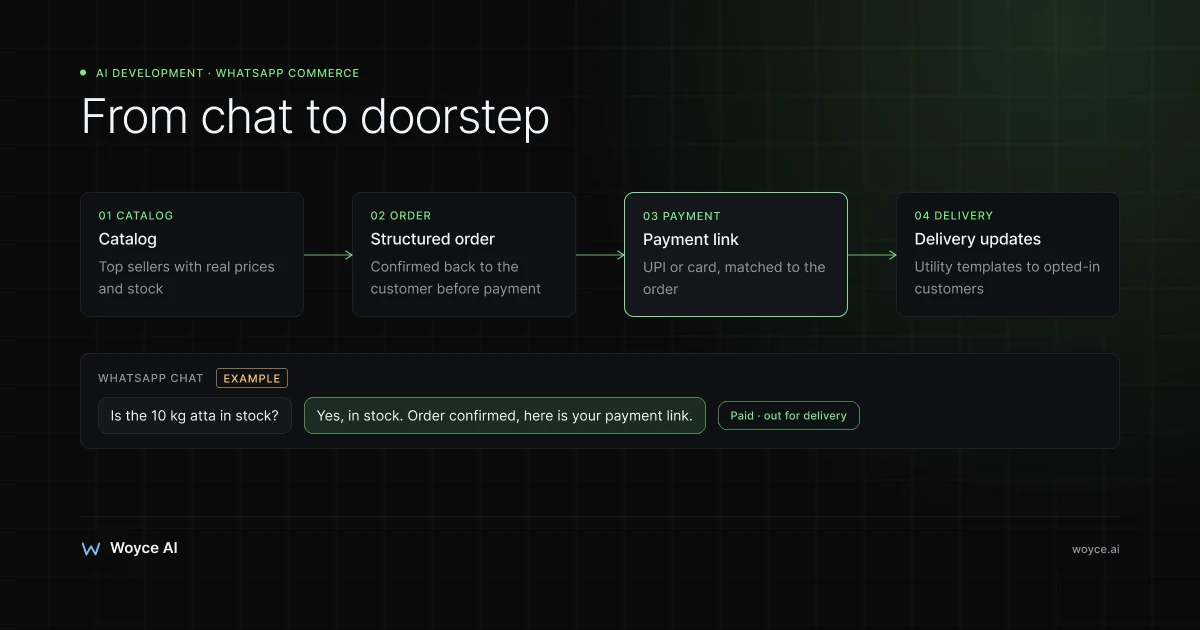
For a lot of local shops, WhatsApp already is the online store. Regular customers message the kirana with a grocery list, send the boutique a screenshot of a kurta from Instagram, or ask the bakery whether there's a chocolate cake for Saturday. The owner reads, replies, checks the shelf, quotes a price, waits for a UPI screenshot, and arranges delivery, all from one phone, often in between serving customers at the counter.
That works until it doesn't. Messages pile up at the evening rush. Orders get lost between voice notes and photos. A customer pays, but nobody can find the screenshot to match it. Two people ask for the last cake. The shop owner's personal number becomes a 14-hour job.
WhatsApp commerce is the practice of turning that informal chat into a proper sales channel: a catalog customers can browse, orders captured in a structured way, payment collected through links or in-chat UPI, and delivery updates sent automatically. Done well, it keeps everything customers like about ordering on WhatsApp and removes most of the manual work.
This guide is written for local retailers: kirana and grocery stores, boutiques, bakeries, pharmacies, and speciality shops. It explains the difference between the free WhatsApp Business app and the WhatsApp Business Platform (API), how catalogs and orders work, how to take payment with UPI, Razorpay, or Stripe, how delivery updates and template messages work, the opt-in rules you must follow, and where an AI agent that answers stock and price questions actually helps. It also covers costs and when the free app is all you need.
The Evening Rush on One Phone
Take an illustrative neighbourhood grocery store that gets 60 to 100 WhatsApp messages a day, most of them between 6pm and 9pm. A typical evening looks like this:
- A regular sends a photographed handwritten list of 18 items.
- Someone asks whether a specific brand of atta is in stock and what the 10 kg bag costs.
- A customer sends a voice note asking to add milk to the order placed an hour ago.
- Three people send UPI payment screenshots with no order reference.
- Someone asks when their delivery will arrive.
Every one of those messages needs the owner or a family member to stop, read, check, and reply. Price and stock questions are the most frequent and the most repetitive. Payment matching is the most error-prone. Delivery status questions are pure interruption.
None of this needs replacing. Customers want to keep ordering on WhatsApp. What needs to change is how the shop handles it behind the scenes.
WhatsApp Business App vs WhatsApp Business Platform (API)
Meta offers two very different products, and choosing the right one is the most important decision.
The WhatsApp Business app
The free WhatsApp Business app runs on a phone, with a few linked devices such as a laptop for WhatsApp Web. It adds business features on top of normal WhatsApp:
- Business profile with address, hours, website, and description.
- Catalog of products or services with photos, prices, and descriptions that customers can browse inside the chat.
- Cart so customers can add catalog items and send them as an order message.
- Quick replies for common answers, plus greeting and away messages.
- Labels to organise chats as new order, paid, delivered, and so on.
- Short links and QR codes to start a chat from a poster, bill, or Instagram bio.
For a shop handling dozens of orders a day with one or two people replying, the app is often enough. Its limits are that it's tied to one number on a phone with a small number of linked devices, there's no real integration with your billing or inventory system, every reply is manual, and broadcast messages only reach people who have saved your number.
The WhatsApp Business Platform (Cloud API)
The WhatsApp Business Platform, usually called the API, is the version for businesses that need automation, integrations, or several staff on one number. Meta hosts it as the Cloud API, and most businesses access it through a Business Solution Provider (BSP) such as Gupshup, Interakt, AiSensy, WATI, Twilio, or 360dialog, which provide a shared inbox, broadcast tools, and integrations.
With the API you can:
- Let multiple staff answer from one number in a shared inbox.
- Connect WhatsApp to your POS, billing, or inventory system, so orders and stock live in one place.
- Send automated order confirmations, payment links, and delivery updates.
- Run an AI agent or chatbot that answers questions and captures orders.
- Send approved template messages to opted-in customers outside the 24-hour window.
The trade-offs are cost and rules. You pay Meta for certain messages plus the BSP's subscription, you need a verified Meta Business account, and the number registered on the API can't be used in the normal WhatsApp app at the same time. Many shops start on the app and move to the API when one phone can't keep up.
| Factor | WhatsApp Business app | WhatsApp Business Platform (API) |
|---|---|---|
| Cost | Free | BSP subscription + Meta message fees |
| Users | One phone plus a few linked devices | Many agents in a shared inbox |
| Catalog | Built in | Via Meta Commerce Manager |
| Automation | Quick replies, greeting/away messages | Full automation, bots, AI agents |
| Integrations | None | POS, inventory, payments, delivery |
| Broadcasts | Only to contacts who saved your number | Templates to opted-in customers |
| Best for | Small shops, low order volume | Busy shops, multiple staff, integrations |
Building a Catalog That Sells
The catalog turns "do you have...?" chats into orders customers can place themselves.
Start with your top sellers. A grocery store doesn't need every SKU on day one. Begin with the 100 to 200 items people order most, organised into collections like dairy, staples, snacks, and household. A bakery might list cakes by size and flavour, plus daily breads. A boutique lists current stock with sizes in the description or as separate items.
Use clear photos and honest prices. One clean photo per item on a plain background, the exact pack size in the title ("Toor dal, 1 kg"), and the price you actually charge. A catalog with outdated prices creates more arguments than it saves.
Keep it in sync. In the app, you update the catalog by hand. On the API, the catalog lives in Meta Commerce Manager and can be updated automatically from your inventory or billing system through a data feed, so prices and availability stay current. For shops with frequently changing stock, this sync is the main reason to move to the API.
Mark what's out of stock. Hiding or marking unavailable items stops customers ordering things you can't supply, which is the most common source of frustration with WhatsApp ordering.
Capturing Orders Properly
Free-form chat orders are where mistakes happen. The goal is to make every order end up as a structured record: items, quantities, price, customer, address, delivery slot, and payment status.
Catalog cart orders
When customers build a cart from your catalog and send it, the order arrives as a structured message listing items and quantities. On the API, that message arrives at your system as data, so it can create an order in your POS or order sheet automatically.
Lists, photos, and voice notes
Many regulars will keep sending handwritten lists and voice notes, and you shouldn't force them to stop. An AI agent can read a photographed list or transcribe a voice note, match the items against your catalog, ask about anything ambiguous ("Amul or Mother Dairy butter? 100 g or 500 g?"), and send back a priced order summary for the customer to confirm. Staff then only review and pack.
Confirmation before payment
Whatever the source, the order should be confirmed back to the customer before payment: items, substitutions, total, delivery fee, and delivery slot. This one step removes most disputes.
Taking Payment: UPI, Razorpay, and Stripe
Collecting payment is where WhatsApp ordering most often breaks down, mainly because of unmatched payment screenshots.
Payment links. The cleanest approach for most shops is sending a payment link generated for each order. Razorpay Payment Links (and similar products from Cashfree, PayU, and others) let customers pay by UPI, card, or net banking, and the link is tied to the order, so the payment is matched automatically. Outside India, Stripe Payment Links do the same for cards, Apple Pay, and Google Pay. Gateways charge a fee per transaction, roughly around 2% for standard domestic payments in India (approximate, check current pricing).
Payments inside WhatsApp in India. For businesses on the API in India, Meta supports sending order details with a payment request that customers can pay without leaving the chat, using UPI apps or other methods through supported payment partners such as Razorpay and PayU. Availability and setup requirements change, so check Meta's current documentation and your BSP.
UPI QR codes. A static UPI QR at the counter works for walk-ins, but for WhatsApp orders it creates the screenshot-matching problem. A dynamic QR or a link with the amount and order reference built in solves it.
Cash on delivery. Many local customers still prefer paying cash or UPI to the delivery person. That's fine; record the payment method on the order so the end-of-day reconciliation is simple.
The rule of thumb is that every payment should be linked to an order without anyone reading a screenshot.
Delivery Updates Without the "Where Is My Order?" Messages
Delivery questions are easy to remove once orders are structured. With the API, the shop's system can send automatic messages at each step:
- Order confirmed, with the items and total.
- Payment received.
- Packed and out for delivery, with the delivery person's name and number.
- Delivered.
For shops using their own delivery staff, a simple screen or app where the delivery person marks "out for delivery" and "delivered" is enough to trigger the messages. Shops using delivery services such as Porter, Shadowfax, or logistics partners on the ONDC network can trigger updates from those services' status events.
These are usually utility template messages (more on templates below), which Meta prices lower than marketing messages and doesn't charge for when sent inside an open customer service window. Check current pricing for your country.
An AI Agent for Stock and Price Questions
The most repetitive WhatsApp messages a local shop receives are versions of "do you have X, and how much is it?" They're exactly what an AI agent handles well, provided it's connected to real data.
What it does
An AI agent on your WhatsApp number can:
- Answer stock and price questions from your live inventory or billing system ("Yes, Aashirvaad atta 10 kg is in stock at ₹520").
- Suggest alternatives when something is out of stock.
- Turn lists, photos, and voice notes into priced order summaries.
- Send the payment link once the customer confirms.
- Answer routine questions: opening hours, delivery areas, minimum order, cake order lead times.
- Reply in the customer's language, including Hindi, Gujarati, Tamil, and mixed Hinglish messages.
- Hand over to a person for complaints, special requests, or anything it isn't sure about.
What it needs
The agent is only as good as the data behind it. It needs read access to current stock and prices, which means connecting to whatever you use to bill: a POS or billing tool such as Vyapar, Marg, Tally, Zoho Inventory, or Shopify POS, or at minimum a regularly updated spreadsheet. If stock is only in the owner's head, the agent will either guess, which you must never allow, or escalate everything.
It also needs clear rules: delivery areas and fees, minimum order values, substitution policy, cut-off times, and when to hand over to a human.
When it's worth it
For a small shop with manageable message volume, quick replies and a well-maintained catalog in the free app may be enough. An agent becomes worth building when message volume regularly overwhelms the people answering, when you have several branches or a large catalog, or when you lose orders because replies come too late. Our guide to building a WhatsApp AI chatbot for business covers the technical side in more depth, and AI agents for retail covers wider store automation.
Opt-In Rules and Template Messages
The API comes with rules that protect customers from spam. Breaking them gets your number restricted, so understand them before you start.
The 24-hour customer service window
When a customer messages you, a 24-hour customer service window opens. Inside it, you can reply freely with normal messages. Outside it, you can only start a conversation with a pre-approved template message.
Template categories
Templates are reviewed by Meta and fall into categories:
- Utility: order confirmations, payment receipts, delivery updates, appointment reminders. Tied to something the customer did.
- Marketing: offers, new arrivals, festival sales, "we've restocked your favourite".
- Authentication: one-time passcodes.
Meta moved to charging per delivered template message in 2025, with marketing messages priced higher than utility ones and rates varying by country. Replies inside the customer service window are not charged. Prices change, so check Meta's current rate card and your BSP's markup.
Opt-in is required
Before sending template messages, you need the customer's opt-in to receive WhatsApp messages from your business. For a local shop, that can be a checkbox at online checkout, a clear line on the bill ("Reply YES to get order updates and offers on WhatsApp"), or a customer starting the chat themselves after scanning a QR code. Keep a record of when and how each customer opted in.
Keep marketing restrained
Customers who get daily offers will block or report the number, which lowers your quality rating and can limit how many people you can message. One useful message a week, such as fresh stock arrivals, festival orders opening, or a weekend special, works better than daily blasts. Always make it easy to opt out.
Connecting to ONDC and Other Channels
Many local retailers in India now also sell through the Open Network for Digital Commerce (ONDC), which lets customers find shops through buyer apps like Paytm and Magicpin. WhatsApp and ONDC work well together when they share the same catalog and inventory: the same stock data that powers your WhatsApp catalog and AI agent can feed your ONDC listings, and orders from both channels flow into one system. Our guide to ONDC and AI integration explains how the network works and where automation fits.
The same principle applies to a website or Instagram shop. Keep one source of truth for products, prices, and stock, and let every channel read from it.
The Numbers for an Illustrative Shop
Consider an illustrative grocery store taking 40 to 60 WhatsApp orders a day, with roughly 150 to 200 incoming messages. This is a worked example, not a client result; your numbers will differ.
| Task | Manual handling | With API, catalog sync, and AI agent |
|---|---|---|
| Stock and price questions | Owner or family replies to each one | Most answered automatically from inventory |
| Converting lists and voice notes | Typed out by hand | Draft order created, staff review |
| Payment matching | Screenshots checked one by one | Payment links matched to orders automatically |
| Delivery status questions | Answered individually | Automatic updates at each step |
| Orders lost at the evening rush | Some, rarely counted | Every message gets a reply |
The point isn't to remove people from the shop. It's to move the owner's time from repetitive replies to the work only they can do: sourcing, regulars, and the counter.
What It Costs
Costs depend on which route you take. Third-party prices are approximate; check current pricing.
- WhatsApp Business app: free. The cost is staff time.
- API through a BSP: BSP subscriptions for small businesses commonly run from a modest monthly fee upwards, plus Meta's per-template-message charges. For a shop sending mainly utility messages to its own customers, message costs are usually small.
- Payment gateway fees: a percentage per transaction through Razorpay, Stripe, or similar.
- An AI agent connected to your inventory: a custom build. At Woyce, AI agent pilots run $8,000–$20,000 over three to five weeks, and production agents $20,000–$60,000 over six to twelve weeks; full details are on our AI agent development cost page.
That last figure is real money for a single neighbourhood shop, and we'd say so in a first conversation. A custom AI agent makes most sense for multi-branch retailers, larger grocery and pharmacy operations, or local chains where message volume is high. A single bakery is often better served by a well-built catalog, quick replies, and a BSP's off-the-shelf automation.
Common WhatsApp Commerce Mistakes
Letting the catalog go stale
A catalog with wrong prices or items that ran out weeks ago causes more chats, not fewer. If you can't keep it updated by hand, either keep it small or automate the sync.
Messaging without opt-in
Adding every customer's number to a broadcast list and sending offers is the quickest way to get reported and restricted. Collect opt-in, record it, and send marketing sparingly.
Letting an AI guess about stock
An agent that says something is in stock when it isn't damages trust fast. It must answer only from real inventory data, and say "let me check with the shop" when data is missing.
Moving to the API too early, or too late
A shop with 10 orders a day doesn't need the API's cost and complexity. A shop where the owner is answering WhatsApp until midnight needed it months ago. Count your daily messages and orders before deciding.
Forgetting the people who prefer to call
Some customers, often older regulars, will always prefer a phone call or ordering at the counter. WhatsApp commerce should add a channel, not remove the others.
WhatsApp Commerce Best Practices
- Use a dedicated business number, not the owner's personal one.
- Keep one source of truth for products, prices, and stock across WhatsApp, the counter, ONDC, and any website.
- Confirm every order with items, total, and delivery slot before taking payment.
- Link every payment to an order using payment links or in-chat payment requests.
- Automate delivery updates so customers stop asking.
- Collect and record opt-in before sending any template message.
- Write clear hand-over rules so complaints and special requests reach a person quickly.
- Review chats weekly in the first months to spot repeated questions and fix the catalog, quick replies, or agent rules.
Where This Doesn't Fit
If most of your trade is walk-in and WhatsApp messages are occasional, a tidy business profile, a short catalog, and a few quick replies are all you need. If your stock and prices only exist in your head or on paper, start by getting them into a billing tool; automation built on missing data creates more work than it saves. And if your customers value talking to you personally, keep that. Many of the best local shops win precisely because the owner answers.
Related guides
- WhatsApp AI chatbot for business: how to build one that works
- ONDC + AI: selling on India's open commerce network
- AI agents for retail
- E-commerce website development: custom store vs Shopify vs WooCommerce
- AI agent development services
Ready to Take the Pressure Off Your WhatsApp?
If your shop's WhatsApp has become a second full-time job, there's a sensible path from the free app to a connected ordering system, one step at a time.
Talk to us about your business. Tell us how many messages and orders you handle and what you bill with, and we'll tell you honestly whether you need an AI agent, an off-the-shelf BSP setup, or just a better catalog.
Frequently Asked Questions
Is the WhatsApp Business app enough for a small shop?
Often, yes. If you handle a few dozen orders a day with one or two people replying, the free app's catalog, cart, quick replies, labels, and away messages cover most needs. Move to the WhatsApp Business Platform when one phone can't keep up, when several staff need to answer from the same number, or when you want orders, payments, and stock connected to your billing system.
How do customers pay for WhatsApp orders?
The most reliable method is a payment link sent for each order through a gateway like Razorpay in India or Stripe elsewhere. Customers pay by UPI, card, or net banking, and the payment is matched to the order automatically. In India, businesses on the API can also send payment requests that customers complete inside WhatsApp through supported partners. Cash or UPI on delivery still works; just record the method on the order.
Can I send offers to all my customers on WhatsApp?
Only to customers who have opted in to receive messages from you. On the API, offers are sent as marketing template messages, which Meta reviews and charges for per message. Send them sparingly, since customers who block or report you lower your number's quality rating and can limit your messaging.
Can an AI agent tell customers whether something is in stock?
Yes, if it's connected to your live stock data through your POS, billing tool, inventory system, or an updated spreadsheet. It should answer only from that data and hand over to a person when information is missing. An agent without a reliable stock source shouldn't answer stock questions at all.
Does the AI agent understand regional languages and voice notes?
Modern language models handle Hindi, Gujarati, Tamil, Marathi, Bengali, and mixed-language messages like Hinglish reasonably well, and voice notes can be transcribed before processing. Accuracy varies by language and audio quality, so test with real customer messages before going live, and route anything unclear to a person.
How much does WhatsApp Business API messaging cost?
Meta charges per delivered template message, with rates that depend on the category (marketing, utility, or authentication) and the customer's country. Replies inside the 24-hour customer service window are not charged. Your BSP adds its own subscription or markup. Check Meta's current rate card, as pricing has changed several times in recent years.
Can WhatsApp orders and ONDC orders go into the same system?
Yes, and they should. When both channels read from the same catalog and inventory, stock stays accurate and orders from WhatsApp, ONDC buyer apps, and the counter can be managed in one place. Many POS and inventory tools used by Indian retailers support ONDC through seller apps, and WhatsApp can be connected through a BSP or a custom integration.
Conclusion
WhatsApp commerce lets local shops keep the channel their customers already love while removing the chaos behind it. A good catalog turns questions into orders, structured order capture removes mix-ups, payment links end screenshot matching, and automatic delivery updates stop the "where is my order?" messages.
The free WhatsApp Business app is the right starting point for most small shops. The WhatsApp Business Platform becomes worth it when volume, staff, or integrations outgrow one phone, and an AI agent earns its place when stock and price questions overwhelm the people answering, as long as it's connected to real inventory data. Through all of it, follow the opt-in and template rules, and keep marketing restrained.
Start by counting a week of WhatsApp messages and orders, and noting which questions repeat most. That tells you whether you need a better catalog, an API setup, or an agent. When you're ready, our AI agent development team can help you work out the next step.