


OmniAI Chatbot
Fully customisable omnichannel AI chatbot that deploys across web, WhatsApp, SMS, and email with unified conversation history.
8Channel integrations
- AI agents & LLM apps
- Chatbots & RAG
- Web & SaaS platforms


A construction project management platform that enables builders and contractors to plan projects, track site progress, manage workforce and materials, and handle billing in one place.
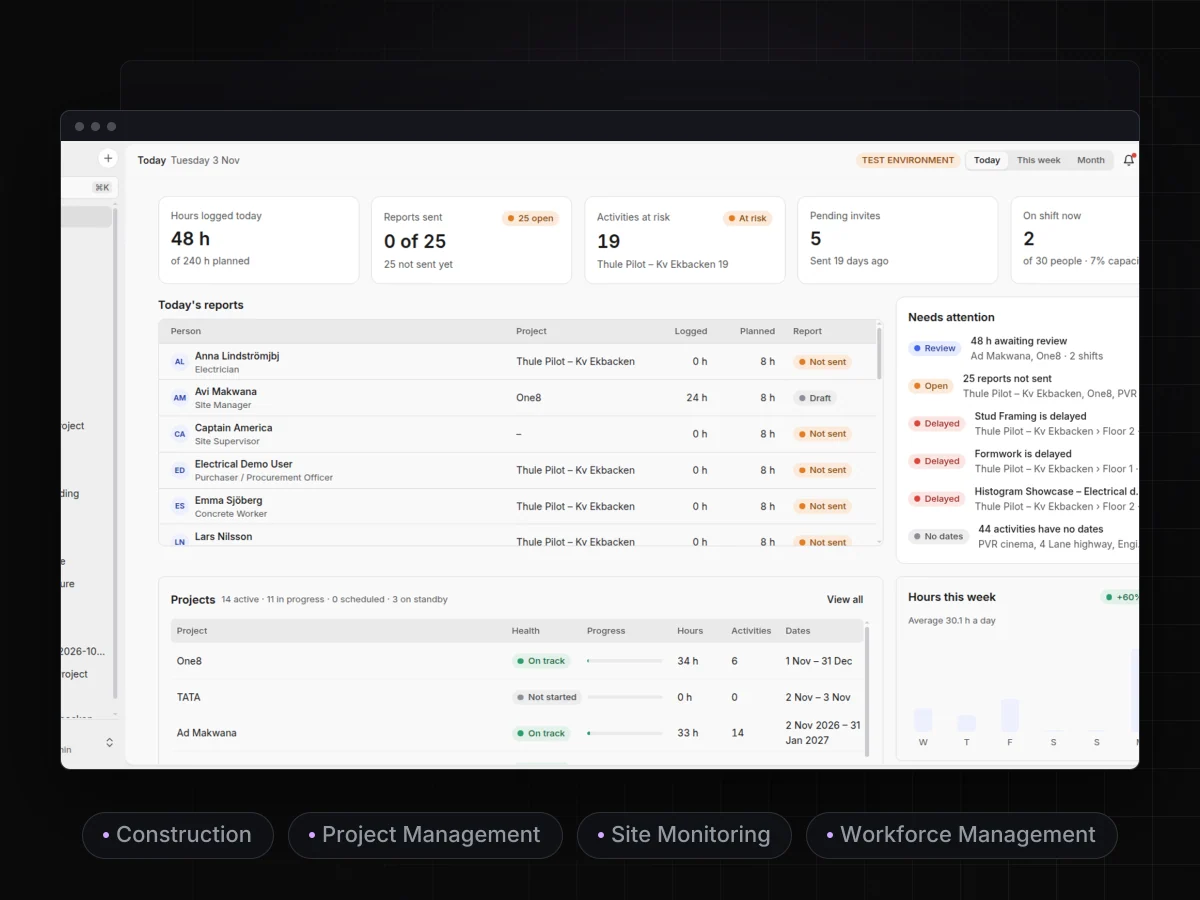
Structly brings every part of a construction project onto one platform, from planning and scheduling to site execution and billing. Project managers can track daily progress, assign tasks to teams, monitor material usage, manage contractors and labour, and receive instant alerts about delays, budget overruns, or pending approvals, all in real time.
Structly’s Today dashboard gives a real-time summary of hours logged, reports sent, at-risk activities, pending invites, and workers currently on shift. Project health, progress, and delay alerts are all available on a single screen.
The Projects page gives organisation admins a complete portfolio view of all construction projects. Each row shows the project name, a color-coded health status (On track, Delayed, or Not started), a progress bar with completion percentage, total hours logged, assigned team members, project dates, and the project admin. This makes it easy to spot delayed or stalled projects quickly and compare progress across sites. Pagination keeps large project lists manageable, a “New project” button allows quick project creation, and the left sidebar lets users jump directly into any individual project.
Structly’s Reports page shows logged, confirmed, and unsent hours across all projects for any selected period, with a project-wise breakdown and a weekly planned vs. logged chart.
The Schedule page helps teams plan and track project timelines visually. The left panel lists the project structure with type, start and end dates, and estimated hours, while the Gantt chart on the right shows each task’s duration and progress by week or month. Color-coded statuses indicate on-track, overdue, completed, blocked, and upcoming work, and a “Today” marker shows the current position in the timeline. Users can switch between Activities and Resources, zoom, toggle the chart and column views, export the schedule, and rely on automatic saving of changes.
The “Build project structure” wizard walks users through creating a project hierarchy step by step: Location, Zone, Construction part, and Activity. Counters at the top track how many items have been created and the overall structure readiness percentage. Users can pick an existing location or type a new one, while a live preview on the right marks items as Existing, Changed, or New. Progress is saved automatically as the user goes, making project setup quick and consistent.
The Activities page gives project teams a structured view of all work items. Setup tasks such as building the project structure, assigning resources, and managing teams appear at the top, followed by the hierarchy of locations, zones, construction parts, and activities. Each row shows its status (To do, In progress), assigned members, start and end dates, and planned vs. logged hours. Search, filters, and quick toggles for each item type make it easy to find work, and users can switch between Grid, Board, and Gantt views or add a new activity in one click.
The Resources page helps managers plan and balance their workforce. Workers are grouped by job title, such as Carpenter, Concrete Worker, Electrician, Foreman, and Groundworker, with daily planned hours shown in a calendar-style grid. Color coding flags people who are over or under their maximum allocation, and total planned hours are shown per person. Users can switch between 2, 4, or 8-week views, group by job title, show teams, search people, manage members and teams, and export the plan.
The Meetings page guides users through four steps: Prepare, Meeting notes, Review minutes, and Share & export. In the preparation step, users enter meeting details such as title, project, date, location, chair, minute-taker, and approver, and choose an agenda template with predefined meeting items. Participants are selected from the project team for distribution. An AI notetaker can join online meetings through a Google Meet, Teams, or Zoom link, record the conversation, and draft the minutes in the selected language, saving time on documentation.
The Notifications page keeps managers updated on everything happening across projects. The feed shows when team members log hours, correct time entries, or complete their workday, along with the project, task, and time of each update. Tabs filter between All, Unread, and Read notifications, unread items are highlighted with a blue indicator, and a “Mark all as read” button clears the list quickly.
Design goals this product was built toward. They are estimates, not measured results.
Fully customisable omnichannel AI chatbot that deploys across web, WhatsApp, SMS, and email with unified conversation history.

A conversational AI chatbot enabling natural language queries against enterprise data, with seamless Microsoft Teams integration and a secure multi-cloud architecture for in-app data access and insights.

A complete AI-powered call center platform that enables businesses to create, manage, and deploy intelligent voice agents with real-time call handling, recordings, detailed logs, and conversation analytics.
Tell us about your project. We'll send back a fixed-price proposal within 48 hours, or tell you honestly if we're not the right fit.