

Running one coding agent at a time and babysitting it is the beginner move; running five and losing track of which terminal is doing what is the intermediate failure mode most people hit next. Orca, built by YC-backed Stably AI, calls itself an ADE — an Agent Development Environment — built specifically for that second stage: running a genuine fleet of coding agents in parallel, each isolated in its own git worktree, tracked from one place, with a mobile app to check in from your phone when you're away from the desk.
The problem it targets is real for any team leaning on background coding agents. Once several agents are working at once, the bottleneck shifts from the agents to you: which branch belongs to which task, which terminal is waiting for an answer, and which of three attempts at the same fix is actually the best one. Without some structure, parallel agents create merge conflicts, lost context, and a lot of tab-switching that eats the time they were supposed to save.
This explainer covers how Orca approaches that problem: parallel git worktrees as the core idea, its agent-agnostic design, the mobile companion app, Design Mode and inline diff annotation, installation and remote execution options, and how it compares with Paperclip and jcode. It closes with practical implications and the security questions worth asking before you connect it to a real codebase.
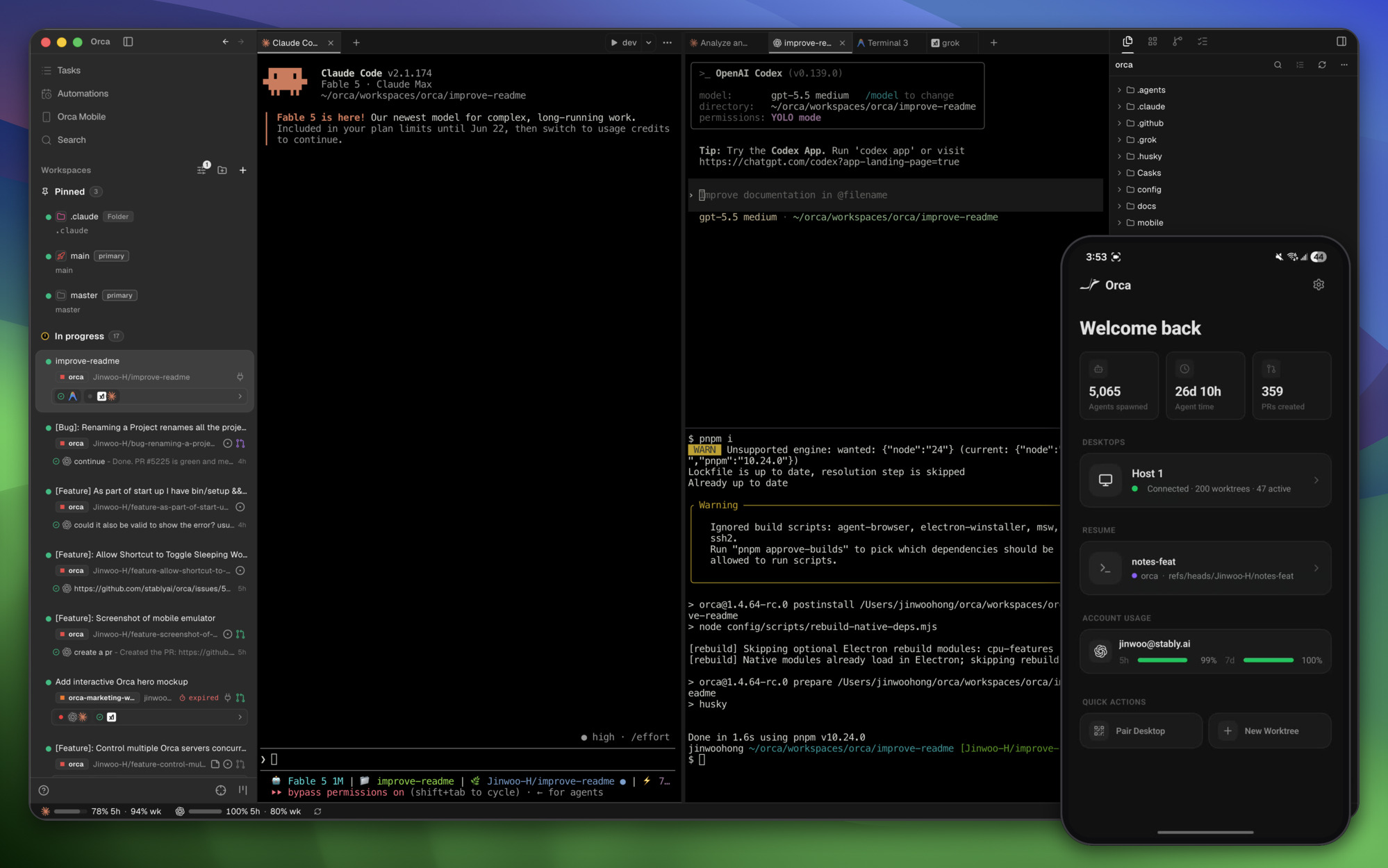
Parallel Worktrees Are the Core Idea
The headline feature is fanning one prompt across several agents at once, each running in its own isolated git worktree, so you can compare the results side by side and merge whichever attempt actually worked best. That's a genuinely different workflow than running agents sequentially and hoping the first attempt is good enough — it trades compute for a real A/B comparison on a task, which matters more the higher the stakes of getting an implementation right the first time. Git worktrees make this cheap to do without the mess of branch-juggling by hand, and Orca also supports SSH worktrees for running agents against a remote host rather than only local checkouts.

Almost Any CLI Agent, Not a Closed Ecosystem
Orca's stated design principle is blunt: if it runs in a terminal, it runs in Orca. The supported-agents list backs that up — Claude Code, Codex, Cursor, GitHub Copilot, OpenCode, Grok, Devin, Goose, and roughly twenty more CLI coding tools are explicitly listed, alongside a catch-all "+ any CLI agent." That's a meaningfully different bet than the growing crop of orchestration platforms that pick one or two favored agents and build tight integrations around just those — Orca is explicitly agent-agnostic, treating the orchestration layer as the product rather than any particular underlying model or tool.
Steering Agents From Your Phone
The mobile companion app (available on iOS App Store, TestFlight, and as a direct Android APK) is worth calling out specifically because most agent-orchestration tools stop at the desktop. It lets you monitor running agents, get notified when one finishes, and send follow-up instructions from your phone — a real answer to the actual failure mode of kicking off a long-running agent task and then being away from the machine when it needs a decision. Whether that matters depends entirely on how you work; for anyone running long, multi-hour agent tasks that need occasional human judgment calls mid-flight, it closes a real gap.
The Rest of the Feature Set
A few other pieces round out the environment:
| Feature | What it does |
|---|---|
| Terminal Splits | Ghostty-class terminals with WebGL rendering, infinite splits, and scrollback that survives restarts |
| GitHub & Linear, native | Direct integration rather than a bolted-on webhook, including stacked pull request support |
| Annotate AI Diffs | Leave inline comments directly on an agent's proposed diff before accepting it |
| Drag Files to Agents | Attach files to an agent's context by dragging them in, rather than describing paths in text |
| Orca CLI | Scriptable command-line access for automating agent orchestration outside the GUI |
| Design Mode | A visual mode for design-focused work, distinct from the terminal-first coding flow |
Design Mode and the Rest of the Review Workflow
Two features worth understanding on their own, not just as line items in the feature table. Design Mode lets you click any element in a real embedded Chromium window and have its HTML, CSS, and a cropped screenshot sent straight into an agent's prompt — a direct way to point an agent at "this specific button" rather than describing it in text and hoping the agent finds the right DOM node. Annotate AI Diffs works the other direction: instead of accepting or rejecting an agent's proposed diff wholesale, you drop inline comments directly on specific lines and ship them back to the agent for a revision, keeping the review loop inside Orca rather than switching to a separate PR review tool. Both are aimed at the same underlying problem — reducing the amount of context that has to travel through a text description before an agent can act on it.
Installation and Where It Runs
Orca ships as a desktop app for macOS, Windows, and Linux, downloadable directly from onorca.dev or through a package manager (Homebrew cask on macOS, an AUR package on Arch Linux), plus platform-specific builds — DMG, Windows installer, or Linux AppImage — available straight from GitHub releases. Beyond local desktop use, orca serve supports running on a headless Linux server, which combined with the SSH worktree support means the actual agent execution doesn't have to happen on the machine you're looking at the UI from — a real answer for anyone who wants agent compute on a beefier remote box while still reviewing and steering from a laptop. The mobile companion apps are separate installs (iOS via the App Store or TestFlight, Android via a direct APK) that pair with a running desktop instance rather than running agents independently on the phone itself.

How It Compares to Paperclip and jcode
Orca sits in the same general space as Paperclip and jcode — all three exist because running multiple AI coding agents at once creates a coordination problem plain terminal tabs don't solve — but they solve different slices of it. Paperclip is an org-chart-and-governance layer for long-running, budget-tracked autonomous agents. jcode is a single low-memory harness built to run many sessions efficiently with its own agent-memory system. Orca is closer to an IDE: parallel git worktrees, side-by-side comparison, and a genuinely broad any-CLI-agent compatibility list, with the mobile app as its most distinctive addition. Which one fits depends on whether the actual pain point is governance at scale, per-session resource cost, or comparing several attempts at the same task before committing to one.

Benefits of Orca
A real comparison instead of a first attempt
Fanning one prompt across several agents in separate worktrees turns a single guess into a set of options. For tasks where the right approach isn't obvious, seeing three implementations side by side shows trade-offs that a single attempt hides: one may be simpler, another may handle an edge case the others missed. You merge the best result rather than iterating on whichever attempt happened to come first, which often saves more time than it costs in compute.
Parallel work without stepping on each other
Each agent gets its own git worktree, so several tasks can run at once without overwriting each other's files or forcing you to juggle branches by hand. That isolation is what makes running a fleet of agents practical at all. When an attempt goes badly, its worktree can be discarded without affecting the others or your own checkout.
Freedom to keep your preferred agents
Because Orca treats any terminal-based agent as a first-class citizen, teams don't have to standardise on one coding tool to adopt it. Engineers who prefer different agents can share the same orchestration layer, and the team can switch or add agents later without changing its workflow. That reduces lock-in at a time when coding agents are changing quickly.
Staying in the loop away from the desk
Long-running agent tasks often stall waiting for a decision while their owner is in a meeting or commuting. The mobile companion app sends a notification when an agent finishes or needs input, and lets you reply from your phone. Tasks that would otherwise sit idle for hours keep moving, and you return to the desk to finished work rather than a blocked prompt.
Tighter review loops
Design Mode and inline diff annotation reduce how much has to be described in text. Pointing at the exact UI element, or commenting on the exact line of a diff, gives the agent precise context for its next revision. Reviews stay inside one tool rather than bouncing between an editor, a browser, and a pull request page.
Orca Use Cases
Comparing approaches on an ambiguous task
When a bug fix or feature could be implemented several ways, a developer sends the same prompt to two or three agents and compares the resulting diffs. The problem is uncertainty about the right approach; the outcome is a choice made with evidence, and often a better implementation than any single attempt would have produced. It works best when tests can distinguish good attempts from bad ones.
Running several independent tasks at once
A developer with a backlog of small, well-specified tickets can assign each to an agent in its own worktree and work on something else. Orca keeps track of which terminal belongs to which task and which agent is waiting for input. The developer's role shifts to reviewing finished work rather than watching each agent type, one worktree at a time.
Offloading agent compute to a remote server
Teams that want heavier machines for agent work can run orca serve on a headless Linux server and use SSH worktrees, while reviewing from a laptop. Laptops stay responsive, long tasks keep running when the laptop is closed, and several developers can work against a shared, more powerful host. The remote box also becomes a single place to control credentials and network access for agent work.
Front-end work driven by Design Mode
Front-end developers fixing layout or styling issues can click an element in the embedded browser and send its HTML, CSS, and a screenshot straight to an agent. The agent targets the right component the first time instead of guessing from a text description, which shortens the cycle of small tweaks typical of UI work.
Keeping long tasks moving after hours
An engineer kicks off a large refactor or migration at the end of the day and checks progress from the mobile app in the evening. When an agent asks a question or finishes, the engineer replies or approves the next step from the phone. Work continues overnight rather than waiting until the next morning, though anything that needs careful review is still best left for the desk.
Common Orca Mistakes
Fanning out every task by default
Parallel runs multiply model costs and review effort. Sending trivial tasks to three agents produces three nearly identical diffs to read and three bills to pay. The comparison workflow pays off on ambiguous or high-stakes tasks; routine changes are better handled by a single agent. Without a rule for when to fan out, usage drifts toward "always", and the cost shows up on the model invoices before anyone notices the habit.
Skipping a security review of the mobile pairing
The mobile app extends access to running agents, repositories, and session state beyond your desk. Pairing it without understanding what it can reach, how sessions are authenticated, and what happens if a phone is lost creates a new route into your codebase. Treat it like any remote access tool, with the same expectations for device security and revocation.
Leaving default telemetry on in regulated environments
Orca collects anonymous usage telemetry by default. Teams with policies on telemetry sometimes roll it out widely before anyone checks. Review the telemetry documentation and opt out where required before connecting it to sensitive projects.
Comparing attempts without good tests
Side-by-side comparison only works if you can tell which attempt is correct. Without meaningful tests, reviewers pick the diff that looks tidiest, which may not be the one that works. Strengthen the tests for a task before fanning it out.
Expecting orchestration to remove the review bottleneck
Running more agents generates more code to review. Teams that adopt Orca to go faster can end up with a growing pile of unreviewed worktrees. Agent throughput needs to match the time available to read and merge the results. Old worktrees that nobody reviews also drift from the main branch, so their eventual merge becomes harder than starting again.
Orca Best Practices
Test the worktree-comparison workflow first
Fanning a genuinely ambiguous or high-stakes task across several agents and comparing outputs is a different (and often better) use of compute than accepting the first attempt — worth trying specifically on a task where you're not confident which approach is right.
Use broad agent compatibility to avoid lock-in
Because it's agent-agnostic rather than betting on one model or CLI, adopting Orca doesn't mean standardizing your whole team on a single coding agent — a real advantage if different engineers already have different preferences.
Review the mobile app's access before relying on it
The mobile app is a genuine differentiator, not a gimmick, for long-running tasks — but it's also additional attack surface and a new place credentials and session state live, worth a normal security review before connecting it to anything sensitive.
Pin versions and watch release notes
This is a fast-moving, actively developed product — release notes show two dozen PRs merged in a single release cycle covering features, fixes, and performance work, which is a good sign for momentum but also means the surface area is still shifting. Agree which version the team uses and read changelogs before upgrading.
Budget compute per task type
Decide which categories of work justify parallel attempts and how many agents each gets. Track model spend per merged change so the comparison workflow stays a deliberate choice rather than a habit.
Clean up worktrees and keep agents on least privilege
Delete worktrees once a task is merged or abandoned, and run agents with the narrowest credentials the task needs. If agents run on a remote server, restrict its network access and keep production secrets off it. Decide on telemetry settings before rolling the tool out to the whole team, and document the agreed setup for new joiners.
Practical Takeaway
Orca is a bet that the next real productivity gain in AI-assisted development isn't a better single agent, it's better infrastructure for running several agents at once and picking the best result — parallel worktrees, broad agent compatibility, and remote visibility via mobile are all pointed at that same idea. For teams already running multiple coding agents and feeling the coordination overhead, it's worth trying specifically for the parallel-comparison workflow before evaluating the rest of the feature set.
Teams building or adopting multi-agent development workflows — orchestration, comparison, or remote agent management — can get hands-on architecture help from Woyce Technologies.
FAQ
What is Orca?
Orca is an open-source Agent Development Environment (ADE) that runs multiple CLI coding agents — Claude Code, Codex, Cursor, and dozens of others — in parallel, each in its own isolated git worktree, with a desktop app for macOS, Windows, and Linux plus a mobile companion app for iOS and Android.
Is Orca free to use?
Yes, it's MIT-licensed and open source, available as a free download for desktop and mobile. Note that Orca itself is only the orchestration layer: the agents you run inside it, such as Claude Code, Codex, or Cursor, keep their own subscriptions or API billing. Running the same prompt across several agents in parallel multiplies those model costs, so it's worth deciding which tasks genuinely justify a side-by-side comparison rather than fanning out everything by default.
Which coding agents does Orca support?
Nearly any CLI-based coding agent, including Claude Code, Codex, Cursor, GitHub Copilot, OpenCode, Grok, Devin, Goose, and roughly twenty others explicitly listed, with the stated principle that any terminal-based agent can run inside it. Because Orca is agent-agnostic, adopting it does not force a team to standardise on one coding agent, so engineers can keep the tools they already prefer while sharing the same orchestration layer.
What are parallel worktrees in Orca?
A workflow where one prompt is sent to multiple agents at once, each working in its own isolated git worktree, so the results can be compared side by side before merging the best one — rather than accepting a single agent's first attempt. Git worktrees let several branches be checked out in separate directories from the same repository, so the agents never overwrite each other's files and you avoid juggling branches by hand.
Can I monitor Orca agents remotely?
Yes — a mobile companion app for iOS and Android lets you monitor running agents, get notified when one finishes, and send follow-up instructions from your phone. The app pairs with a running desktop or server instance rather than executing agents on the phone itself, so your machine or remote host still does the work. Because it extends access to your agents and repositories beyond your desk, treat the pairing like any other remote access tool and review it before using it on sensitive code.
How is Orca different from Paperclip or jcode?
All three address coordination problems that come from running multiple AI coding agents, but Orca focuses on an IDE-style experience with parallel worktree comparison and broad agent compatibility, Paperclip focuses on org-chart-style governance and budgets for autonomous agents, and jcode focuses on a low-memory harness with its own agent-memory system.
Can Orca run agents on a remote server instead of my local machine?
Yes — it supports SSH worktrees for running agents against a remote host, and orca serve explicitly supports headless Linux server deployment, so agent execution can live on a separate, more powerful machine while you review and steer from the desktop or mobile app. This suits teams that want heavier agent compute off their laptops.
What is Design Mode in Orca?
A visual feature that lets you click any element inside a real embedded Chromium browser window and have its HTML, CSS, and a cropped screenshot sent directly into an agent's prompt, so you can point at a specific UI element instead of describing it in text. That spares the agent from guessing which DOM node you meant.
Does Orca integrate with GitHub and Linear directly?
Yes, natively rather than through a bolted-on webhook — you can browse pull requests, issues, and project boards inside Orca, open a worktree straight from a task, and the latest release added support for stacked pull requests specifically. Combined with inline diff annotation, this keeps most of the review loop inside Orca instead of switching to a separate tool.
Does Orca collect usage data?
Orca collects anonymous usage telemetry by default, with details on what's collected and how to opt out published in its telemetry documentation — worth reviewing before connecting it to anything sensitive, same as any tool with broad filesystem and credential access. If your organisation has rules about telemetry, opt out before rolling it out to a team.
Conclusion
Running several AI coding agents at once sounds like a straightforward productivity win until you have to keep track of them. Orca's answer is to treat orchestration as the product: each agent gets its own git worktree, one prompt can fan out to several agents for a side-by-side comparison, and a mobile app keeps you in the loop when a long task needs a decision.
The most valuable idea to test is the comparison workflow. For an ambiguous or high-stakes task, spending extra compute to see three different implementations and merge the best one can beat accepting the first attempt. The broad any-CLI-agent support also means a team doesn't have to standardise on one coding agent to adopt it.
The caveats are practical. Parallel runs multiply model costs, the product is changing quickly, telemetry is on by default, and the mobile app adds a new path to your repositories and credentials that deserves a security review. Orca also doesn't remove the human bottleneck; someone still has to review what comes back.
If your team already runs several coding agents and feels the coordination overhead, try Orca on one contained task before rolling it out widely. For help designing a multi-agent development workflow that stays reviewable, talk to our AI agent development team.