

The moment a team goes from one AI coding agent to five or ten running at once, a specific, recognizable mess shows up: a dozen terminal tabs nobody can label, agent configs scattered across folders, no record of who approved what, and a token bill that spikes overnight because one agent got stuck in a loop. Paperclip is built specifically for that mess — not another agent framework, but a control plane that sits on top of whatever agents you're already running and gives them an org chart, a budget, and an approval process.
Why does this matter? Once agents have real access to code, tickets, and credentials, "which agent did what, and who said it could?" stops being an academic question. Without a coordination layer, teams end up hand-building budget alerts, task locks, and audit logs, usually after something has already gone wrong. This guide explains how Paperclip models agents as employees, the design choices that separate it from a task board, what it deliberately leaves out, how installation works, what's shipped versus still on the roadmap, and how it compares with agent frameworks and workflow builders, so you can decide whether it fits your setup.
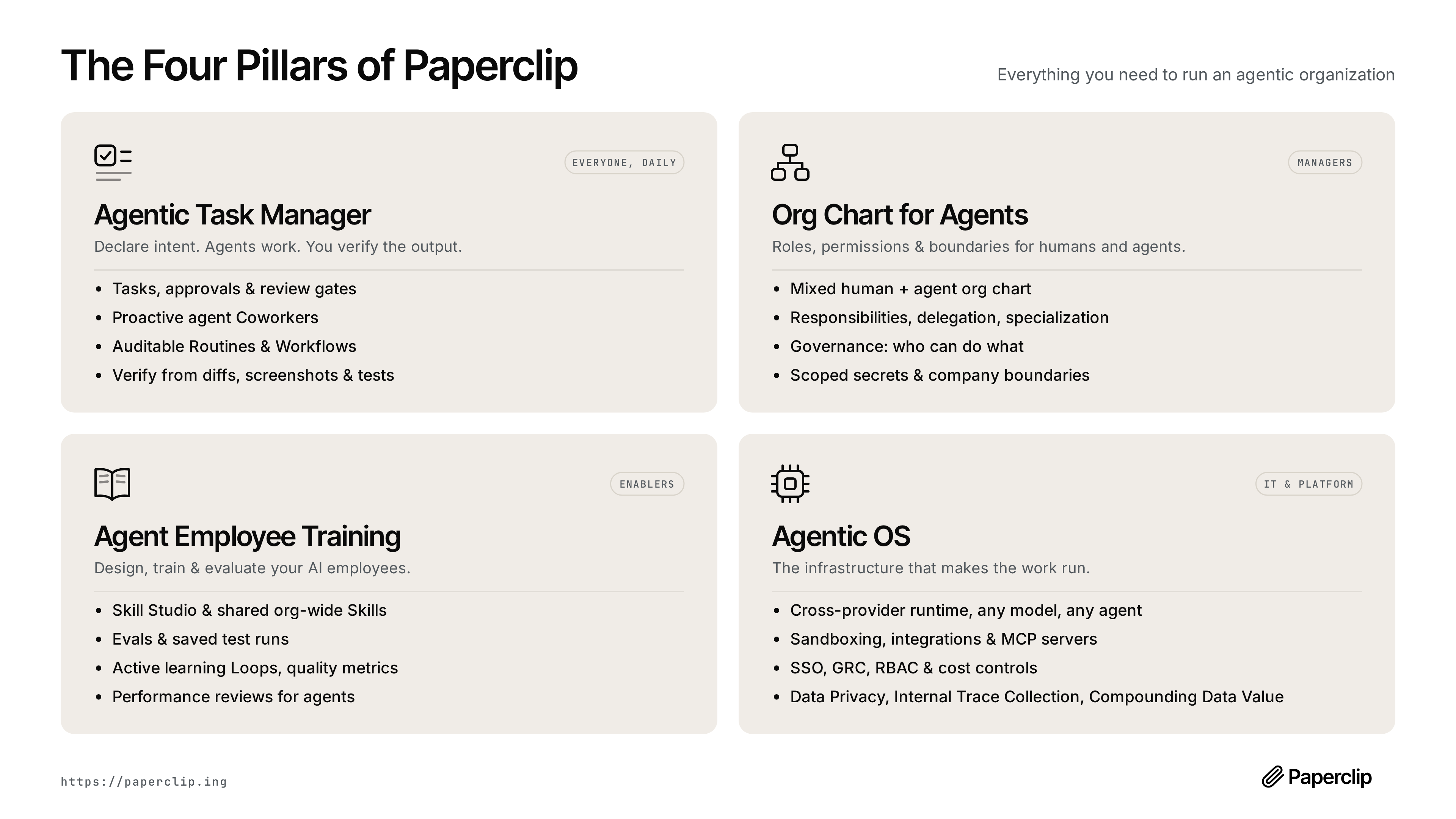
The Core Idea: Manage Agents Like Employees, Not Scripts
Paperclip's framing is explicit and a little unusual: agents get roles, titles, reporting lines, and budgets, the same as a human hire would. Tasks aren't fire-and-forget prompts — they're tickets that carry the full chain of why a task exists, tracing back through a project to a company goal, so an agent picking up work three levels deep in a hierarchy still has the context for what it's actually for. Recurring work runs on heartbeats: agents wake on a schedule, check for work, act, and go back to sleep, rather than needing a human to remember to kick off the weekly report or the daily support triage.

The project organizes itself around four things it argues have to work for a group of agents to actually be productive together:
| Pillar | Covers |
|---|---|
| Agentic Task Manager | Tickets, approvals and review gates, auditable routines, verification from diffs/screenshots/tests |
| Org Chart for Agents | Roles, delegation, specialization, governance over who can do what, scoped secrets |
| Agent Employee Training | A skill library shared org-wide, evals, saved test runs, performance tracking |
| Agentic OS | The runtime underneath — any model, any agent, sandboxing, integrations, SSO/RBAC, cost controls |
What Actually Makes This Different From a Task Board
A handful of design decisions in the README are worth calling out specifically, because they're the parts that separate this from "Trello with an AI label" or a thin wrapper around an existing framework:
- Atomic task checkout and budget enforcement. Two agents can't grab the same ticket, and a budget hard-stop can't be raced past — both are enforced atomically, which matters once you have enough concurrent agents that races become a real, regular occurrence rather than a theoretical one.
- Persistent state across heartbeats. An agent resumes the same task context on its next wake-up rather than starting cold every time, which is the difference between a genuinely long-running worker and a stateless script that happens to run on a timer.
- Cost control as a first-class feature, not a dashboard. Budgets are scoped per company, agent, project, and even individual issue, with hard stops that pause an agent and cancel its queued work automatically when it runs out — a direct answer to the specific, common failure mode of a runaway agent loop burning through a token budget overnight.
- Bring-your-own-agent, not a walled garden. Claude Code, Codex, CLI agents, and HTTP/webhook bots all plug in through adapters — the stated bar is "if it can receive a heartbeat, it's hired." Paperclip explicitly doesn't tell you how to build an agent; it manages the organization the agents you already have work inside of.
- True multi-company isolation. Every entity in the system is scoped to a company, so one deployment can run multiple separate organizations — with genuinely separate data and audit trails — rather than one flat workspace.

What It Deliberately Doesn't Do
The README is unusually direct about scope, which is worth taking at face value: it explicitly says it's not a chatbot, not an agent framework, not a workflow builder, not a prompt manager, and not a code review tool. Its own honest self-assessment on fit is blunt too — if you're running one agent, you probably don't need this; the value shows up once you're coordinating enough agents that keeping track of them by hand has become the actual bottleneck.
That scoping matters for evaluation. Paperclip assumes you already have agents and frameworks you like — it isn't competing with Claude Code, Codex, or Cursor, it's the management layer that sits above all of them at once.
Benefits of Paperclip
Once several agents run against real work, the gains from a control plane are mostly about knowing what is happening and keeping it within limits.
Spending That Stops Before It Surprises You
Budgets scoped to company, agent, project, and issue, with hard stops that pause the agent and cancel queued work, turn cost control from a report into an enforcement mechanism. A loop that would otherwise burn tokens all night stops at the limit you set. Finance gets predictable spend, and engineers get a clear signal when an agent behaves unexpectedly, rather than discovering it on the next invoice.
No Duplicate or Conflicting Work
Atomic task checkout means two agents can't pick up the same ticket. As the number of concurrent agents grows, races that were rare become routine, and without this guarantee teams waste spend on duplicated effort or end up with conflicting changes to the same code. Paperclip removes that whole category of coordination bug without teams building their own locking.
Context That Travels With the Work
Tickets carry the chain from task to project to company goal, and agents resume the same context on each heartbeat. An agent several levels down a hierarchy knows why its task exists, and long-running work continues where it left off instead of restarting cold. That improves the quality of agent decisions on work that spans days rather than minutes.
Accountability and Audit Trails
Approval gates, role-based governance, and recorded decisions answer the question that matters once agents have real access: which agent did what, and who allowed it. Security and compliance reviews get a record to examine instead of a reconstruction from terminal history, and teams can tighten or loosen agent permissions based on evidence. That evidence is what lets agents graduate to more responsible work.
Freedom to Keep Your Existing Agents
Because agents plug in through adapters, teams can keep Claude Code, Codex, CLI tools, and webhook bots they already rely on. Paperclip adds management without forcing a rewrite or a switch to a new framework, and new agent tools can be added as they appear. Adopting a better agent later becomes an adapter change rather than a migration.
Paperclip Use Cases
These are the situations Paperclip's design targets, based on the project's stated scope and shipped features.
Coordinating a Fleet of Coding Agents
An engineering team runs several coding agents against a backlog, each in its own terminal. Work overlaps, nobody can say which agent touched which change, and spend is hard to attribute. Bringing the agents under Paperclip assigns each ticket to exactly one agent, ties it to a project, and routes changes through review gates verified by diffs or test results. The team gains a single view of who is doing what and what it costs.
Scheduled Operational Work
Recurring jobs such as daily support triage, weekly reporting, or routine maintenance are easy to forget when they depend on someone starting them. Heartbeats wake the responsible agent on schedule, it checks for work, acts within its budget, and records what it did. Persistent state means each run builds on the last. The recurring work happens reliably without a human remembering to trigger it. Budgets keep each scheduled run from growing unexpectedly expensive.
Agencies and Consultancies Running Several Clients
A firm using agents for multiple clients needs strict separation of data, secrets, and spend. Paperclip's company-level isolation lets one deployment host separate organisations with their own audit trails and budgets. Client work stays partitioned, and costs can be reported per client without manual bookkeeping.
Governed Access to Sensitive Systems
When agents need credentials for production systems, ticket trackers, or customer data, security teams want scoped access and approvals. Scoped secrets and approval workflows let a team grant each agent only what its role requires and require sign-off for risky actions. Agents can take on more responsible work without blanket credentials. Approval history also shows reviewers which actions are routinely approved and could be delegated safely.
Building Up an Organisation-Wide Skill Library
Teams that develop prompts, tools, and evaluations for their agents can share them through Paperclip's skills manager rather than copying files between projects. New agents start with proven capabilities, and saved test runs show whether changes improve performance. Shared skills also make agent behaviour more consistent across teams.
Paperclip vs. Agent Frameworks and Workflow Builders
Because Paperclip touches agents, tasks, and automation, it's easy to lump it in with tools that solve different problems. The comparison below uses the project's own stated scope.
| Question | Paperclip | Agent framework | Workflow builder (Zapier, n8n) |
|---|---|---|---|
| What it manages | An organization of agents: roles, goals, budgets, approvals | How a single agent reasons, calls tools, and responds | Step-by-step pipelines triggered by events |
| Who builds the agent | You bring existing agents through adapters | The framework is how you build it | No agent required; steps are predefined |
| Unit of work | A ticket tied back to a project and company goal | A prompt, run, or conversation | A trigger plus a fixed sequence of actions |
| Cost control | Budgets per company, agent, project, and issue with hard stops | Usually left to you or the model provider | Usually metered by tasks or executions, not token budgets |
| Recurring work | Heartbeats wake agents on a schedule with persistent state | Depends on how you host it | Scheduled triggers; state passed explicitly between steps |
| Best fit | Several agents doing ongoing work that needs governance | Building one capable agent | Deterministic automations with known steps |
The practical takeaway is that these layers stack rather than compete. You might build an agent with a framework, run it as a coding agent, use a workflow tool for deterministic glue, and use Paperclip to decide which agent owns which ticket and how much it's allowed to spend. If your work is mostly fixed sequences, our comparison of AI agents vs. Zapier covers when an agent is overkill. If you're choosing between orchestration options more broadly, see our overview of AI agent orchestration platforms.

Running It
Paperclip is fully open source (MIT-licensed) and self-hosted — there's no hosted account required to run it, and the installer sets up an embedded PostgreSQL database automatically, so there's no separate database to stand up first. It ships in two access modes: a trusted local loopback mode for the fastest first run, and an authenticated mode (LAN or Tailscale-bound) for anything beyond a single machine. Given that it's explicitly built to hold agent secrets, budgets, and cross-system access, that mode choice is worth making deliberately rather than defaulting into whatever the quickstart picks — the authenticated path is the one to use for anything beyond a solo local experiment.
The actual quickstart is a shell script fetched with curl, checked against a published SHA-256 checksum, and run — it installs a managed CLI under ~/.paperclip/cli, checks for Node.js 20 or newer, and can register itself as a background service on supported Linux and macOS systems. A non-interactive path (--no-prompt --no-onboard, followed by onboard --yes) exists for scripted setups, and there's an npx-based path for trying it without installing anything permanently. By default the onboarding flow now picks trusted local loopback mode for speed; passing --bind lan or --bind tailnet explicitly switches to authenticated mode at setup time instead of after the fact. For anyone who'd rather run it from source directly, git clone, pnpm install, and pnpm dev starts the API server on localhost:3100 with the same automatic embedded-Postgres behavior — that path requires Node.js 20+ and pnpm 9.15+.
What's Actually Shipped vs. Still Coming
The project's own roadmap is a useful reality check on how much of the "org chart for agents" pitch is already built versus aspirational. Already shipped, by the roadmap's own accounting: the plugin system, OpenClaw-style agent employees, full company import/export, a Skills Manager and Skill Studio, scheduled routines, budgeting, agent review and approval workflows, multi-human-user support, cloud and sandboxed agent execution across several providers, deep planning with revisioned plans, an MCP tool gateway, and a scoped secrets manager. Still open, and worth knowing about before assuming they exist: a dedicated memory/knowledge layer, work queues, automatic organizational learning, a desktop app, bring-your-own-ticket-system support for teams that want to keep using Asana, Linear, or Jira instead of Paperclip's own tracker, and one-click Connected Apps (currently shipping gated behind an experimental settings flag). That last item — Connections v3 — is under active development in recent releases, laying groundwork for governed, scoped API access to third-party services rather than raw secret injection.
Common Paperclip Adoption Mistakes
Paperclip solves a coordination problem, which means most mistakes come from misjudging that problem or the controls around it.
Adopting It for a Single Agent
The project itself says one agent probably doesn't need it. Teams that install a control plane for one coding agent add setup, upgrades, and a second ticket system without gaining much. A provider-side spending limit and a config file cover that case. Wait until coordinating several agents has become a real bottleneck.
Leaving It in Loopback Mode as Usage Grows
The quickstart defaults to trusted local loopback mode for speed. That is fine for a solo experiment, but a deployment holding agent secrets and budgets that other people or machines reach should run in authenticated mode. Teams that grow out of the experiment without switching end up with a sensitive system protected only by its network position.
Treating Budgets as Reporting Rather Than Control
Budgets in Paperclip can pause agents and cancel queued work. Teams that set generous limits everywhere, or skip issue-level budgets, keep the dashboard but lose the protection against a runaway loop. Set limits that reflect what each task should reasonably cost and treat a hard stop as a signal to investigate.
Assuming Roadmap Features Already Exist
A memory layer, work queues, external tracker sync, and a desktop app are on the roadmap, not shipped. Teams that plan around them, for example expecting Jira tickets to sync, discover gaps after rollout. Check the current release notes against your requirements before committing.
Forcing a Pipeline Into an Org Chart
Paperclip models work as roles, delegation, and tickets. If your automation is really a fixed sequence of known steps, a workflow builder is simpler and more predictable. Bending a deterministic pipeline into an organisational hierarchy adds complexity without adding value.
Paperclip Best Practices
- If you're already past the "folder of scripts" stage, running several agents against real, ongoing work, this addresses a genuine operational gap — coordination, budget enforcement, and audit trails are the unglamorous engineering that a growing agent fleet needs and that most teams end up half-building themselves.
- The governance model is the part worth taking most seriously before adoption. Approval gates, budget hard-stops, and scoped secrets are exactly the controls a security review would ask for anyway when agents get real system access — evaluate them as you would any system that's about to hold credentials and make autonomous decisions, not as a convenience feature.
- It's still an early, fast-moving project. It was created in 2026 and is shipping detailed, frequent releases with real migrations and a genuine multi-contributor team behind it — a sign of active development, but also a reason to expect breaking changes and rough edges more often than a mature, stable platform would have.
- The "org chart" metaphor is a real design commitment, not just marketing. If your mental model for running agents is closer to a pipeline or DAG than a company hierarchy, the fit may be less natural than for a team that's already thinking in terms of roles and delegation.
- Use authenticated mode for anything beyond one machine. Pass
--bind lanor--bind tailnetat setup rather than switching after agents and secrets are already configured in loopback mode. - Set budgets at every scope before agents run unattended. Configure company, agent, project, and issue budgets with warning thresholds and hard stops, then deliberately trigger a stop in testing to confirm queued work is cancelled as expected.
- Put approval gates on irreversible actions. Require human sign-off for merges, deployments, external messages, and anything touching production data, and loosen gates only once an agent's track record justifies it.
- Scope secrets per agent. Give each agent only the credentials its role needs through the secrets manager, so a misbehaving agent can't reach systems outside its remit.
- Pin versions and read release notes before upgrading. Frequent releases with real migrations mean upgrades deserve a backup and a test run against a copy of your data first.
Practical Takeaway
Paperclip is a bet that the interesting problem in multi-agent systems has stopped being "how do I get one agent to do a task well" and started being "how do I run twenty of them without losing track of what they're doing and why" — and it's built entirely around that second problem rather than competing on the first. For a team that's already past the single-agent stage and starting to feel real coordination pain, it's worth evaluating on its own terms: try the local quickstart, look hard at the governance and budget controls specifically, and decide whether the org-chart model matches how your team actually wants to manage a growing fleet of autonomous coworkers.
Teams standing up multi-agent operations — and needing the governance, identity, and cost-control layer around them done right — can get hands-on architecture help from Woyce Technologies.
FAQ
What is Paperclip?
Paperclip is an open-source, self-hosted control plane for managing teams of AI agents — giving them roles, budgets, scheduled work via heartbeats, and an approval workflow, similar to how a company manages employees, rather than functioning as an agent-building framework itself. Think of it as the management layer above your agents: it tracks who owns which ticket, how much each agent may spend, and what needs human sign-off, while the agents themselves keep running on whatever model or tool you already use.
Is Paperclip free to use?
Yes, it's MIT-licensed and fully open source. It's self-hosted with no Paperclip account required, and an embedded database is created automatically on install. The software itself costs nothing, but you still pay for what runs underneath it: model and API usage for each agent, plus whatever server or machine hosts it. Its per-agent budgets are designed to keep that second cost predictable.
Does Paperclip replace Claude Code, Codex, or other coding agents?
No — Paperclip is explicitly designed to sit above whatever agents you're already using. It connects to Claude Code, Codex, CLI agents, and HTTP/webhook bots through adapters rather than replacing any of them. The project's own bar is that anything able to receive a heartbeat can be hired. Paperclip handles assignment, scheduling, budgets, and approvals, while the coding agent still does the actual work inside its own environment.
How does Paperclip control AI agent costs?
It tracks token and cost usage by company, agent, project, and even individual task, with scoped budget policies that include warning thresholds and hard stops — an agent that exceeds its budget is automatically paused and its queued work cancelled. That hard stop is the key difference from a cost dashboard: a runaway loop can't keep burning tokens overnight while nobody is watching.
Do I need Paperclip if I only run one AI agent?
Probably not, by the project's own assessment. Its value is coordination overhead that shows up once you're running several agents at once — task tracking, delegation, and governance across a growing fleet, not the experience of running a single agent. With one agent, a terminal, a config file, and a provider-side spending limit usually cover the same ground with far less setup.
Is Paperclip a workflow automation tool like Zapier or n8n?
No. Paperclip explicitly avoids the drag-and-drop pipeline model — it manages an organizational structure of roles, goals, and budgets for agents rather than defining step-by-step automation workflows. If your process is a fixed sequence of known steps, such as moving form data into a spreadsheet, a workflow builder is simpler and more predictable. Paperclip is aimed at open-ended work where agents decide how to complete a ticket within a budget and approval rules.
How do I install Paperclip?
The documented path is a shell script fetched with curl, verified against a published SHA-256 checksum, and run — it checks for Node.js 20+, installs a managed CLI, and can register itself as a background service. There's also a manual path (git clone plus pnpm install and pnpm dev) for running it directly from source, and an npx-based path for trying it without a permanent install.
Does Paperclip support bring-your-own issue tracker, like Linear or Jira?
Not yet — it's on the public roadmap but not shipped. Today, tasks live in Paperclip's own ticket system rather than syncing to an external tracker. Teams that rely on Asana, Linear, or Jira for human work would currently run two systems side by side, so check the roadmap and recent releases before assuming the integration exists.
Does Paperclip collect telemetry data?
Yes, anonymous usage telemetry is enabled by default to help the team understand product usage — the project states it never collects personal information, issue content, prompts, file paths, or secrets, and private repository references are hashed with a per-install salt. It can be disabled via an environment variable, a config setting, or the DO_NOT_TRACK=1 convention, and is automatically off in CI environments.
Does Paperclip integrate with observability tooling?
Yes — it ships with opt-in OpenTelemetry auto-instrumentation for server-side traces, activated by setting the standard OTEL_EXPORTER_OTLP_ENDPOINT environment variable, with the OpenTelemetry packages themselves as optional dependencies installed only if tracing is wanted. That means agent activity can show up in the same tracing backend you already use for your services, which helps when debugging slow heartbeats or tracing which request triggered an expensive run.
Conclusion
The problem Paperclip tackles isn't making a single agent smarter. It's what happens when several agents run against real work at once: duplicated tasks, lost context, unclear approvals, and token bills that spike because one loop never stopped. Its answer is to treat agents like staff, with roles, reporting lines, tickets tied to goals, heartbeats for recurring work, and budgets that pause an agent instead of just reporting on it.
The design choices that matter most are the unglamorous ones: atomic task checkout, hard budget stops, persistent state between heartbeats, and company-level isolation. Those are the controls a security or finance review would ask for anyway. The caveats are just as clear. It's a young, fast-moving project, some roadmap items like external tracker sync and a memory layer aren't shipped, and the org-chart model suits teams that already think in roles more than ones that think in pipelines.
If you're running one agent, you can skip it for now. If you're coordinating several, try the local quickstart, switch to authenticated mode before going beyond one machine, and test the budget and approval controls against a realistic workload. For help designing the governance and cost controls around a growing agent fleet, explore our AI agent development services.