

Palantir built a business around fusing disparate intelligence feeds into one situational picture for governments and enterprises willing to pay for it. World Monitor is an open-source attempt at a similar idea aimed at anyone with a browser: it pulls together news, flight data, shipping, market signals, conflict reporting, and infrastructure alerts into a single live map and dashboard, with AI doing the work of turning hundreds of raw feeds into something a person can actually scan.
The problem it addresses is familiar to analysts, journalists, and risk teams: the signal that matters is scattered across news wires, flight trackers, shipping data, and market tickers, and nobody has time to watch all of them. Commercial platforms that fuse those streams are priced for governments and large enterprises. This explainer walks through what World Monitor aggregates, how its local-first AI pipeline and architecture work, how it exposes data to AI agents, what its AGPL licensing allows, how it compares to commercial intelligence platforms, and how to get a working instance running.
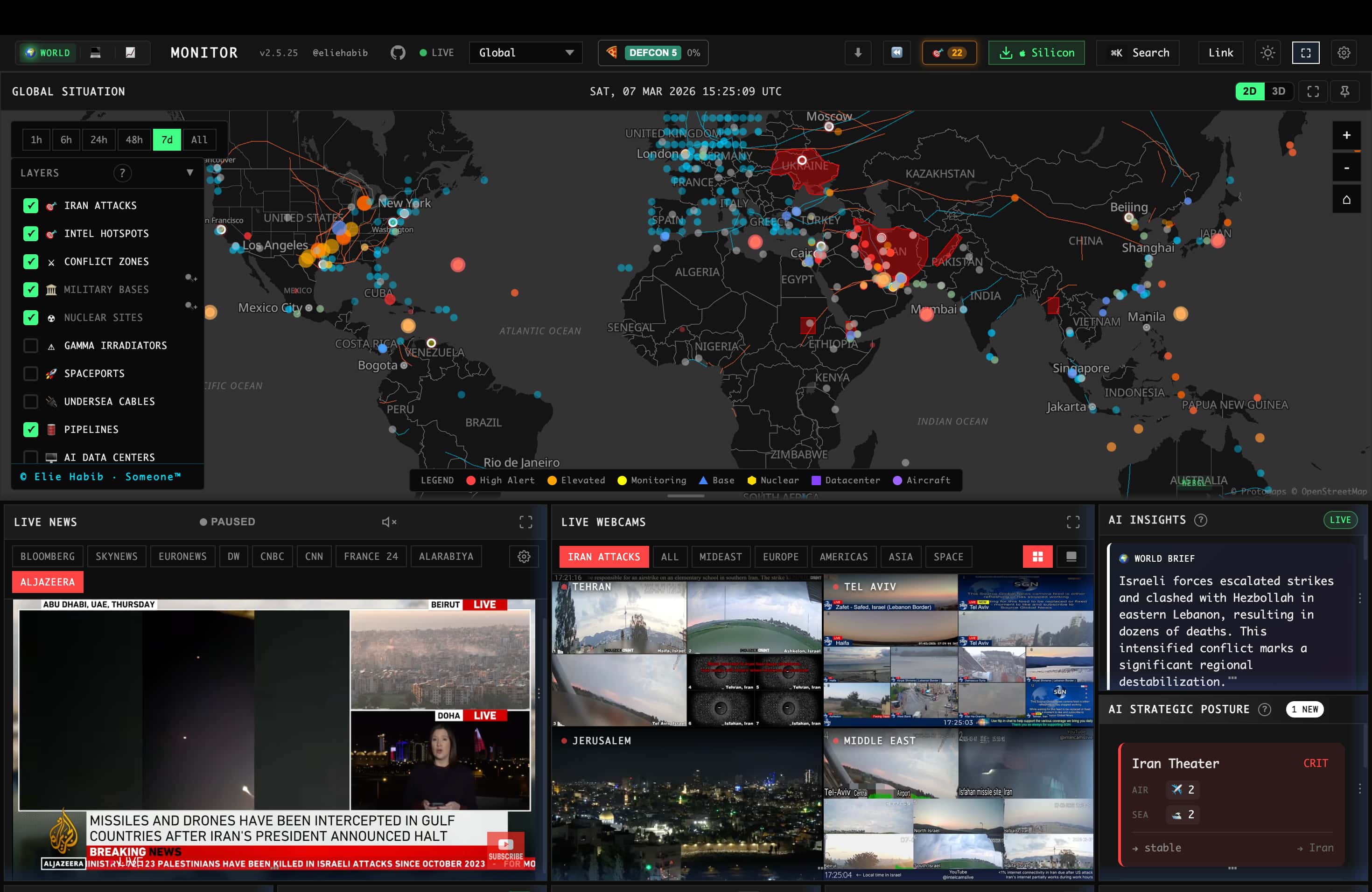
What It Actually Aggregates
The scale of what's being pulled together is the headline feature: 500+ curated news feeds across 15 categories, synthesized by AI into readable briefs rather than left as a raw firehose. On top of the news layer sits a dual map engine — a 3D globe and a WebGL flat map — carrying 56 distinct layer types, from aviation delays and GPS jamming zones to military basing and live webcam feeds. A Country Instability Index scores 31 tier-one countries using a server-authoritative model that correlates military, economic, disaster, and escalation signals against each other, rather than surfacing each feed as an isolated, uncorrelated alert.
There's a finance layer running alongside the geopolitical one — 29 stock exchanges, commodities, and crypto tracked through a seven-signal composite — which is a deliberate design choice: geopolitical events and market movement are causally linked often enough that treating them as separate dashboards misses the connection a real analyst would draw between them.
Local AI Is a First-Class Option, Not an Afterthought
The detail worth highlighting for anyone evaluating this seriously: World Monitor explicitly supports running its AI classification and summarization entirely through Ollama, with no API keys required. For a tool whose whole purpose is processing sensitive geopolitical and financial monitoring data, having a fully local inference path — rather than every classification call round-tripping to a third-party API — is a real architectural commitment, not a checkbox feature. Groq and OpenRouter are supported as hosted alternatives for teams that want faster inference and don't mind sending traffic externally.
How It's Actually Built
This isn't a thin wrapper around an RSS reader. The tech stack backing it is a full, deliberately engineered system: a Vanilla TypeScript and Vite frontend rendering the globe through Three.js and the flat map through deck.gl and MapLibre GL, a Tauri 2 (Rust) desktop shell wrapping a Node.js sidecar for native macOS/Windows/Linux builds, and an API layer described by nearly 300 Protocol Buffer definitions across three dozen services. Beyond the Ollama/Groq/OpenRouter classification path, browser-side inference runs through Transformers.js directly in the client for tasks that don't need a full model round-trip. Caching runs through Redis with a three-tier strategy backed by CDN and service-worker layers — necessary infrastructure once you're aggregating from hundreds of upstream sources without hammering any of them or serving stale data during a fast-moving event. Flight data specifically comes from Wingbits, an ADS-B data provider credited directly in the README rather than left unattributed.
Six separate site variants — general world monitoring, tech, finance, commodities, and two others — ship from the same codebase and the same desktop binary, switchable in-app rather than requiring separate installs. That's a meaningfully different maintenance model than running six forks, and it shows in how tightly scoped the release notes are to shared infrastructure fixes (caching, rate limiting, feed reliability) rather than variant-specific rewrites. The project also publishes a support-status table distinguishing what's actively maintained from what isn't: all six web variants and every desktop binary (Windows, macOS Apple Silicon, macOS Intel, Linux AppImage) are marked stable, built from the same release process, and triaged from a single shared issues backlog rather than per-variant queues.
Underneath the 500+ curated feeds sits a broader collection layer — the project describes tracking 531+ observed upstream hosts across geopolitics, finance, energy, climate, aviation, cyber, military, and infrastructure sources, monitored for freshness across 35 distinct source groups so a stale or dead feed gets flagged rather than silently going quiet. Coverage extends to 26 languages with native-language feeds and right-to-left text support, which matters for a tool whose whole premise is surfacing signal from regions where the primary sources aren't in English.

Built for Agents, Not Just Browsers
World Monitor exposes itself the way a modern developer tool is expected to: an MCP server for direct agent access, a REST API described by an OpenAPI spec, an official CLI (npx worldmonitor), and zero-dependency SDKs in Python, Ruby, and Go. It also publishes an llms.txt and an agent-skills manifest — machine-readable discovery files aimed specifically at AI agents that need to figure out what a service offers without a human reading the docs first. That's a genuinely forward-looking piece of infrastructure design: treating "an AI agent might be the client, not a person" as a first-class case rather than an afterthought bolted onto a human-facing product.

Security Disclosures Are Handled in the Open
For a tool whose desktop app bridges a Rust shell, a Node.js sidecar, and remote data relays, the trust boundary between those pieces is a real attack surface, and World Monitor's README addresses it directly rather than staying silent on it. The project credits a specific researcher, Cody Richard, with responsibly disclosing three distinct findings in 2026: IPC command exposure, a trust-boundary analysis of the renderer-to-sidecar interface, and a credential-injection issue in the app's fetch-patching architecture. Naming the specific researcher and the specific categories of finding, rather than a vague "we take security seriously" line, is a stronger signal than most self-hosted dashboards bother to provide — it means there's an actual disclosure process behind the security policy rather than one that's never been exercised.
Licensing Has More Nuance Than "Open Source"
The AGPL-3.0 license covers personal use, self-hosting, forking, and even commercial use or SaaS deployment — as long as you comply with AGPL's copyleft and source-availability obligations when you do. Where it gets more restrictive is private-source proprietary use or use of the project's official branding, both of which require a separate commercial or trademark permission the AGPL alone doesn't grant. A commercial license is available as an explicit alternative for teams that need non-AGPL terms, which is the practical escape hatch for anyone who wants to build a closed-source product on top of World Monitor rather than release their modifications.
Benefits of World Monitor
The project's value comes from pulling scattered public signals into one place and making that view available to both people and software.
One View Instead of a Dozen Tabs
Analysts tracking world events typically juggle news wires, flight trackers, shipping data, and market tickers in separate windows. World Monitor puts hundreds of feeds, dozens of map layers, and a finance layer into a single interface, with AI turning the raw stream into readable briefs. Less time goes into switching between sources and more into deciding what matters, which is the part of the work that actually needs a human.
Correlation, Not Just Collection
The Country Instability Index and cross-stream signal convergence highlight places where several kinds of signal move together: military, economic, disaster, and escalation indicators in the same country, or geopolitical news alongside market moves. That correlation is the work an experienced analyst would otherwise do by hand. It doesn't replace judgement, but it points attention at the combinations most worth a closer read.
Sensitive Monitoring Can Stay Local
With classification and summarisation running through Ollama, and some inference running in the browser, the content you monitor never has to leave your own hardware. For teams tracking sensitive regions, supply chains, or topics, that removes a significant exposure that comes with sending every request to a hosted model provider.
Ready for Agents and Integrations
An MCP server, REST API with an OpenAPI spec, CLI, and SDKs in three languages mean the data can feed other systems directly. An AI agent can check for disruptions near a shipping route mid-task, or an internal dashboard can pull relevant events, without scraping web pages. Discovery files such as llms.txt make it easier for agents to understand what the service offers.
No Licence Fee and Full Source Access
The AGPL licence allows self-hosting, modification, and even commercial use under its copyleft terms, and the full source is available to inspect. Teams can see exactly how data is collected and processed, adapt it to their needs, and avoid the enterprise contracts that commercial intelligence platforms usually require. Smaller teams can start the same day.
World Monitor Use Cases
These are the workflows the project's feature set suits best, based on what it aggregates and how it exposes data.
Newsroom and Research Monitoring
Journalists and researchers covering international affairs need to know quickly when something changes in a region they follow. World Monitor's native-language feeds across 26 languages surface local reporting that English-language coverage may miss or report later, and AI summaries make those feeds scannable. Reporters use the dashboard to spot developing stories early, then go to the primary sources to verify and report.
Supply Chain and Logistics Risk
Companies with suppliers, routes, or facilities in many countries need early warning of disruptions. Layers covering shipping, aviation delays, GPS jamming, conflict, and infrastructure alerts, combined with country-level instability scores, help risk teams spot events near their operations. Joining that output with an internal list of supplier locations through the API turns general awareness into specific alerts about the business's own exposure.
Market-Adjacent Analysis
Traders and analysts watching commodities, currencies, or regional equities benefit from seeing geopolitical events and market signals side by side. The finance layer tracks exchanges, commodities, and crypto alongside the geopolitical layers, so a market move can be checked against concurrent events. Analysts get context faster, though any trading decision still needs its own research and risk controls.
Context for AI Agents
Teams building agents that need live awareness of world events can connect them through the MCP server or SDKs. An agent planning travel, assessing a shipment, or drafting a briefing can query current conditions rather than relying on stale training data. Outputs should be treated as one input and validated before the agent acts on them.
Security and Situational Awareness Desks
Corporate security teams responsible for staff travel and facilities can use the map layers and briefs as a shared situational picture. Self-hosting with local inference keeps monitoring of sensitive locations in-house. Security staff can watch the regions where employees are travelling, check for disruptions near offices or events, and share one consistent view across the team rather than each person following different sources. Decisions still rest on verified reports and established travel-security procedures.
World Monitor vs Commercial Intelligence Platforms
It's tempting to frame World Monitor as a free Palantir, but the two categories solve different problems. The table below compares the open-source dashboard with the general class of enterprise intelligence platforms, not any single vendor.
| Factor | World Monitor | Enterprise intelligence platforms |
|---|---|---|
| Cost | Free under AGPL-3.0; commercial license available | Enterprise contracts, typically sold to governments and large firms |
| Data sources | Public feeds, ADS-B flight data, market data, curated news | Public sources plus proprietary, licensed, and internal organizational data |
| Deployment | Hosted web variants, desktop apps, or self-hosted | Vendor-managed or private-cloud deployments with integration services |
| AI processing | Local via Ollama, hosted via Groq or OpenRouter, some in-browser | Vendor-defined, usually integrated with the customer's own data stack |
| Customization | Full source access; fork and modify under AGPL terms | Configurable, but core platform code is closed |
| Support | Community issues backlog | Contracted support and service-level agreements |
The practical difference is the data. World Monitor fuses public signals very well, but an enterprise platform's main value is joining outside signals with an organization's own records: supplier lists, asset locations, internal incident reports. If you need that join, World Monitor's API and MCP server are a starting point you'd build on, not a finished replacement. If public-source situational awareness is the goal, the open-source tool covers a lot of ground for no license fee.
Common World Monitor Mistakes
The dashboard makes a huge volume of information look orderly, which is exactly why it is easy to misuse. These are the mistakes most likely to cause problems.
Treating the Instability Score as a Forecast
The Country Instability Index correlates signals into a single number, and a single number invites people to treat it as a prediction or an authoritative risk rating. It is neither. A rising score says several feeds are moving together and deserve a closer look; it doesn't say what will happen next. Teams that act on the score alone, without reading the underlying reports, risk overreacting to noise or missing context the model can't capture.
Trusting AI Summaries Without Checking Sources
AI-generated briefs make hundreds of feeds scannable, but summarisation can drop nuance, merge separate events, or misattribute details, especially with smaller local models. For journalism, risk decisions, or anything published, the summary should lead you to the original reports rather than replace them. Spot-check summaries against sources regularly to understand how reliable your chosen model is.
Sending Sensitive Monitoring to Hosted Inference by Default
Groq and OpenRouter are convenient and fast, so teams sometimes enable them without thinking about what the classification requests reveal. If the topics, regions, or watchlists you monitor are sensitive, routing them to a third-party API exposes your interests. Use the local Ollama path for that work and reserve hosted inference for non-sensitive monitoring.
Ignoring the AGPL Until a Product Ships
Developers who fork the code and build a modified service for others, assuming permissive terms, can find themselves with source-disclosure obligations they didn't plan for. Read the AGPL terms, and consider the commercial license, before building anything you intend to distribute or offer as a network service.
Expecting It to Know Your Organisation
World Monitor fuses public signals. It doesn't know your suppliers, facilities, or assets unless you connect it to that data yourself. Teams expecting enterprise-platform answers out of the box end up disappointed. Use the API or MCP server to join its output with your own records.
World Monitor Best Practices
- For research, journalism, or analyst workflows, the value is in the correlation layer — the Country Instability Index and cross-stream signal convergence do work that would otherwise mean manually cross-referencing a dozen separate feeds and dashboards.
- The local-AI path is the right default for anything sensitive. Running classification through Ollama keeps the content you're monitoring off third-party infrastructure entirely — worth using deliberately rather than defaulting to a hosted inference provider out of convenience.
- Self-hosting is straightforward and well-documented — a plain
git cloneandnpm installgets a working local instance with no environment variables required for the base app, with a documented path to Vercel, Docker, or static deployment for anything beyond local use. - This is under an AGPL v3 license, which matters if you're planning to build on top of it and redistribute a modified version — read the copyleft terms before assuming MIT-style permissiveness for anything beyond running it as-is.
- Verify before acting on any score or summary. Treat the Country Instability Index and AI-generated briefs as prompts to read the underlying sources, and confirm important events through at least one primary report before they feed a decision, a story, or an automated agent action.
- Start from the hosted variant closest to your use case. Spend a few days checking whether the feeds, regions, and map layers you need are actually covered before investing time in self-hosting or integration work.
- Watch feed freshness for the sources you rely on. The project flags stale or dead feeds; check those signals for the regions and topics that matter to you, and add or replace sources where coverage is thin.
- Review the desktop app's trust boundaries before sensitive use. The disclosed findings around IPC and the sidecar show where to look; keep the app updated and limit which credentials you configure on machines handling sensitive work.
How to Get Started With World Monitor
A low-risk way to evaluate the project, moving from zero setup to a fully local install:
Step 1 – Try a hosted variant
Start with the public web variants listed in the project README. Pick the one closest to your use case, such as the finance or general world view, and spend a few days checking whether the feeds and map layers you care about are actually covered.
Step 2 – Run it locally
Clone the repository and install dependencies with npm. The base app runs without environment variables, so you can confirm it works on your machine before configuring anything else. Add API credentials only for the extra data sources you actually need.
Step 3 – Switch AI classification to Ollama
If the content you monitor is sensitive, point classification and summarization at a local Ollama model instead of a hosted provider. Expect a speed trade-off on modest hardware, and test whether a smaller local model's summaries are good enough for your workflow.
Step 4 – Connect it to your own tools
Use the REST API, CLI, SDKs, or the MCP server to pull World Monitor data into your own agents or dashboards. Read the AGPL terms before shipping anything modified to other users.

Practical Takeaway
World Monitor is a serious attempt at open-sourcing the "fuse everything into one situational picture" category that's normally the domain of expensive enterprise intelligence platforms — real map engineering, a genuine correlation/scoring layer, a local-inference option, and agent-native access via MCP and published SDKs, not just a news aggregator with a map skin on it. For anyone doing OSINT, market-adjacent risk monitoring, or building an agent that needs live world-event context, it's worth trying the hosted variants first and evaluating self-hosting once the specific data sources and correlation logic prove useful for your actual workflow.
Teams building monitoring dashboards, real-time data architectures, or agent-accessible intelligence tooling can get hands-on help from Woyce Technologies.
FAQ
What is World Monitor?
World Monitor is an open-source, real-time situational-awareness dashboard that aggregates news, flight, shipping, market, and infrastructure data from 500+ sources into a live map and briefing interface, using AI to classify and summarize what it collects. It's aimed at analysts, journalists, researchers, and risk teams who want a single live view of world events without paying for an enterprise intelligence platform. It runs as hosted web variants, as a desktop app, or as a self-hosted instance you control.
Can World Monitor run without sending data to a third-party AI provider?
Yes — it supports running its AI classification and summarization entirely through a local Ollama instance, with no API keys required, as an alternative to hosted providers like Groq or OpenRouter. That matters if you're monitoring sensitive topics or simply don't want every classification request leaving your network. The trade-off is speed and summary quality, which depend on the local model you choose and the hardware you run it on, so it's worth testing a few models before settling on one.
Is World Monitor free and self-hostable?
Yes, it's open source under AGPL v3. It can be self-hosted with a straightforward git clone and npm install, and the base app runs with no required environment variables — additional data sources may need their own API credentials. The software itself has no license fee, but self-hosting still has costs: a machine or server to run it, any paid upstream data you add, and, if you use hosted inference, API usage. Running inference locally through Ollama removes that last cost at the price of needing capable hardware.
Does World Monitor support AI agents directly?
Yes — it exposes an MCP server, a REST API with an OpenAPI spec, an official CLI, and SDKs in Python, Ruby, and Go, plus machine-readable discovery files (llms.txt, an agent-skills manifest) aimed specifically at AI agent clients. In practice, that means an agent can query live world-event context during a task, for example checking for disruptions near a shipping route or market-moving news, without scraping web pages. Teams should still treat the output as one input and validate anything an agent acts on.
What is the Country Instability Index?
It's a server-authoritative scoring model covering 31 tier-one countries that correlates military, economic, disaster, and escalation signals into a single stress score, rather than surfacing each data feed as an isolated alert. The point is correlation: a single protest report or currency move may mean little, but several signals moving together in one country are more meaningful. Treat the score as a prompt for closer reading of the underlying sources, not as a forecast or an authoritative risk rating.
Is World Monitor only a desktop app or also available as a website?
Both — it ships as hosted web variants (world, tech, finance, commodity, and others) and as a native desktop app for macOS, Windows, and Linux built with Tauri, all from a single shared codebase. The desktop app wraps the same interface in a Tauri shell with a Node.js sidecar, so features and fixes generally land on both at once. Starting with the hosted web variant is the quickest way to evaluate it; the desktop and self-hosted options make more sense once you know it fits your workflow.
How many languages does World Monitor support?
26 languages, with native-language feeds and right-to-left text support rather than only translated UI strings over English-language sources. That distinction is important for monitoring work. Local-language reporting often surfaces events earlier and in more detail than English-language coverage, so native feeds give a more complete picture of regions where English sources are thin. AI summarization then makes those feeds scannable for readers who don't speak every language.
Has World Monitor had any independent security review?
The README credits a named researcher, Cody Richard, with responsibly disclosing three security findings in 2026 covering IPC command exposure, renderer-to-sidecar trust boundaries, and a fetch-patch credential-injection issue — all handled through the project's published security policy. A credited disclosure history is a positive signal that a working reporting process exists, but it isn't the same as a formal third-party audit. Teams deploying it in sensitive environments should do their own review, especially of the desktop app's IPC and sidecar boundaries and of any credentials they configure.
Can I use World Monitor's code in a closed-source commercial product?
Not under the default AGPL-3.0 license, which requires sharing source for modifications and covers commercial/SaaS use only under its copyleft terms. A separate commercial license is available for teams that need non-AGPL terms, including private-source proprietary use. If you only run it internally without distributing it or offering it as a network service to others, AGPL obligations are lighter, but the specifics depend on how you deploy it. For anything commercial, read the license carefully and get legal advice rather than assuming MIT-style permissions.
Does World Monitor run any AI inference in the browser itself?
Yes — alongside the Ollama/Groq/OpenRouter path for classification and summarization, it uses Transformers.js to run some inference client-side rather than round-tripping every task to a model provider. Running lightweight models in the browser reduces latency and server load for small tasks and keeps that processing on the user's device. Heavier classification and summarization still go through the configured Ollama, Groq, or OpenRouter path, so browser inference complements rather than replaces the main AI pipeline.
Conclusion
Keeping track of fast-moving world events usually means juggling a dozen tabs or paying for an enterprise intelligence platform. World Monitor offers a third option: an open-source dashboard that fuses public news, flight, shipping, and market data onto one map, with AI classification you can run entirely on your own hardware.
Its strengths are real engineering choices rather than surface polish: a correlation layer in the Country Instability Index, a local-first inference path through Ollama, agent-native access via MCP and SDKs, and an open security disclosure record. The caveats are just as concrete. It works with public signals, not your organization's internal data. The AGPL license carries obligations that matter the moment you modify and distribute it. And any AI-generated summary or instability score is a starting point for analysis, not a conclusion to act on blindly.
The sensible path is to evaluate a hosted variant first, then self-host with local inference once you've confirmed the sources cover what you need. If you want to plug that kind of live event data into your own dashboards or agents, our real-time systems team can help you design the pipeline.