

Ask any coding agent for a landing page and there's a good chance you'll get the same page back, regardless of what the brief actually asked for: a centered hero, a rounded-card feature grid, a gradient blob in the corner, the same handful of fonts. Hallmark, built by Together AI, is a Claude Code, Cursor, and Codex skill built specifically to break that pattern — not by tweaking colors on the same template, but by refusing the "on-distribution defaults every LLM was trained into" and picking a genuinely different structure for every brief.
That matters if you ship front-end work with AI help. Generic output costs you twice: once when the page looks like every other AI-built site, and again when a designer has to unpick the defaults by hand. This explainer covers how Hallmark's 57-gate slop test works, the four verbs it exposes, what happens when no theme fits, how to install it across tools, how it compares to Diagram Design, a simple way to trial it on a real project, and the caveats worth weighing before you rely on it.
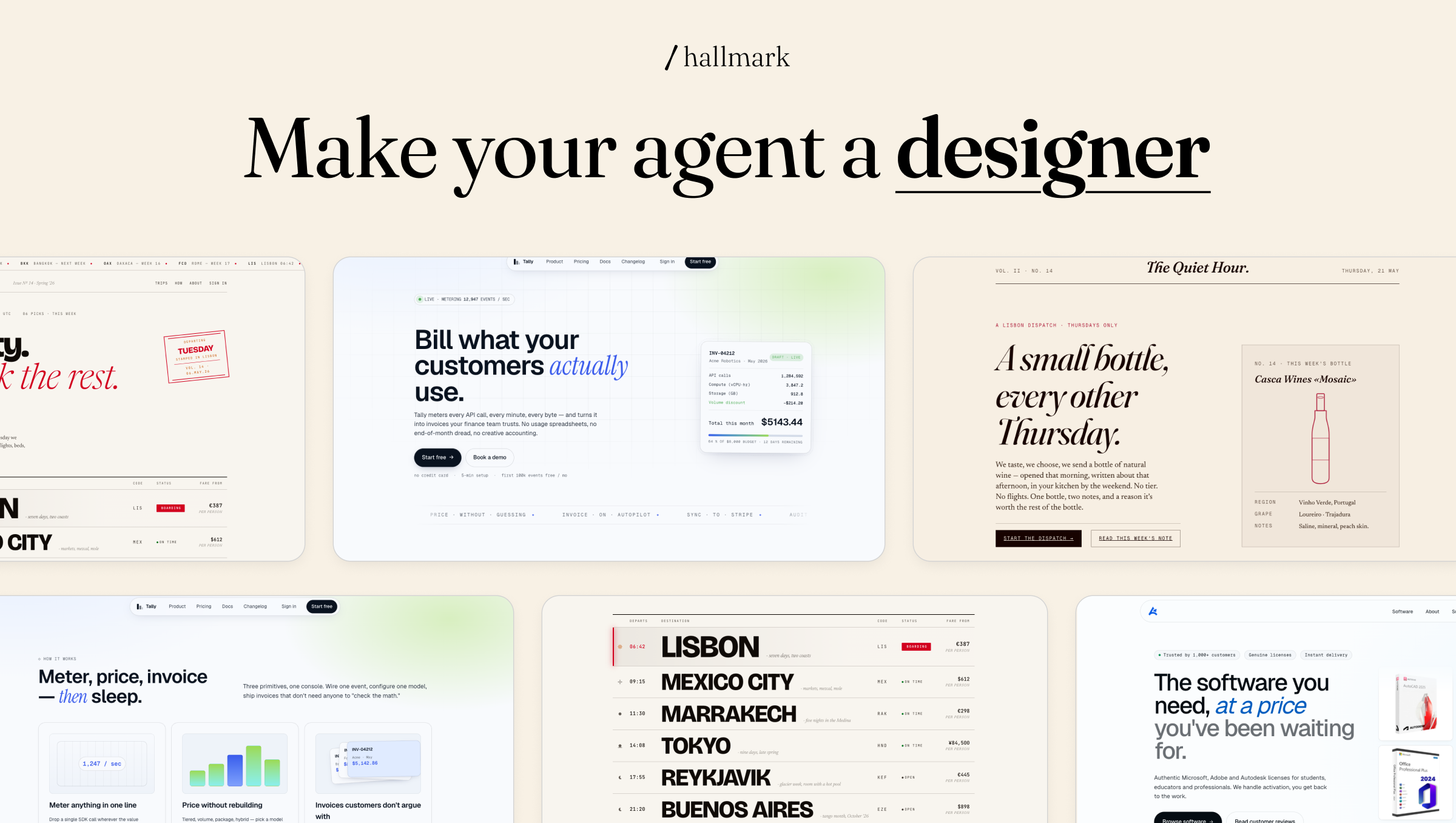
The Actual Mechanism: 57 Gates and a Self-Critique
The core claim is specific and testable, not just marketing language: Hallmark picks a macrostructure for the brief, applies one of twenty-one themes, runs it through 57 slop-test gates, and does a pre-emit self-critique before handing the result back. That's a meaningfully different design than a style guide alone — a set of rules an LLM might follow loosely — because it's a checklist the output has to actually pass before it ships. The stated goal, that two pages generated from two different briefs should "feel like different sites, not colour-swaps of the same template," is the bar the whole system is built around clearing.

Four Ways to Use It
Hallmark isn't just a generator — it exposes four distinct verbs that cover the full lifecycle of a design, not just the initial build:
| Verb | What it does |
|---|---|
| (default) | Builds new UI — picks a macrostructure, applies the rule-set, runs the slop test before returning it |
hallmark audit <target> | Scores existing code against the anti-patterns and returns a punch list, without making edits |
hallmark redesign <target> | Keeps the copy, information architecture, and brand, but rebuilds the structure with a different fingerprint |
hallmark study <screenshot | URL> | Extracts the "DNA" — macrostructure, type-pairing, color anchor — from a design you admire, and can emit a portable design.md for other tools |
The study verb is worth calling out specifically: it's explicit about refusing to produce pixel-clones or reproduce paid templates, extracting structural principles rather than copying the actual design — a meaningful ethical line for a tool whose whole premise is learning from existing designs.
What Makes the Variation Real, Not Cosmetic
The example gallery in the README backs up the "different sites, not colour-swaps" claim with output that spans genuinely different structural approaches — a sourdough app, a content-extraction API, a record label, a travel booking product, and a Moroccan fashion brand all come out with visibly different macrostructures and type systems, not the same skeleton in different colors. Each generated page ships as self-contained HTML and CSS, with its macrostructure stamped directly in a CSS comment — a small detail that makes the system's own output auditable after the fact.
When No Catalog Theme Fits: The Custom Branch
Every one of Hallmark's themes is still, by definition, a preset — a named starting point the skill dresses a macrostructure in. The Custom mode exists for the briefs that resist that entirely: when a brief's creative intent doesn't map cleanly onto any catalog theme, Hallmark switches over and designs the page from scratch — a made-to-measure palette, type system, and layout with no template underneath, run through the same 57 slop-test gates as everything else. The README's own examples show what that looks like in practice: a sleeper-train ticket page for a fictional route called The Cascadia Nightjar, and a repair-café broadsheet for The Mend Assembly — neither one resembling a typical landing page structure at all, because neither brief called for one. Custom is deliberately a quiet branch: an ordinary SaaS or product brief never triggers it, and the protocol governing when and how it activates lives in its own reference file (custom-theme.md) rather than being folded into the general rule-set, which keeps the common case predictable while still leaving room for briefs that genuinely need something bespoke.

Where to See It Actually Working
Because the whole pitch rests on structural variation being real rather than asserted, Hallmark ships more than a static gallery to check the claim against. The live demo at usehallmark.com lets you cycle through the theme catalog directly in the browser — pressing T swaps the active theme on the page you're looking at, which is a faster way to feel the difference between macrostructures than scrolling a screenshot grid. For anyone actually adopting the skill, docs/recipes.md and docs/study-examples.md are worth reading before your first real brief: they walk through worked examples rather than just describing the rule-set in the abstract, which matters for a tool whose entire value proposition is in the specifics of how it applies rules to a given brief, not in the rules themselves.
Benefits of Hallmark
The value of a design skill is measured by how much hand-editing it saves and how distinct the result looks. Here is what Hallmark offers on both counts.
Pages That Don't Share One Skeleton
The headline benefit is structural variety. Because Hallmark picks a macrostructure per brief rather than reskinning a single layout, two different products get two genuinely different pages. For agencies and product teams shipping several sites, that removes the tell-tale sameness that makes AI-assisted work easy to spot. Clients notice when their page looks like a competitor's, even if they can't say why.
Rules the Output Must Actually Pass
A style guide in a prompt is advice a model can ignore. Hallmark's 57 gates and pre-emit self-critique are a checklist the page has to clear before it is returned. That shifts quality control from "hope the model listened" to an explicit, inspectable process, and the macrostructure stamped in a CSS comment makes each result traceable afterwards.
Less Clean-Up for Designers
Generic output costs designer time twice: first to notice the defaults, then to remove them. Starting from a page that already avoids the common anti-patterns means designers spend their review on brand fit, content and accessibility instead of stripping out gradient blobs and identical card grids.
Useful Beyond Generation
The audit, redesign and study verbs extend the skill across a design's lifecycle. Teams can score pages built by hand or by other tools, rebuild a tired layout while keeping copy and brand, or extract the principles of a design they admire into a portable design.md. Even teams that never use the generator can get value from the audit punch list, since it gives reviewers a shared vocabulary for what "looks AI-generated" actually means.
One Rule-Set Across Several Agents
Because the same skill installs into Claude Code, Cursor and Codex, a team using more than one agent can apply consistent design rules everywhere. That consistency matters more as different people on a team reach for different tools for the same front-end work. Updates also flow from one source, so improvements to the rules reach every tool at once.
Hallmark Use Cases
These are the situations where the skill's design fits naturally, based on what its verbs and examples are built for.
Landing Pages for New Products
A startup or product team needs a launch page quickly and doesn't want it to look like every other AI-built site. Given a real brief with audience and tone, Hallmark selects a macrostructure and theme and returns self-contained HTML and CSS. The result is a distinct starting point a designer can refine rather than a template they have to fight. For early-stage products that will iterate on positioning, getting a credible, non-generic page live quickly is often more valuable than polishing a first draft.
Auditing Existing AI-Built Pages
Many teams already have pages generated with coding agents. Running hallmark audit against them produces a punch list of generic patterns without changing any code. Teams then decide which items to fix and which are deliberate brand choices, which turns a vague sense that "it looks AI-made" into specific actions.
Redesigning Without Rewriting
A marketing site with good copy and information architecture can still look dated or generic. The redesign verb keeps the content and brand while rebuilding structure with a different fingerprint. That suits refresh projects where the words have been approved and only the presentation needs to change, and it avoids reopening copy sign-off with stakeholders who were happy with it.
Capturing a Reference Design's Principles
Designers often point to a site they admire as inspiration. The study verb extracts its macrostructure, type pairing and colour anchor into a design.md that other tools can follow, while refusing to produce a pixel clone. The team gets a reusable brief built on principles rather than copied visuals, which can be shared with designers and other tools alike.
Unusual Briefs That Need Something Bespoke
Event pages, editorial broadsheets or tickets for a fictional train route don't fit standard SaaS layouts. Hallmark's Custom branch designs palette, type and layout from scratch for briefs like these, still passing the same 57 gates. It gives teams a way to handle one-off creative work without forcing it into a preset.
Installing It
Hallmark installs the same way most Claude Code skills do at this point — npx skills add nutlope/hallmark, re-runnable any time to pull updates — or by copying SKILL.md and its references/ folder directly into the right location for whichever tool you're using: ~/.claude/skills/hallmark/ for Claude Code, .cursor/rules/hallmark.mdc for Cursor, or ~/.codex/skills/hallmark/ (personal) or .codex/skills/hallmark/ (project-scoped) for Codex. That cross-tool install path is the same pattern we've seen in other well-built Agent Skills — one source of rules, adapted to whatever format each harness expects.
How It Compares to Diagram Design
Hallmark and Diagram Design are solving the same underlying problem — generic, recognizably-AI output — for two different output types. Diagram Design targets architecture diagrams and flowcharts with a fixed design system and brand-token extraction from a live website. Hallmark targets full page layouts with a broader catalog of macrostructures and themes, plus an explicit anti-pattern gate system rather than a single design-token spec. Neither tool is a replacement for the other; teams that produce both documentation diagrams and marketing pages could reasonably use both side by side. Both point at the same real gap in current agent tooling: a generic system prompt asking for "clean, modern design" reliably produces the same recognizable output, and closing that gap takes an actual specified rule-set, not a better adjective in the prompt.
What to Weigh Before Relying on It
- 57 gates is a lot of rules to trust blindly. Worth reading
SKILL.mdand thereferences/folder directly at least once to understand what the checklist actually enforces, rather than treating it as an opaque black box that "makes things not look AI-generated." - It's still a young project with no formal releases yet. Active commit history is a good sign, but there's no versioned release history to point to for stability guarantees — pin to a specific commit if consistency matters for a production workflow.
- Structural variety doesn't guarantee quality. A genuinely different macrostructure per brief is real progress over template-swapping, but it's not a substitute for actual design review on anything customer-facing — treat it as raising the floor, not replacing a designer's judgment on the ceiling.
Common Mistakes When Using Hallmark
Feeding It a One-Line Brief
"Make a landing page for my app" gives the skill almost nothing to choose a macrostructure from, so results drift back toward the generic. Hallmark's variety depends on the brief: audience, tone, what the product does and what the page must achieve. Teams that write the brief they would give a human designer get noticeably more distinct output.
Judging It From the Gallery
The example gallery is curated to show range. It can't tell you how the skill handles your product, your copy or your constraints. Deciding to adopt or reject Hallmark based on screenshots alone skips the only test that matters: whether it reduces edits on your real work. A one-week trial on two genuine briefs answers that question far better than any showcase.
Treating a Passed Slop Test as a Finished Design
Clearing 57 anti-pattern gates means the page avoids common clichés. It doesn't mean the page is accessible, responsive across devices, on brand or persuasive. Shipping generated pages without the same review you'd give hand-written front-end code invites bugs and brand drift that the gates were never meant to catch.
Tracking the Latest Commit in Production
With no formal releases yet, the rule-set can change between commits. Teams that pull updates automatically into a production workflow may find output shifting from one week to the next. Pinning a commit, and updating deliberately after checking the changes, keeps results reproducible. It also makes it possible to tell whether a change in output came from your brief or from the rules.
Using Study as a Shortcut to Cloning
The study verb deliberately extracts principles, not pixels. Trying to push it, or other tools, toward reproducing a specific competitor's site or a paid template defeats the purpose and creates legal and brand risk. Use it to understand why a design works, then build something of your own on those principles.
Hallmark Best Practices: Trialling It on a Real Project
A gallery can't tell you whether a design tool fits your work. A short, structured trial can:
- Install it in one tool first. Use whichever agent your team already relies on, and pin to a specific commit so results are reproducible.
- Audit before you generate. Run
hallmark auditon an existing page you know well. The punch list shows you what the rule-set considers slop, and whether you agree with it. - Use a real brief. Give it the same brief you'd give a designer, including audience and tone, rather than "make a landing page".
- Generate twice from two different briefs. The core claim is structural variety, so test it directly by comparing the two outputs side by side.
- Review like production code. Check accessibility, responsiveness and copy fit, since a passed slop test is not the same as a design review.

Once the trial is running, three habits keep the evaluation honest:
- Read the rule-set once. Spend time with
SKILL.mdand thereferences/folder so you know what the gates enforce and can explain to stakeholders why a page looks the way it does. The worked examples indocs/recipes.mdare a quick way in. - Track edits, not impressions. Count how many changes a designer makes before each page is shippable, and compare that with your current approach. That number is a fairer measure than whether the first render looks striking.
- Keep house rules alongside it. If your brand has fixed fonts, colours or components, document them clearly so reviewers can tell when Hallmark's choices conflict with brand standards and adjust before anything ships.
If the output clears your own review with fewer edits than your current approach, it's earning its place. If it doesn't, the audit verb alone can still be useful as a checklist in product design reviews.
Practical Takeaway
Hallmark is a concrete answer to a complaint nearly everyone using AI for UI generation has had — that the output all looks the same regardless of what was actually asked for — built by a team with real incentive to get it right, since Together AI's own product surfaces benefit from generated UI not looking generic. For teams doing a lot of AI-assisted frontend work, it's worth trying against a real brief and checking whether the structural variation holds up, rather than judging it from the example gallery alone.
Teams building AI-assisted design or frontend workflows — evaluating skills like this one or building house-specific design rule-sets — can get hands-on help from Woyce Technologies.
FAQ
What is Hallmark?
Hallmark is an open-source design skill for Claude Code, Cursor, and Codex, built by Together AI, that generates page layouts using a catalog of macrostructures and themes and runs the output through 57 anti-pattern checks to avoid the generic look typical of AI-generated UI. Beyond generation, it can also audit existing pages, redesign them, and study designs you admire.
How is Hallmark different from just prompting for "modern, clean design"?
A plain prompt still draws from the same statistically common patterns an LLM was trained on. Hallmark uses a specified rule-set — macrostructure selection, a 57-gate slop test, and a pre-emit self-critique — that the output has to pass, rather than relying on the model's own judgment of what looks good.
Can Hallmark audit designs I already have instead of generating new ones?
Yes — the hallmark audit <target> verb scores existing code against its anti-pattern rules and returns a punch list without making any edits. That makes it useful as a review step on pages that were built by hand or by another tool, since you get a list of generic patterns to fix without the skill touching your code. You decide which items matter and which are deliberate choices for your brand.
Does Hallmark copy designs I show it?
No — the hallmark study verb explicitly refuses to produce pixel-clones or reproduce paid templates. It extracts structural principles like macrostructure and type-pairing rather than copying the design itself. The output of study is a description of how a design is put together, which can be saved as a portable design.md and used as guidance for new work. You are borrowing principles, not pixels, which keeps you clear of the obvious problems with cloning someone else's site.
Is Hallmark free to use?
Yes, it's MIT-licensed and open source, installable via npx skills add nutlope/hallmark or by copying the skill files directly into your tool's skills directory. The licence allows commercial use, but as with any open-source dependency, read it and keep the copyright notice where required. The only running cost is the model usage of whichever coding agent you pair it with.
How is Hallmark different from Diagram Design?
Both are Claude Code skills aimed at reducing generic AI output, but for different targets — Diagram Design focuses on architecture diagrams and flowcharts with brand-token extraction, while Hallmark focuses on full page/UI layouts with a broader theme catalog and an explicit anti-pattern gate system. Teams that produce both diagrams and web pages can reasonably use the two side by side.
What happens if a brief doesn't fit any of Hallmark's catalog themes?
Hallmark switches to its Custom mode and designs the page from scratch — its own palette, type system, and layout, with no template underneath — and still runs the result through the same 57 slop-test gates as a themed page. It's an intentionally quiet fallback: typical briefs never trigger it.
Can I see example output before installing Hallmark?
Yes — the live demo at usehallmark.com shows the theme catalog directly in the browser, and pressing T cycles through themes on the page you're viewing so you can compare macrostructures without installing anything first. The repository also includes example pages and documentation such as docs/recipes.md, which are worth reading if you want to understand how the rules are applied to a brief rather than just seeing finished results.
Does Hallmark cost anything to use beyond the underlying model?
No — Hallmark itself is free and MIT-licensed. You still pay whatever your coding agent (Claude Code, Cursor, or Codex) normally charges for the generation itself; Hallmark is a rule-set the agent follows, not a separate paid service. Because the skill adds a self-critique and a 57-gate check to each generation, expect somewhat more tokens per page than a bare prompt, which is usually a small price for fewer manual design fixes.
Conclusion
Ask most coding agents for a web page and you'll get a familiar template: centred hero, rounded card grid, the same fonts. That isn't a bug in any one model. It's what happens when a model falls back to the most common patterns it learned. Hallmark's answer is to replace vague style adjectives with a specified process: choose a macrostructure, apply a theme or a fully custom design, pass 57 anti-pattern gates, and critique the result before returning it.
The useful part for teams is that it covers more than generation. Audit gives you a punch list for existing pages, redesign keeps your content while changing the structure, and study extracts principles from designs you admire without cloning them.
The caveats are worth repeating. It is a young project without formal releases, so pin a commit. A long rule list deserves reading rather than blind trust, and passing a slop test does not guarantee good design, accessibility or brand fit. Treat it as a stronger floor, not a replacement for design judgment.
If you're building AI-assisted front-end workflows and want them to ship work that looks like yours, explore our web development services.