
Ask an AI assistant for an architecture diagram and you'll almost always get the same thing back: rounded boxes, a default blue, drop shadows, and Comic Sans energy dressed up as a flowchart. It's recognizable on sight — "Mermaid-slop," as one developer put it — and it looks nothing like the site or deck it's supposed to live in. Diagram Design, an open-source Agent Skill built by Cathryn Lavery, is a direct answer to that problem: 27 diagram types, editorial quality, rendered in whatever colors and fonts your own website already uses — extracted automatically, in about 60 seconds, the first time you use it in a new project.
It's a useful case study for two separate reasons. First, on its own terms, it's a well-built tool for a genuinely annoying gap in AI-assisted work — the twenty minutes everyone has lost fighting Figma for a diagram that should have taken thirty seconds. Second, it's one of the clearer real-world demonstrations of what the Agent Skills format is actually good for, past the abstract pitch: a large, structured body of design knowledge that only loads into context when it's needed.
What It Actually Produces
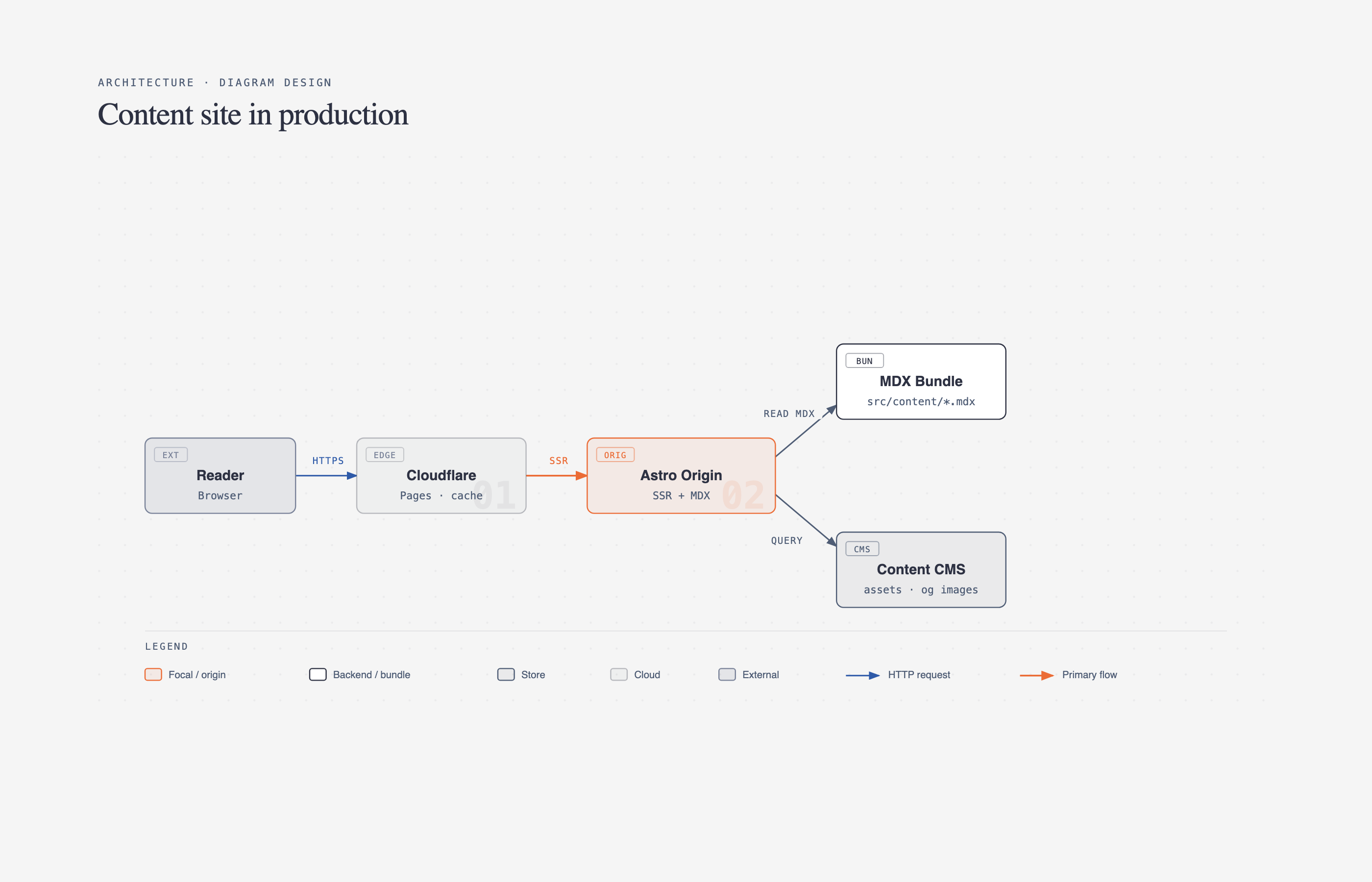
Diagram Design ships 27 diagram types — architecture, flowchart, sequence, state machine, ER/data model, timeline, swimlane, quadrant, nested hierarchy, tree, org chart, layer stack, Venn, pyramid/funnel, radar, loop/flywheel, Gantt, bar/line/scatter charts, and several more specialized ones for IT modernization and data-platform diagrams. Every type renders in three variants — minimal light, minimal dark, and a fuller "editorial" layout with summary cards — as self-contained HTML and SVG. No build step, no JavaScript framework, no external image dependencies. You open the file in a browser and it's done.
That output format is a quieter design decision than it looks. A diagram that's just an SVG wrapped in HTML is trivially portable — it drops into a static site, an email, a slide, or a design tool without a rendering pipeline. Compare that to a Mermaid diagram, which needs a Mermaid-aware renderer wherever it ends up, or a Figma file, which needs Figma. The tradeoff is that Diagram Design doesn't give you a live, editable canvas the way Figma does — you're editing structured HTML/SVG, or re-prompting Claude, not dragging shapes around. For final polish on a hero graphic that's fine to hand off to a designer; for the fast, disposable diagrams that make up most technical writing, it's the right end of that tradeoff.
The Design System, in Practice
The README states the underlying philosophy in one line: "the highest-quality move is usually deletion." Every diagram targets a density score of 4 out of 10, one accent color is reserved for the one or two things a reader should actually notice first, and — the detail that does the most invisible work — every coordinate, width, and gap is divisible by 4. That last rule sounds fussy until you've seen enough AI-generated layouts with elements two pixels off from an implied grid; that jitter is a large part of what makes generated diagrams read as generated. Enforcing a hard 4px grid is a cheap, mechanical fix for a problem that's usually treated as a fuzzy aesthetic judgment.
Typography is fixed to three families with defined jobs, not left to the model's discretion per diagram: Instrument Serif for titles and italic editorial callouts, Geist Sans for node labels, Geist Mono reserved specifically for technical content — ports, URLs, field types — rather than used as a blanket "developer" look. Borders are 1px hairlines, shadows are banned outright, and border-radius tops out at 10px. None of this is groundbreaking as a design system on its own; what's notable is that it's specified precisely enough for an LLM to follow consistently across 27 different diagram types without drifting back toward defaults.
Reading Your Brand Automatically
The part that separates this from a static template library is the onboarding flow. Point it at a URL — "onboard diagram-design to https://yoursite.com" — and it fetches the homepage, extracts the dominant palette and font stack, and maps what it finds to semantic roles rather than raw hex codes:
| Detected from your site | Becomes |
|---|---|
<body> background | paper token |
| Primary text color | ink token |
| Secondary/caption text | muted token |
| Most-used brand color (CTA, link, heading) | accent token |
<h1> font family | title font |
<body> font family | node-name font |
Before writing anything, it runs a WCAG AA contrast check on ink-over-paper — if a site's actual brand color would fail at the 9-12px text sizes diagrams use, it proposes an adjusted value and explains why, rather than silently shipping unreadable labels. Every downstream diagram, the annotation primitive, and the gallery all reference these values by semantic name — accent, never a literal #eb6c36 — so a rebrand is a one-file edit in style-guide.md, not a search-and-replace across dozens of generated files.
There's also a first-run gate: on a new project where the style guide is still at its jet-black-and-tangerine default, the skill pauses before generating anything and asks whether you want to onboard, paste tokens manually, or proceed with the default look. That's a small but deliberate choice — it stops a team from accidentally shipping fifteen off-brand diagrams before anyone notices the skill never got pointed at their actual site.
How the Skill Itself Is Structured
This is the part worth studying if you're building or evaluating Agent Skills generally, not just diagrams. SKILL.md — the file Claude always has in context once the skill is active — stays deliberately thin: philosophy, a selection guide for picking the right diagram type, and a checklist. The 27 type specs, the icon set, the sketchy and terminal-window rendering primitives, the export procedure, and the onboarding spec all live in separate files under references/ and only get loaded when the specific request calls for them.
The repo's own table makes the pattern concrete:
| You ask for… | Claude loads |
|---|---|
| "Make me a flowchart" | SKILL.md + type-flowchart.md |
| "Onboard this skill to my site" | SKILL.md + onboarding.md + style-guide.md |
| "Give me a hand-drawn version" | SKILL.md + primitive-sketchy.md |
That's progressive disclosure doing real work: the skill ships 34 reference files total, but a routine request only ever pulls in SKILL.md plus the one file it actually needs. It's the same mechanism explained more abstractly in what Agent Skills are — here it's the difference between a skill that stays fast at 34 files and one that would choke a context window trying to hold all of them at once. Adding a 28th diagram type tomorrow means dropping in one new type-*.md file and a line in the selection guide; nothing else in the skill changes.
Installing and Extending It
The repo is MIT-licensed and works three ways: symlink the inner skills/diagram-design/ folder into ~/.claude/skills/ for a version you can hand-edit and keep in sync with git pull; install it as a Claude Code plugin via /plugin marketplace add cathrynlavery/diagram-design for a faster setup that won't survive local edits to the style guide across plugin updates; or add it to Codex with npx skills add. The same directory tree works across all three, which is itself a small demonstration of the portability argument for the SKILL.md format — one folder, multiple agent harnesses.
Finished diagrams export to SVG or PNG via a slash command (/diagram-design:export), with PNG rasterized through Playwright at 2x scale by default. There's also a lint-skin.py script contributors run against new example diagrams to keep the design system's rules — the 4px grid, the token usage, the density target — enforced mechanically rather than by eyeballing pull requests.
Where It Falls Short
The README is unusually direct about its own boundaries, which is worth taking at face value rather than reading as false modesty. It explicitly lists cases where you shouldn't use it: a single labeled box, a before/after comparison that's really just a table, a list dressed up as a diagram. Its own litmus test — "would a reader learn more from this than from a well-written paragraph?" — is a useful check to borrow even outside this specific tool.
Practically, a few limits matter for evaluation:
- It needs an agent harness that supports Agent Skills. This isn't a standalone app — it only does anything inside Claude Code, Claude Cowork, or Codex with the skill installed.
- PNG export needs a one-time local setup (
pip install playwright && playwright install chromium), which is a small but real dependency to add to a writing workflow that's otherwise dependency-free. - The editorial "-full" variant isn't exported. SVG/PNG export is diagram-only; the summary cards and headers in the fuller editorial layout require a browser screenshot instead.
- Brand extraction is a starting point, not a guarantee. It reads what's actually on the page — a site with inconsistent color usage or no clear accent color will need manual token adjustment after onboarding, same as any automated brand-extraction tool.
Why This Is Worth Watching
Most of the AI tooling conversation around design and diagrams has been about generation quality in the abstract — can the model draw a good box. Diagram Design is evidence that the more tractable problem, for a lot of real work, is constraint: a tightly specified design system plus a brand-extraction step plus a deliberate gate against off-brand output solves "this doesn't look like slop" more reliably than a better prompt would. That's the same lesson showing up elsewhere in spec-driven development and in how teams are learning to scope vibe coding — the win usually comes from tighter specification, not a smarter model call. It's also a clean example of the open-source skill ecosystem that's forming around agent harnesses: a folder on GitHub, MIT-licensed, that adds a real capability to whichever agent you already run, no vendor lock-in required.
For teams doing a lot of technical writing, internal documentation, or content marketing that leans on architecture diagrams and process flows, it's a reasonable default to try before reaching for Figma or accepting whatever an assistant draws unprompted — and worth reviewing the same way you'd review any AI-generated output entering a real workflow: check the contrast, check the brand match, and apply the tool's own "would a paragraph be better" test before publishing.
FAQ
What is Diagram Design?
Diagram Design is an open-source Agent Skill for Claude Code (and compatible harnesses like Codex) that generates 27 types of editorial diagrams — architecture, flowcharts, sequence diagrams, org charts, and more — as self-contained HTML and SVG files styled to match a project's own brand colors and fonts.
How does it match my brand automatically?
You ask it to onboard against your site's URL. It fetches the homepage, extracts the dominant background, text, and accent colors along with the heading and body font families, checks the result against WCAG AA contrast standards, and writes the values into a style guide file that every diagram then references.
Do I need Figma or design skills to use it?
No. Diagrams are described in natural language ("make me a sequence diagram of an OAuth refresh flow") and Claude Code generates the HTML/SVG file directly — no design tool or manual drawing required.
Can I export the diagrams as images?
Yes — a slash command exports diagrams to SVG directly or to PNG via Playwright at 2x resolution by default. The fuller "editorial" layout with summary cards isn't included in the export and needs a browser screenshot instead.
Is Diagram Design free to use?
Yes, it's MIT-licensed and available on GitHub — installable by symlinking the skill folder, as a Claude Code plugin, or via Codex's skill installer.
What's the difference between this and asking Claude for a diagram directly without the skill?
Without a skill, an agent falls back to generic defaults — rounded boxes, default colors, no consistent grid or typography rules. The skill supplies a fixed design system (spacing grid, font roles, accent-color discipline) and 27 pre-specified diagram types, which is what produces consistent, on-brand output instead of a different look every time.
Teams building AI-assisted documentation, internal tooling, or content workflows around Claude Code and Agent Skills can get hands-on architecture and integration help from Woyce Technologies.